
Image to Text Prompts | Using AI to Analyze Images
Most AI chatbots can now generate images from text prompts, but you can also upload visuals with image to text prompts to ask the AI to interpret them. This means you can use tools like QuillBot’s free AI Chat for tasks such as:
- Extracting text from a photo (e.g., a whiteboard, a restaurant specials board, or a shopping list)
- Generating captions or alt text for images
- Identifying things in an image (e.g., a plant, product, or unfamiliar object)
- Pinpointing the possible location or context of a photo
“Create an alt text description for this image I want to put on my blog.”
“What kind of tree is this?”
“When and where was this photo taken?”
How to write image-to-text prompts
If you want to use AI to analyze an image, writing an image-to-text prompt is simple: upload the visual and clearly describe the task or state your question. Here are some example prompts for common real-world image-analysis tasks.
| Purpose | Example image-to-text prompt |
|---|---|
| Identifying a product | “I want to buy a jacket like this. What is this type of jacket called?” |
| Interpreting a diagram | “What does this diagram show?” |
| Creating shopping lists | “Here are some pictures of the content of my fridge and kitchen cupboards. List all the items you can identify. I want to add them to my grocery staples list.” |
| Deciphering difficult-to-read text | “Look at this photo of me and a school friend. Tell me what the text on the poster in the background says.” |
Using AI to analyze an image
Let’s say you’ve found an old vacation photo, but you can’t remember where you took it. You upload it to QuillBot’s free AI Chat along with the prompt: “Where did I take this photo?”
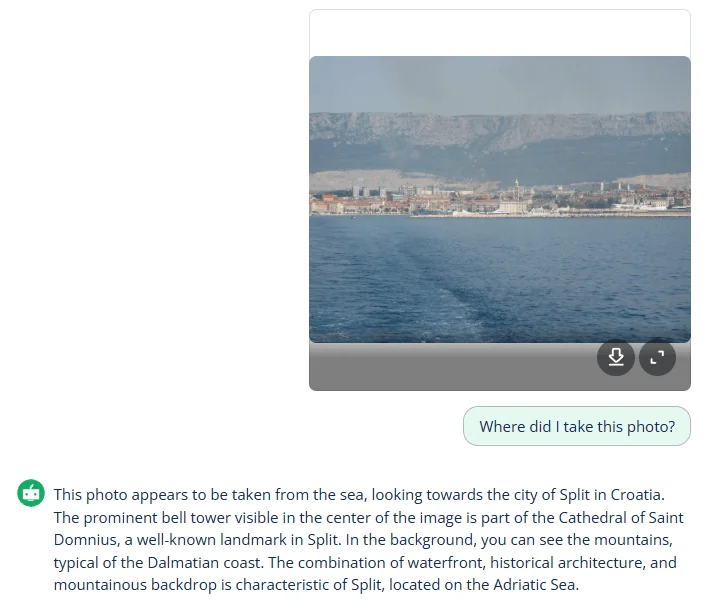
QuillBot analyzes the image and correctly identifies the city shown in the photo, bringing back memories of a wonderful summer vacation. You can use the same approach for many other image-to-text tasks—whether you’re identifying objects, interpreting diagrams, extracting text, or summarizing what’s happening in a picture.
Frequently asked questions about AI image to text prompts
- Can AI analyze images?
-
Yes, AI tools like QuillBot’s free AI Chat can analyze images. You can use them to help identify objects and locations by uploading the image file with an image-to-text prompt such as “What is the object in this photo used for?”
- Can an image to text generator read handwriting?
-
Yes, an image to text generator can read handwriting if it uses an AI model that has been trained on handwriting datasets. When converting handwriting to digital text, the following strategies can improve the accuracy of the output.
- Neat and clear handwriting
- Lined paper
- Good lighting (when photographing the document)
QuillBot’s image to text converter can instantly convert a JPG or JPEG of a handwritten document into an editable .txt file.
Cite this QuillBot article
We encourage the use of reliable sources in all types of writing. You can copy and paste the citation or click the "Cite this article" button to automatically add it to our free Citation Generator.
QuillBot. (2025, December 01). Image to Text Prompts | Using AI to Analyze Images. Quillbot. Retrieved March 3, 2026, from https://quillbot.com/blog/ai-prompt-writing/image-to-text-prompts/
