
Ready-to-Use Gemini AI Photo Editing Prompts
What if a single photo could tell more than one story?
With Gemini AI photo editing prompts, you can transform your casual photos into everything from fashion shoots to cinematic movie stills, without changing what you actually look like.
This is a collection of ready-to-use prompts based on some of the most popular styles right now, including traditional saree looks, Bollywood-inspired portraits, couple photos, and creative 3D transformations. Just upload your photo, pick a prompt, and see which version you like best.
If you want to try out your own ideas, Quillbot’s AI Image Prompt Generator can help you turn a simple description into a detailed prompt.
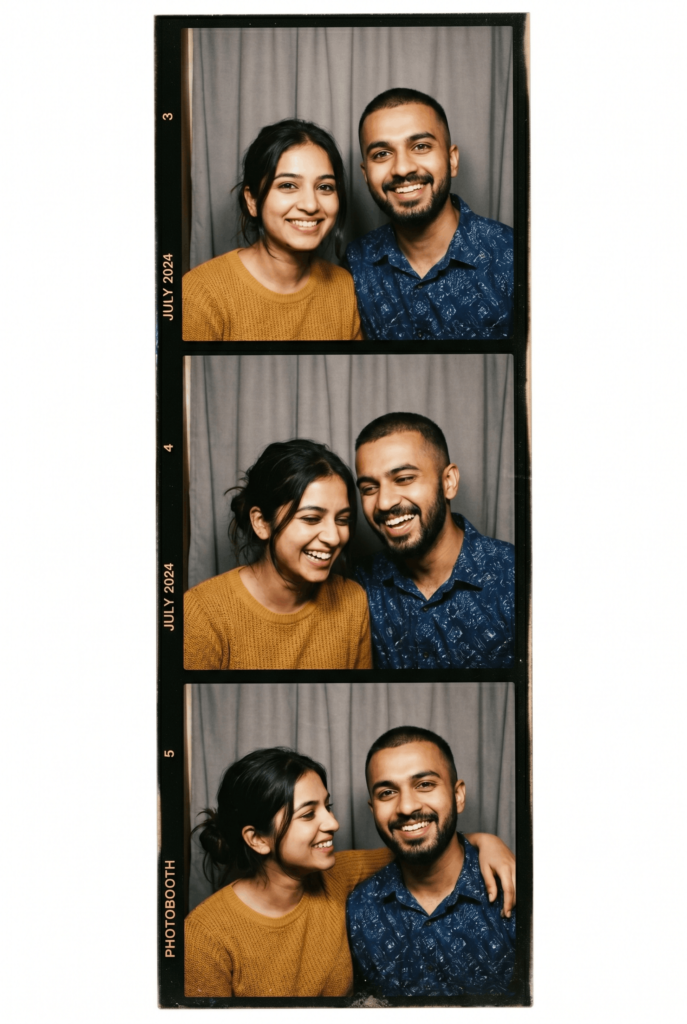
Photo booth-style strip created with Gemini AI photo editing prompts
Gemini AI photo editing prompts
Whether you want to try the viral saree trend, a cinematic portrait, or a 3D figurine look, these ready-to-use AI image prompts are designed to get you started. Just upload your photo, enter a prompt, and tweak the result until it feels right.
AI saree trend
One of the most popular ways to use Gemini AI right now is to transform casual photos into traditional Indian attire, like sarees, lehengas, or kurtas. The key here is forcing the AI to maintain your original face while changing the background and clothing.
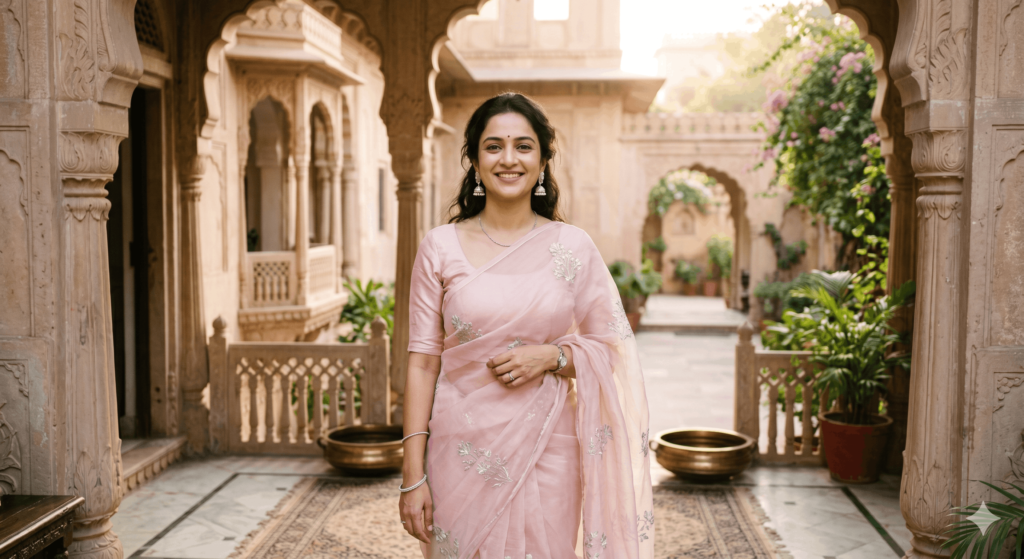
- Pastel organza saree
Modify my clothing into a pastel blush-pink organza saree with delicate silver floral embroidery and a soft sheer texture. Place me in a sandstone heritage-style courtyard inspired by Jaipur architecture with elegant arches and carved details. Use soft natural morning light with an airy, glowing atmosphere. Add jasmine flowers in the hair for a soft floral touch. Preserve my facial features, expression, and pose exactly as in the original image.
- Kanjeevaram silk saree
Transform my outfit into a deep emerald green Kanjeevaram silk saree with rich gold zari brocade patterns. Place me in a minimal studio setting with a plain backdrop and subtle texture. Use soft golden-hour side lighting that creates gentle cinematic shadows. Keep the styling minimal with small gold studs or simple earrings. Keep my facial features, hair, and body posture unchanged.
- Banarasi Silk Saree
Transform my outfit into a mustard-gold Banarasi silk saree with intricate brocade weaving and traditional motifs. Place me in a grand Jaipur palace courtyard with sandstone architecture and historic arches. Use warm sunrise lighting with a soft golden glow. Add a full traditional bridal jewelry set including a maang tikka, gold bangles, and statement earrings. Preserve my facial features, identity, and natural pose without any changes.
- Saree street photography portrait
Modify my outfit into a flowing pastel-blue saree with soft embroidered details and a lightweight, elegant drape. Place me on a lively street lined with historic buildings and outdoor cafés. Use warm late-afternoon sunlight with natural lens flare and subtle reflections to create the feel of a candid street photography portrait. Add simple silver jhumkas and optional sunglasses for a modern, effortless look. Preserve my facial features, expression, and overall pose exactly as they appear in the original image, ensuring a natural and realistic result.
- Traditional lehenga portrait
Transform my outfit into an elegant deep-red lehenga with intricate gold embroidery and traditional craftsmanship. Place me in a grand heritage setting with ornate archways and carved architectural details. Use soft golden-hour lighting to create a warm, flattering glow. Add a traditional bridal set including a maang tikka, gold bangles, and statement earrings. Preserve my facial features, expression, and identity exactly as they appear in the original image while maintaining a natural and realistic look.
Trending Gemini AI photo prompts for girls
A casual snapshot doesn’t have to stay casual. These Gemini prompts explore different portrait styles, from fashion-inspired edits to family and special-occasion shots.

- Birthday celebration portrait
Modify this photo to turn it into a festive birthday celebration. Do not alter or change the face, expression, or features of the person in the photo. Adjust the posture to feel more natural and integrated into the scene. In the background, add a vibrant cluster of colorful helium balloons and some soft, floating confetti. In front of the person, add a small, realistic birthday cake with a few lit candles, making sure it fits naturally into the scene. Adjust the overall lighting of the image to be warm, bright, and cheerful to match a party atmosphere.
- Fashion portrait
Modify this photo to turn it into a high-fashion portrait. Do not alter or change the face, expression, or facial features of the person in the image. Adjust the posture so it feels natural and well-composed within a professional photoshoot setting. Change the outfit to a stylish, modern fashion look suitable for an editorial shoot. In the background, add a clean, minimal urban environment with soft architectural details and a shallow depth-of-field effect. Adjust the lighting to be soft, directional, and professionally lit, similar to a fashion magazine photoshoot.
- Father-daughter portrait
Modify this photo to create a warm father-daughter portrait. Do not alter or change the faces, expressions, or features of either person in the image. Adjust their posture so they appear naturally positioned in a close, comfortable interaction. Place them in a soft outdoor setting, such as a park during golden hour, with gentle greenery in the background. Add subtle natural depth and blur to create focus on the subjects. Adjust the lighting to be warm, soft, and natural to enhance the emotional tone of the image.
- Floral garden portrait
Modify this photo to create an elegant portrait in a flower garden. Do not alter or change the face, expression, or features of the person in the image. Adjust the posture to feel natural and harmonized with the surroundings. Place the subject in a lush garden filled with blooming flowers and soft greenery. Add gentle floral elements around the frame while keeping the subject clearly in focus. Adjust the lighting to be soft and natural with a warm golden-hour glow to enhance the colors and atmosphere.
Trending Gemini AI photo prompts for boys
From traditional kurta portraits to modern lifestyle shots, these prompts are designed to turn everyday photos into clean, well-composed edits. The focus is on keeping the subject realistic while improving styling, setting, and lighting.
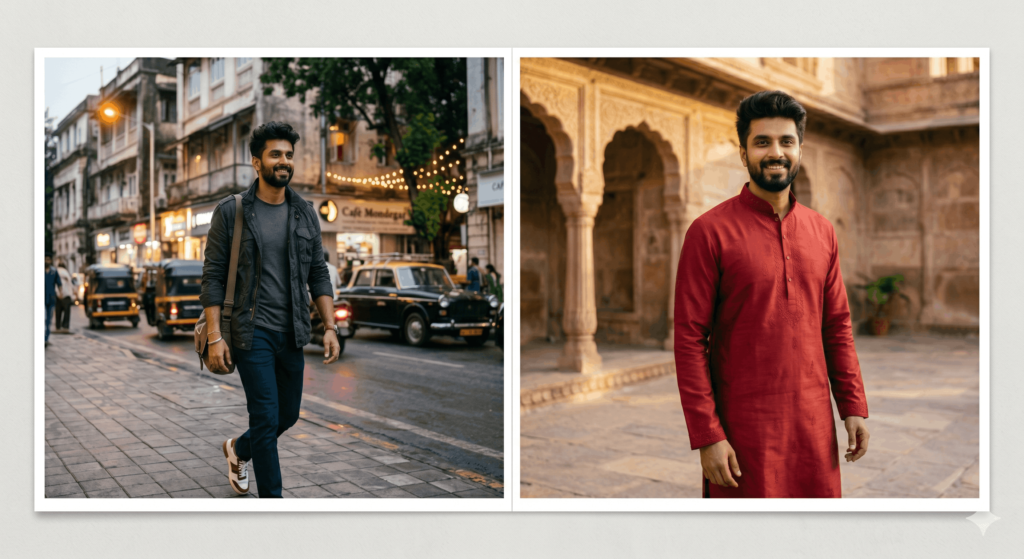
- Traditional kurta portrait
Modify this photo to create a traditional portrait. Do not alter or change the face, expression, or facial features of the person in the image. Change the outfit to a well-fitted kurta in a solid, rich color with subtle embroidery details. Place the subject in a heritage-style outdoor setting with architectural elements such as stone walls or arches in the background. Adjust the posture so it feels natural and well-balanced within the scene. Adjust the lighting to warm natural light, similar to golden hour, to create a soft and realistic portrait look.
- Modern stylish portrait
Modify this photo to create a modern, stylish portrait. Do not alter or change the face, expression, or facial features of the person in the image. Change the outfit to a smart casual look such as a fitted shirt, jacket, or layered outfit. Place the subject in a clean urban environment with simple architectural backgrounds and soft depth of field. Adjust the posture to feel natural and relaxed, as if captured in a candid moment. Adjust the lighting to soft, even portrait lighting for a polished, contemporary look.
- Father-son portrait
Modify this photo to create a warm father-son portrait. Do not alter or change the faces, expressions, or facial features of either person in the image. Adjust their posture so both subjects appear naturally positioned in a close and comfortable interaction. Place them in a simple outdoor setting such as a park or garden with soft greenery in the background. Adjust the lighting to warm natural daylight to create a soft, emotional, and realistic family portrait.
- Lifestyle portrait (car-inspired setting)
Modify this photo to create a casual lifestyle portrait. Do not alter or change the face, expression, or facial features of the person in the image. Place the subject in a realistic urban street setting next to a parked car in a clean, modern environment. Adjust the posture so it feels natural and candid, as if captured in a spontaneous moment. Adjust the lighting to soft natural daylight with subtle shadows to maintain realism and avoid over-stylization.
Gemini AI photo prompts for couples
Maybe you have a special announcement to make, or maybe you just want to play around with your vacation pictures. Whatever the occasion, the prompts below can whisk you and your sweetheart away to dreamy, romantic settings while preserving your likeness.
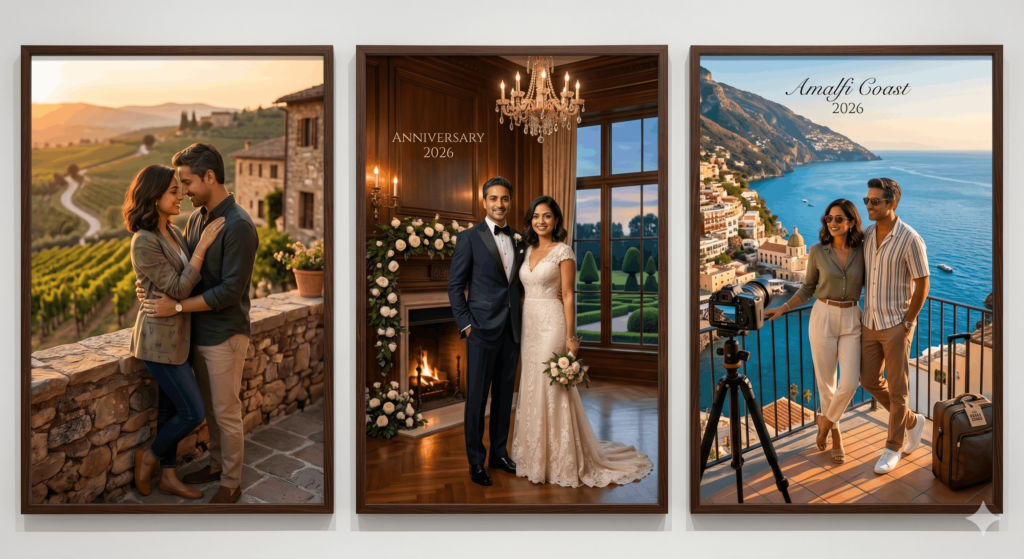
- Romantic portrait
Create an elegant couple’s portrait using this photo. Place us in a scenic outdoor setting at sunset with soft natural lighting and a warm color palette. Preserve our facial features, expressions, and overall likeness while enhancing the image with professional portrait photography aesthetics.
Style: Romantic lifestyle photography.
- Anniversary portrait
Transform this photo into a refined anniversary portrait. Dress us in coordinated formal attire and place us in an elegant setting with subtle floral details and warm ambient lighting. Preserve both faces, expressions, and body proportions exactly as they appear in the original image.
Style: Classic anniversary photography.
- Vacation-inspired couple photo
Transform this photo into a professional travel portrait. Place us in a picturesque coastal destination with beautiful ocean views and golden-hour lighting. Preserve our facial features and expressions while creating the look of a high-quality vacation photoshoot.
Style: Travel and lifestyle photography.
- Photo booth-style couple strip
Create a photo booth-style vertical strip of 3–4 images using this photo. Preserve our facial features and overall likeness consistently across all frames. Place us in a simple indoor photo booth setting with a neutral background and tight head-and-shoulders framing. Use soft flash lighting with a slightly nostalgic, candid feel. Each frame should show natural variations in expression (subtle smiles, laughter, relaxed moments).
Style: Analog photo-booth photography with light film grain, natural colors, and a vintage aesthetic.
- Traditional festive couple portrait
Transform this photo into a warm, festive couple portrait set during an Indian celebration. Place us in a traditional courtyard decorated with marigold flowers, diyas, and subtle festive elements. Use soft golden lighting to create a warm and emotional atmosphere. Preserve our facial features, expressions, and natural interaction exactly as in the original image while maintaining a realistic and balanced composition.
Style: Traditional festive lifestyle photography.
Retro Bollywood trend
Dramatic movie posters, vintage studio portraits, and richly colored film photography have helped define Bollywood style for decades. These prompts will give your photos a Bollywood-inspired makeover.
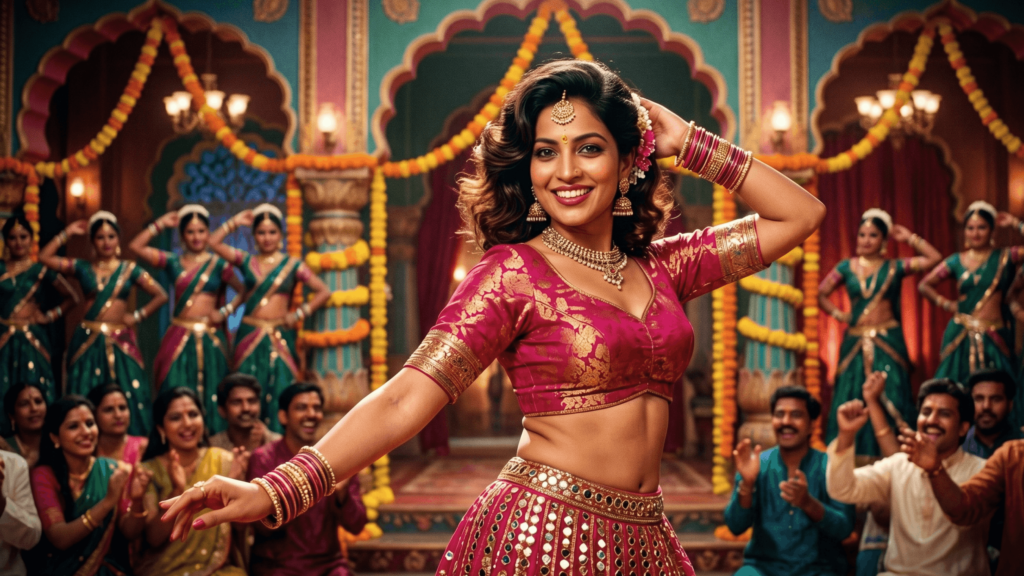
- 90s Bollywood movie poster
Transform me into the star of a 1990s Bollywood movie poster. Dress me in an elegant silk saree with traditional jewelry. Use dramatic cinematic lighting, soft-focus effects, and subtle film grain. Place me against a colorful hand-painted poster-style background with warm, saturated tones. Preserve my facial features and expression exactly as they appear in the original image.
- Classic Bollywood studio portrait
Transform me into a classic Bollywood film star from the 1970s. Dress me in a richly embroidered saree and style my hair in a vintage-inspired look. Place me in a traditional photography studio with a painted backdrop and soft spotlight lighting. Apply subtle film grain and warm color tones while preserving my facial features and expression.
- Retro Bollywood dance sequence
Transform me into a lead actor in a classic Bollywood dance sequence. Dress me in a vibrant 1980s Bollywood-inspired outfit with period-appropriate styling and accessories. Place me on an elaborate film set with colorful décor and warm stage lighting. Apply subtle film grain and rich, saturated colors. Preserve my facial features, expression, and body proportions exactly as they appear in the original image.
Festive Gemini AI photo prompts
Festivals bring people together through color, tradition, and celebration, making them a natural source of inspiration for photo edits. Use these Gemini AI prompts to infuse your photos with the spirit of festivities like Diwali, Holi, and other special occasions.
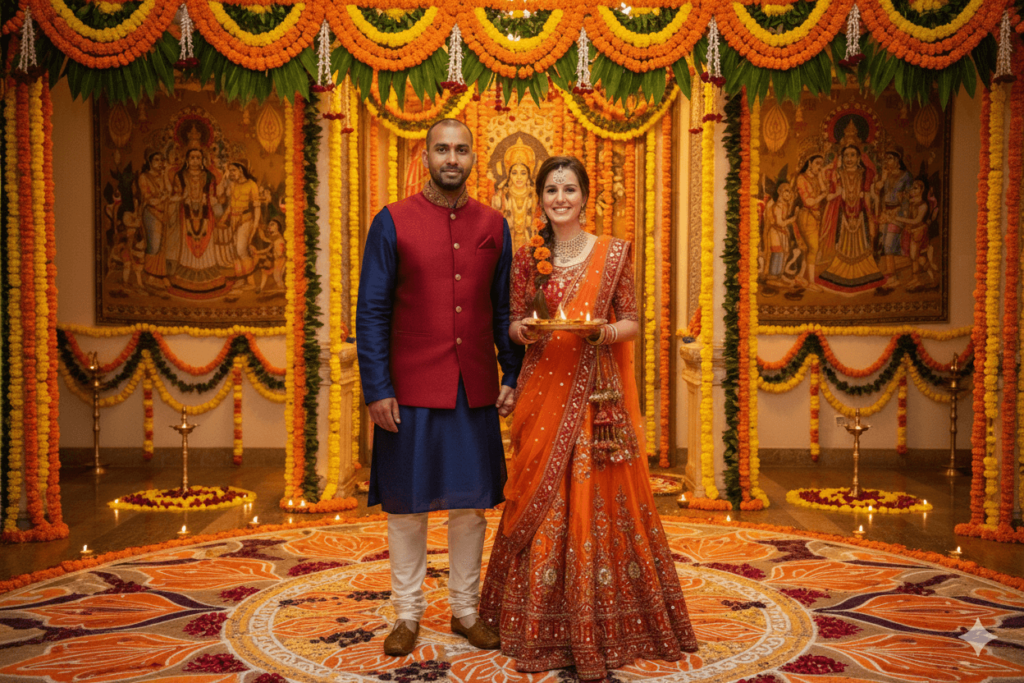
- Traditional Dussehra portrait
Transform this photo into a vibrant Dussehra celebration scene. Place me in traditional Indian festive attire with marigold decorations in the background. Add warm golden lighting, diyas, and festive rangoli patterns. Create a cinematic look with rich oranges, reds, and golds.
Style: Traditional Indian festival photography.
- Family Diwali card
Create a warm Diwali greeting card-style image with this photo. Add decorative borders with traditional Indian patterns, diyas, and fireworks in the background. Include space for text overlay. Lighting should be warm and inviting with golden tones.
Style: Professional greeting card design with festive elements.
- Lakshmi Puja setting
Place me in an elaborate Lakshmi puja setting with traditional decor. Include ornate brass lamps, marigold flowers, rangoli, and religious symbols. Dress me in rich silk traditional attire. Lighting should be soft and devotional with the warm glow of oil lamps.
Background: Beautifully decorated home temple. Style: Traditional Hindu festival photography.
- Colorful Holi portrait
Transform this photo into a joyful Holi celebration scene. Surround me with explosions of vibrant, multi-colored gulal powders flying through the air, leaving cheerful splashes on my face and clothes. The setting should be a bright, sunlit outdoor space filled with energy, laughter, and a lively festive spirit.
Style: High-energy candid festival photography.
3D figurine & cartoon character transformations
Remember when you were little and loved collecting action figures or watching cartoons? These prompts tap into that feeling, turning your photos into playful 3D figurines and cartoon characters that are Instagram-worthy and bound to make your profile picture stand out.
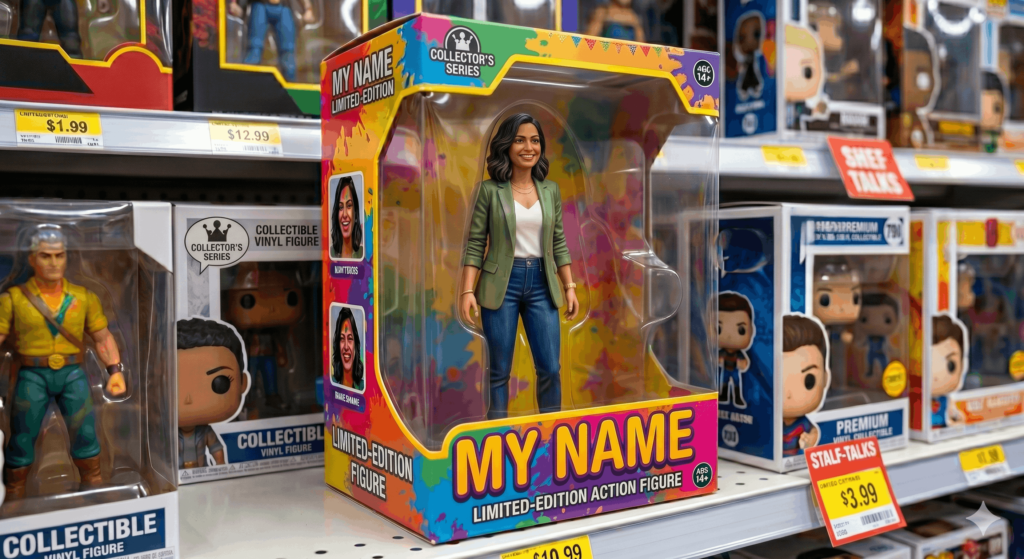
- Collectible figurine style
Transform me into a 3D collectible figurine with an oversized head, simplified facial features, and a cute, stylized look. Keep my outfit and overall appearance recognizable but adapted to a modern toy aesthetic.
Background: Display shelf or collectible box packaging.
Style: Contemporary designer toy design.
- 3D animated character style
Turn me into a 3D animated character with expressive, slightly exaggerated features while keeping my likeness. Add soft, cinematic lighting and high-quality rendering for a polished, storybook-like effect. The overall tone should be warm, friendly, and full of personality.
Background: Simple gradient or softly blurred animated setting
- Limited-edition toy box style
Transform this photo into a 1/7 scale plastic action figure securely anchored to a clear acrylic base. Encasing the figure is a custom-designed toy packaging box with a clear plastic window, bold typography of my name, and vibrant retail graphics.
Background: A brightly lit toy store shelf surrounded by other collectibles. Style: Commercial product and packaging photography.
How to write Gemini AI photo editing prompts
To get accurate results when editing images with Gemini, it helps to follow a structured approach. A reliable prompt clearly defines what needs to change while specifying which elements must remain the same.
These prompts assume you are editing an existing image, not generating a new one.
1. Define the core edit (what to change)
Start with a direct command telling Gemini exactly what part of the photo to modify.
- Replace the background with a beach, city, or studio setting
- Remove unwanted objects like people, trash bins, or distractions
- Change the outfit to formal wear, casual clothing, or traditional attire
- Adjust facial expressions or pose slightly if needed
2. Describe the visual details (what the change should look like)
Add details that define how the edited elements should look. This helps avoid generic results.
- Background: Paris street at night with the Eiffel Tower in the distance
- Lighting: warm golden-hour glow, soft natural daylight, or dramatic cinematic shadows
- Color palette: earthy tones, vibrant neon colors, or muted cinematic blues
- Atmosphere: clean, dreamy, modern, or cinematic
3. Add preservation rules
This is the most critical step for photo editing. Explicitly tell Gemini what not to touch so the edited image remains recognizable.
- Preserve facial features and identity
- Keep original pose and body proportions
- Maintain facial expression
- Do not distort the subject
4. Specify the overall aesthetic (final look)
Define the visual style so the edit feels cohesive and intentional. Refine the output by defining the overall aesthetic or referencing familiar visual formats. This ensures the new edits blend seamlessly with the original photo instead of looking pasted on.
- Cinematic film aesthetic
- DSLR-style photography realism
- Soft-focus editorial magazine look
- Natural outdoor portrait lighting
- Hyper-realistic or artistic stylization
Photo editing prompt formula for Gemini AI
A strong Gemini photo editing prompt follows this structure:
[Core edit] + [visual details] + [preservation rules] + [aesthetic/style]
When you combine these steps, your final prompt looks like this:
Need more help? Check our guide on how to write an AI image prompt—it works with any image generator.
Frequently asked questions about Gemini AI photo editing prompts
- What are Gemini AI photo editing prompts?
-
Gemini AI photo editing prompts are text instructions you can use to modify an existing photo. Instead of using manual editing tools, you just type out what you want to modify, like changing an outfit or swapping the background.
If you want help creating your own prompts, try Quillbot’s AI Image Prompt Generator to turn simple ideas into detailed, ready-to-use prompts
- How do I write a good Gemini AI photo editing prompt?
-
A good Gemini AI photo editing prompt just needs to be clear about two things: what to change and what to keep. When writing one, describe the new setting, lighting, or clothing you want to see, and explicitly state that the original face, expression, and features must stay exactly the same.
If you’re unsure how to structure your prompts, Quillbot’s AI Image Prompt Generator can help you refine your ideas into clearer, more detailed instructions.
- What can I create with Gemini AI photo editing prompts?
-
You can use Gemini AI photo editing prompts to try out different styles like traditional saree looks, Bollywood portraits, festive scenes, couple photos, or 3D character edits.
If you want to experiment with your own variations of these styles, you can use Quillbot’s AI Image Prompt Generator to brainstorm new ideas for your photos.
Other interesting articles
If you want to know more about colors, letters, or the meaning of emojis, make sure to check out some of our other articles with explanations and examples.
3 comments
Rob
October 27, 2025 at 4:40 PMGreat tips!
Anas
October 23, 2025 at 10:45 PMPrompt photo Gemini
Darius
October 21, 2025 at 8:46 PMI want to create a photo