Published on
October 24, 2025
by
QuillBot.
Revised on
November 18, 2025
Nano Banana is the code name for Google’s AI image generator and editor. This tool, which is part of Google’s Gemini AI, lets you both create new images and transform existing ones with just a few words. From turning your pet into a heroic action figure to placing yourself in a da Vinci painting, Nano Banana makes experimenting with creative ideas easy and entertaining. Below, we’ve collected a variety of prompts to help you get started and spark your own imaginative creations.
If you want more help creating prompts that turn your vision into reality, try QuillBot’s free AI image prompt generator.
When using AI image generators, make sure you respect others’ rights. Don’t use these tools to violate copyright, trademark, or other laws.
Word documents are used the world over for creating texts, novels, academic papers, and project proposals, to name just a few. But it’s not always the best file format to use when you want to share a document via email or download. There can be compatibility issues, and of course, others can change your text.
That’s where an online solution like QuillBot’s Word to PDF converter can help. It takes your Word document and converts it to a PDF while maintaining all the elements and format of your original file.
Although you can export directly from Word, using an online converter means you don’t have to have Word installed on your device to create your PDF. This is a real bonus if you are working from your phone, for instance.
You don’t have to be an artist or designer to create polished and eye-catching visuals. An AI illustration generator lets anyone turn words into custom illustrations, perfect for projects like party invitations, flyers, birthday cards, or classroom displays.
With short text descriptions, these tools create fun, unique images in seconds. AI illustration tools are a fast and easy way to get visual ideas, explore styles, and bring your creativity to life.
In this article, you’ll learn what an AI illustration generator does, what kinds of illustrations it can show you, and how to use it step-by-step. Ready to try it out for yourself? QuillBot’s AI illustration generator is completely free to use.
AI art generators are transforming how we create and experience visual art. Whether you’re a designer, content creator, or someone just exploring your creative side, these tools make it easy to produce stunning digital images for use in diverse contexts.
QuillBot’s free AI art generator lets you quickly visualize new ideas, generate concept art, test out textures and lighting, get over creative blocks, and bring your wildest ideas to life.
Pumpkin carving is one of Halloween’s most iconic traditions. There’s something deeply satisfying about transforming a pumpkin into a glowing work of art. But choosing the perfect design can be the hardest part. You want something original and eye-catching that you can carve in a reasonable amount of time.
With an AI image generator and a clever prompt, you can instantly create custom pumpkin carving templates that are as distinct or classic as you want them to be. QuillBot’s AI Image Generator can show you a wide variety of ideas.
Keep reading to learn how to make pumpkin carving templates with AI and to explore dozens of spooky and creative prompts to inspire your next Halloween masterpiece.
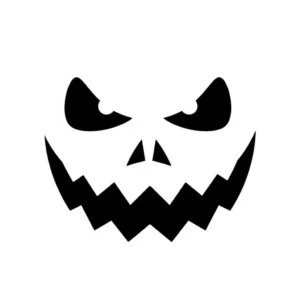
Pumpkin carving stencil exampleAI Prompt: Sinister jack-o-lantern face with a wide mouth and pointy teeth, simple black and white stencil design for pumpkin carving
3D models can make your project or presentation come alive and look very modern. Producing them used to take lots of time, skill, and expensive computer software. Now, with tools like QuillBot’s AI-powered 3D model generator, you can bring your documents or brochures up to date in no time!
Coloring pages are always a hit at Halloween party craft stations and make fantastic DIY decorations for classroom celebrations. AI tools like QuillBot’s AI image generator are great for creating custom coloring sheets themed for your specific Halloween event.
This article includes fun ideas for cute, spooky-season motifs, plus tips on personalizing your pages and prompting the AI to generate images kids will love.
Whether you’re creating happy Halloween images for social media posts, party invitations, menus, trunk-or-treat or party decorations, or kids’ craft stations, AI image tools like QuillBot’s free AI image generator can instantly realize your ideas for funny, cute, or spooky visuals.
Begin with a classic Halloween motif and experiment with different visual styles to create your own custom images.
Getting your album cover right is important because it shapes how listeners experience your music. AI album cover generators, such as QuillBot’s free AI album cover generator, can help you realize your creative ideas as part of the album cover design process.
Microsoft Excel is one of the most widely used tools for tracking data, creating reports, and organizing information. When you need to share the data with colleagues, clients, or other stakeholders, sending an Excel file (.xlsx) can be risky. Excel files can be edited, formulas can break, and formatting can shift, which can compromise the accuracy of your work.
To ensure that your data looks exactly how you intended, it’s best to convert your Excel to a PDF before sharing it. While you can do this within Excel itself, QuillBot’s free Excel to PDF converter offers a fast and easy way to convert online without any installations or special software.