Published on
December 2, 2025
by
QuillBot.
Revised on
February 19, 2026
Working with PDF documents has a major advantage: you can open them in any PDF reader, regardless of the operating system (Windows, Mac, Android, etc.), and they will display the same way every time—without any layout or formatting issues. Even so, PDF files can be cumbersome to edit and reformat, especially when it comes to contracts, resumes, or other text-heavy documents.
That’s where a PDF to DOCX converter comes in handy. Keep reading to find out how to turn a PDF into a DOCX using online tools like QuillBot’s free PDF to DOCX converter.
When you need to share a document, people often prefer receiving it as a PDF because it preserves the document’s formatting and avoids compatibility issues. But what if your file is still in DOCX format?
Using a DOCX to PDF converter—such as QuillBot’s free DOCX to PDF converter—is a quick and easy way to get your document ready to send.
This article walks you through how to turn a DOCX Word file into a PDF using a free online tool.
Word documents are used the world over for creating texts, novels, academic papers, and project proposals, to name just a few. But it’s not always the best file format to use when you want to share a document via email or download. There can be compatibility issues, and of course, others can change your text.
That’s where an online solution like QuillBot’s Word to PDF converter can help. It takes your Word document and converts it to a PDF while maintaining all the elements and format of your original file.
Although you can export directly from Word, using an online converter means you don’t have to have Word installed on your device to create your PDF. This is a real bonus if you are working from your phone, for instance.
Microsoft Excel is one of the most widely used tools for tracking data, creating reports, and organizing information. When you need to share the data with colleagues, clients, or other stakeholders, sending an Excel file (.xlsx) can be risky. Excel files can be edited, formulas can break, and formatting can shift, which can compromise the accuracy of your work.
To ensure that your data looks exactly how you intended, it’s best to convert your Excel to a PDF before sharing it. While you can do this within Excel itself, QuillBot’s free Excel to PDF converter offers a fast and easy way to convert online without any installations or special software.
Published on
October 8, 2025
by
QuillBot.
Revised on
October 23, 2025
Microsoft PowerPoint (PPT) is a hugely popular presentation tool used across the world by business and education. If you want to share the content of your carefully crafted PPT file without leaving it open for people to edit or change, then it’s best to send it as a PDF.
You can do these tasks natively from inside PowerPoint itself, or you can use something like QuillBot’s free PPT to PDF conversion tool. It’s a simple drag-and-drop operation.
Published on
September 9, 2025
by
QuillBot.
Revised on
December 17, 2025
PDF files are perfect for preserving the formatting of reports, proposals, and brochures, but they’re not always ideal for presenting. When it’s time to turn a static document into a dynamic, audience-ready presentation, converting a PDF to a PowerPoint file (PPT) can save time and effort.
To convert a PDF to a PowerPoint (PPT), you can use a free online tool, like QuillBot’s PDF converter. Simply upload your PDF to QuillBot’s converter, and choose PPT for the output. Within seconds, the QuillBot will generate a PPT file that you can download and edit.
Keep reading to see how QuillBot’s PDF converter works and why it’s a smart tool to have in your digital toolkit.
TipIf you need to convert a PPT to PDF instead, try QuillBot’s free PPT to PDF converter.
PDF is the most common file format for a wide variety of important documents, including writing samples, research studies, press releases, and concert tickets. But sometimes, you need to send a document to an application portal, social media platform, or messaging app that only accepts images or to a person who can’t access PDFs. In these cases, knowing how to convert PDF to JPEG is essential.
If you’re on the go, don’t have access to professional software, or just want a quick, hassle-free way to convert, an online PDF to JPEG converter is the easiest solution. QuillBot’s online PDF converter is completely free to use, and it only involves a few easy steps:
Go to the online PDF converter, and upload your PDF file.
Choose JPEG as the desired output format.
Download the converted file.
Keep reading to learn more about why online PDF converters are so helpful and how to use QuillBot’s PDF converter for free!
The greatest strength of a portable document file (PDF) document is also its greatest weakness. Its strength is that no matter what device or operating system you have, the document will look the same, because its elements are fixed in place.
This, however, also means that it is very difficult to alter the PDF once it has been finished. Made a typo? Too bad, you can’t change it. Want to suggest changes to the author? Sorry, it’s finalized.
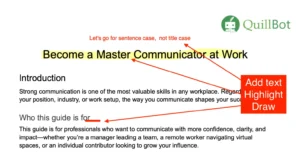
But there is hope. A PDF editor like the QuillBot online PDF editor can save the day. With the PDF editor, you can highlight, add text boxes, insert images, or draw on the PDF.
The thought of reading through a long PDF and trying to make sense of it can be daunting. Thankfully there’s a solution.
Tools like QuillBot’s AI ChatPDF allow you to upload one or more PDFs and “chat” with them—you can ask questions, break down complex sections, or get a clear summary of the key takeaways.
Read on to learn what ChatPDF tools are and how they can help you decipher complicated academic papers or dense technical documents with ease.
A PDF highlighter is an essential tool for marking important information in a PDF. Whether you’re highlighting key terms in textbooks or suggesting changes to workplace documents, you don’t need expensive software to do it. QuillBot’s free online PDF editor lets you highlight text quickly and easily.
Keep reading to learn how to highlight a PDF with the best free PDF editor.