
Online Presentation Tools | Visuals & Text Content
Creating an engaging slide deck doesn’t have to be complicated. Thanks to the latest online presentation tools, you can build polished slides without spending time learning complex software. If you want a fast way to generate a complete set of slides from a short prompt, try QuillBot’s free AI presentation maker.
The best online presentation tools
The best online presentation tools simplify the process of creating visually appealing slides so you can focus on delivering your message, not formatting your deck.
Easy slide creation
Look for an online presentation tool with an intuitive interface and ready-made layouts that reduce the amount of manual formatting you need to do. AI-powered tools—like QuillBot’s free AI presentation maker—take this a step further by generating a complete set of slides from just a short prompt.
Visuals
Strong visuals help reinforce your key points, so you need a tool that makes incorporating charts, graphs, and images a breeze. Many modern online presentation solutions include built-in libraries or AI-assisted visual generation.
QuillBot’s AI Presentation Maker can suggest text and generate visuals—such as charts, graphs, and relevant images—based on your topic. You can also upload supporting material to help guide the tool.
Flexibility
Even with AI assistance, you still need the freedom to edit and update your slides. The best presentation tools make it easy to adapt content and adjust layouts.
In QuillBot’s AI presentation maker, you can make changes to individual slides by prompting the AI. You can also download your deck as a PPTX file, allowing you to open and edit it in PowerPoint or Google Slides.
Free online presentation tools
You can achieve great results using a free online presentation tool like QuillBot’s AI presentation maker in just a few simple steps.
1. Enter your prompt
Start by describing the topic of your presentation, including any key points or themes you want the AI to cover. You can also upload materials you’d like the tool to incorporate.
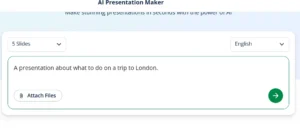
2. Generate the outline
Select the number of slides you want from the dropdown menu, then click the green arrow button to generate a suggested outline. QuillBot’s AI presentation maker will create headings and bullet points that you can edit immediately or change at a later stage.
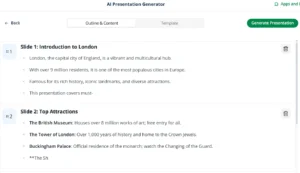
3. Generate the slides
Choose a template—such as “Classic,” “Vibe,” or “Professional”—to guide the AI toward the look and feel you want. If you’d like the AI to generate visuals for you, select a template that includes visual elements.
Now it’s time to create your slide deck by clicking the “Generate Presentation” button.
Once the slides are ready, you can edit them by clicking the green magic wand icon at the top of each slide with a prompt like “Change the visual to a picture of a London bus.”

4. Download your slides
After making the finishing touches to your presentation, click the “Export” button to download your deck as a PPTX file or PDF. If you choose the PPTX option, you can then open and edit it in PowerPoint, Google Slides, or any other compatible desktop or online presentation application.
Frequently asked questions about
- How can I open a presentation created using an online presentation tool?
-
You can open a presentation created with an online presentation tool—such as QuillBot’s free AI presentation maker—by exporting it as a PPTX file and opening it in presentation software like Google Slides or PowerPoint
- Do online presentation tools use AI?
-
Yes, many of the latest online presentation tools—like QuillBot’s free AI presentation maker—use AI to suggest text and generate visuals.
Cite this QuillBot article
We encourage the use of reliable sources in all types of writing. You can copy and paste the citation or click the "Cite this article" button to automatically add it to our free Citation Generator.
QuillBot. (2025, December 01). Online Presentation Tools | Visuals & Text Content. Quillbot. Retrieved March 3, 2026, from https://quillbot.com/blog/ai-writing-tools/online-presentation-tools/

