Content Calendar | Complete Guide, Tips & Tools
A content calendar—also called an editorial calendar—is a schedule that shows when and where you’ll publish specific content. A content calendar organizes content across different channels, like blog posts, social media, emails, podcasts, and more.
One of the biggest challenges of working with a content calendar is keeping it full of content ideas. QuillBot’s AI Chat can help you brainstorm ideas so your calendar stays up to date.
What is a content calendar?
A content calendar is a strategic schedule that manages content creation and publication. It shows what content you’re going to publish, where you’ll publish it, and when it will go live. Depending on their scope, content calendars may include the variables in the table below.
| Variable | Example | Why include it |
|---|---|---|
| Publication date | March 17, 2026 | Establishes when the content will go live so teams can coordinate production, approvals, and distribution |
| Channel | Company blog | Explains where the content will be published and leaves no doubt about what content goes where |
| Title or topic | “10 Email Writing Tips for Professionals” | Clarifies the focus of the content and helps anyone quickly identify the piece |
| Type | Blog post | Shows the exact type of content so there’s no confusion |
| Status | Approved | Tracks progress through the production workflow and prevents missed deadlines or duplicate work |
| Link to asset | Google Docs link | Provides quick access to the working file so collaborators can edit, review, or approve the content |
| Internal due date | March 10, 2026 | Sets the deadline for completing the content, allowing time for edits and approvals |
| Owner | Kate | Identifies the person responsible for creating or managing the content |
| URL slug | /email-writing-tips | Defines a webpage’s URL path for organization, consistency, and search optimization |
| Caption | “Clear email communication improves productivity and collaboration.” | Supplies the descriptive text for social media posts |
| Keywords or hashtags | “Email writing tips,” “professional emails,” “business communication” | Aligns the content with search intent and helps optimize it for search engines or social media |
| Meta details | Title: “Email Writing Tips for Professionals”
Description: “Learn practical tips for writing clear, professional emails at work.” |
Ensures web pages have optimized metadata for search engines and search result previews |
| Image or thumbnail | Header image: professional writing at a laptop | Specifies the visual asset used to represent the content in previews, social shares, or article headers |
Why are content calendars important?
Content calendars are important because they streamline the content management process. A content calendar makes it easier to produce and publish content on time. It’s also a “one source of truth” for your content, meaning anyone can look at it to see the type of content you’re already creating and what type of content your strategy is lacking.
Content calendars offer four core benefits:
- Consistency: Having a regular publication schedule keeps your audience engaged and sends positive signals to algorithms. A steady stream of content is always better than intermittent bursts.
- Versatility: Planning out your schedule lets you address any holes in your strategy before you create the content. This way, you can make sure you’re publishing diverse content with different goals, formats, and topics to address various audience needs.
- Organization: Deadlines and defined ownership help keep your team organized. By looking at your content calendar, all team members can easily see what they need to do and for when. And reducing confusion streamlines tasks and collaboration.
- Efficiency: Outlining your content strategy beforehand saves your team time. They can work more efficiently, perhaps batch-producing content or drafting captions all at once. This alleviates stress and leads to more intentional workflows.
Who needs a content calendar?
Content calendars are useful for anyone who creates and publishes digital content: content marketers, social media managers, small business owners, bloggers, and content creators, just to name a few. Below are a few types of content calendars out there and how they help different teams and individuals stay organized and consistent with their publishing efforts.
Content marketing calendar
There are many types of content marketing, which makes it critical for content marketers to have content calendars. When juggling so many types of content—like blog posts, branded content, videos, listicles, paid ads, UGC, and curated content—having everything planned in one place, with deadlines, details about what channel it’s for, where to find the content asset, and who owns the task keeps content teams organized.
A content marketing calendar also makes it easier to maintain a consistent publishing cadence, coordinate campaigns across channels, check that content aligns with brand identity, and make sure that content aligns with broader marketing goals.
Social media content calendar
One of the most popular types of content calendars these days is a social media content calendar. This type of calendar can help anyone—a brand, organization, small business, or freelancer—who posts on social media to plan posts in advance and maintain a steady presence.
Social media content calendars make it easier to coordinate campaigns, avoid last-minute posting, and check that messaging stays consistent across different channels. They can also help you more easily repurpose your content; for example, you might post a Reel about the best restaurants in your city one month, and the next month create a post carousel presenting that information in a different way.
Podcast or video calendar
A content calendar for videos or podcasts will probably look a bit different from other types of content calendars. There will likely be fewer publications, with more space between each podcast episode or video update.
On the other hand, there will probably be more production stages to track, such as scripting, recording, editing, review, and publishing. A podcast or video calendar helps teams manage these steps, coordinate guests or collaborators, and guarantee that episodes or videos are consistently released on deadline.
How to create a content calendar
Before you can start scheduling content, you have to create your content calendar. Below is how to create a content calendar in five steps.
1. Choose a calendar tool
First, choose where you’re going to host your content calendar. There are many options available, each with its pros and cons.
| Tool | Pros | Cons |
|---|---|---|
| Spreadsheet (e.g., Excel or Google Sheet) | Highly customizable | Can become cluttered |
| Easy to share | No automation | |
| Free or low cost | Manual updates required | |
| Simple for small or beginner teams | ||
| Shared calendar (e.g., Google or Outlook Calendar) | Easy to visualize publishing schedule | Limited fields for detailed content information |
| Reminders and notifications | Less flexible for complex workflows | |
| Simple when creating recurring events | ||
| Content calendar software (e.g., Buffer, Hootsuite, or Later) | Designed for content management | Normally focuses more on social media than other types of content |
| Can schedule content to publish automatically | Learning curve for using the software | |
| Supports various platforms | Almost always subscription-based and can be costly | |
| Usually includes analytics | ||
| Project management software (e.g., Asana, Trello, or Notion) | Combines content planning with task management | May require setup and customization |
| Supports team collaboration | Can be overkill for smaller teams or individuals | |
| Flexible enough for diverse content types | Certain features require paid subscription |
For an individual or a team just getting started with their content strategy, a spreadsheet or shared calendar may suffice. Project management software is best for larger and/or distributed teams, where collaboration needs to be clear and quick. And if you want to be able to schedule your content to publish automatically, it may be worth subscribing to a content calendar tool.
2. Customize your calendar
Once you’ve chosen a content calendar solution, it’s time to customize it. Some tools are more customizable than others, and the scope and type of customization you’ll need will depend on your content strategy, workflow, and team structure.
For example, if you’re setting up an editorial calendar primarily for blog posts or articles, you may want to include custom fields for keywords, metadata, the post’s URL slug, and the featured image. On the other hand, if you’re working with a social media content calendar, you might want to add fields for channels, hashtags, and captions.
This is also a good moment to customize the aesthetics and overall function of your content calendar, too. Consider customizing:
- Views or layout: If your tool allows it, create different views such as a calendar view for publication dates, a Kanban board for workflow stages, or a table view for detailed metadata.
- Workflow stages: Basic workflow stages include “Idea,” “Draft,” “Approved,” “Scheduled,” and “Live,” though depending on the type of content you create and your workflow, you may want to add more. Consider adding stages for “Editing,” “Design,” “SEO Review,” “Legal Approval,” or whatever else your workflow requires.
- Colored tags: Some people find it easier to scan content types and progress if there are different colors for tags related to status or content format. For example, you may use blue for blog posts and yellow for email newsletters. Or for status tags, you might assign teal to “Draft” or lime green for “Live.”
- Team access: If working with a team, decide who should have access to your content calendar. If you’re working with a spreadsheet, everyone at your organization may have access. If you’re working with content calendar software with a limited number of seats, think strategically about who needs access to your calendar. Finally, if you outsource content writing and social media content creation to freelancers, consider how much access—full or limited—you want them to have.
3. Brainstorm content ideas
Next up, it’s time to come up with content ideas for your calendar. There are various methods for content brainstorming, some of which are outlined in the table below.
| Method | How it works | Example |
|---|---|---|
| Mind mapping | Write a core topic in the middle of a piece of paper, and then branch that idea out into subtopics or related ideas. | Write “email marketing” in the center and branch into ideas like “subject lines,” “newsletter design,” “segmentation,” and “automation.” |
| Brainwriting | Various team members write down ideas on sticky notes. After about 5–10 minutes, compare and contrast. | Each team member writes 5 blog post ideas for a marketing blog, then the group reviews the notes and selects the strongest topics. |
| Cubing | Analyze a topic from six different perspectives. Describe it, compare it, associate it, analyze it, apply it, and argue for or against it. | For the topic “remote work,” create content such as “What remote work is,” “Remote work vs. office work,” and “Pros and cons of remote work.” |
| Competitor analysis | Review the blogs, videos, or social feeds of competitors to see what topics they cover. | Look at a competitor’s most popular posts and create related or more in-depth content. |
| Keyword research | Use keyword tools to identify search queries your audience is already looking for. | Find relevant keywords (e.g., “top perfumes 2026” or “tips for training dogs”) and build articles around them. |
| Audience questions | Turn common customer or audience questions into content topics. | If customers often ask how to price freelance work, create a guide explaining pricing strategies. |
| Social media trends | Monitor trending topics, hashtags, and conversations on social platforms. | Create content related to trending hashtags, viral memes, or emerging industry discussions. |
| Content repurposing | Transform existing content into new formats or updated versions. | Turn a blog post into a video tutorial or a series of social media posts. |
| Seasonal or event-based planning | Align content with holidays, industry events, or seasonal trends. | Publish gift guides before the holidays or productivity tips at the start of the year. |
| Internal expertise | Ask team members or subject-matter experts for topic ideas based on their experience. | A customer support team might suggest a tutorial addressing a common product issue. |
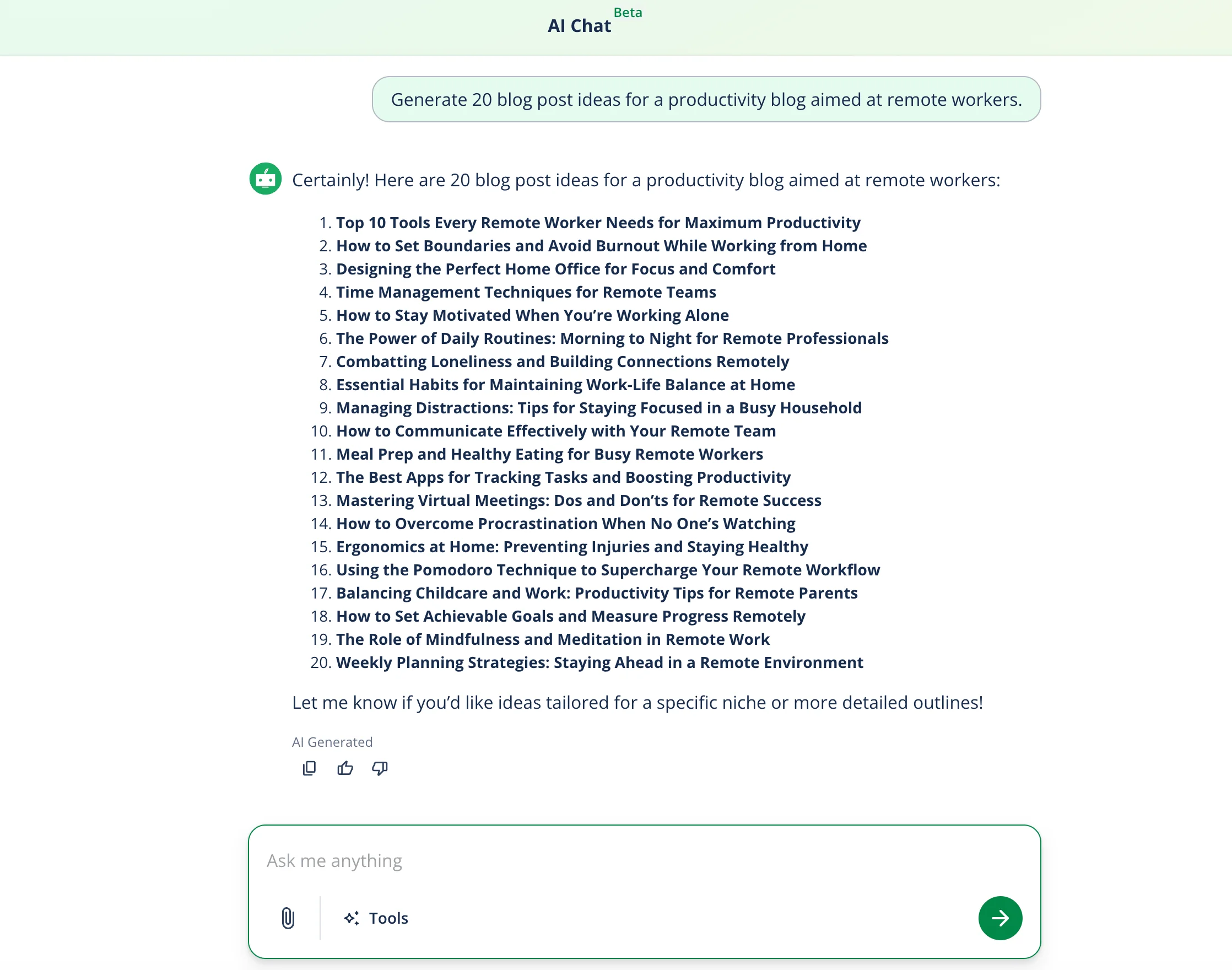
| AI brainstorming | Use an AI tool to generate topic ideas based on your audience, niche, or goals. | Prompt an AI tool: “Generate 20 blog post ideas for a productivity blog aimed at remote workers.” |
Here, QuillBot’s AI Chat can help you brainstorm. By providing a few details about your audience, goals, and content format, you can quickly generate a list of potential topics to fill your calendar.
4. Schedule ideas strategically
After brainstorming, you’ll usually have far more ideas than you can realistically publish. The next step is to evaluate and prioritize them strategically so your content calendar reflects your goals and resources.
When slotting ideas into your content calendar, you should:
- Align ideas with your goals: Review your content ideas in connection with your broader content and marketing goals; some ideas may be interesting but not particularly useful for your objectives. Prioritize topics that support clear outcomes, such as attracting search traffic, educating customers, or promoting a product or service. For example, for SEO-focused blogs, prioritize topics with strong search demand, but for social media campaigns, prioritize topics that encourage user engagement.
- Consider your audience: Evaluate whether each idea is relevant to your target audience. Ideas that clearly serve audience needs should move higher on your list. Think about whether the topic solves a problem, answers a question, or addresses a clear interest your audience has. Ask yourself: Would my audience actively search for this? Would they save, share, or comment on it? Does it help them accomplish something?
- Check feasibility and resources: Some content ideas require more effort than others. Consider the time, skills, and resources needed to produce each piece of content. A short blog post may take a few hours to write, but a research-heavy article could take several days. A video may require scripting, filming, and editing, which are skills that require experience or time to adjust to the learning curve. Choose a mix of ideas that your team can realistically produce within your publishing schedule.
- Balance content types: A good content calendar usually includes a variety of formats and topics. After selecting your top ideas, make sure your calendar isn’t overloaded with one type of content. Aim for a balanced mix, like educational content, promotional or product-heavy content, thought leadership or opinion pieces, and engaging or entertaining content.
- Prioritize high-impact topics: If you’re unsure which ideas to schedule first, prioritize topics that are likely to deliver the most value. These often include keywords with high search volume, frequently asked customer questions, and topics tied to upcoming campaigns, events, or launches.
Once you’ve selected the strongest ideas, you can start assigning publication dates and adding them to your content calendar.
5. Create content and link to calendar
Once your ideas are scheduled, the final step is to start producing the content and connecting each asset to your calendar. Your content calendar should function as the central hub for tracking progress and accessing the materials needed to publish.
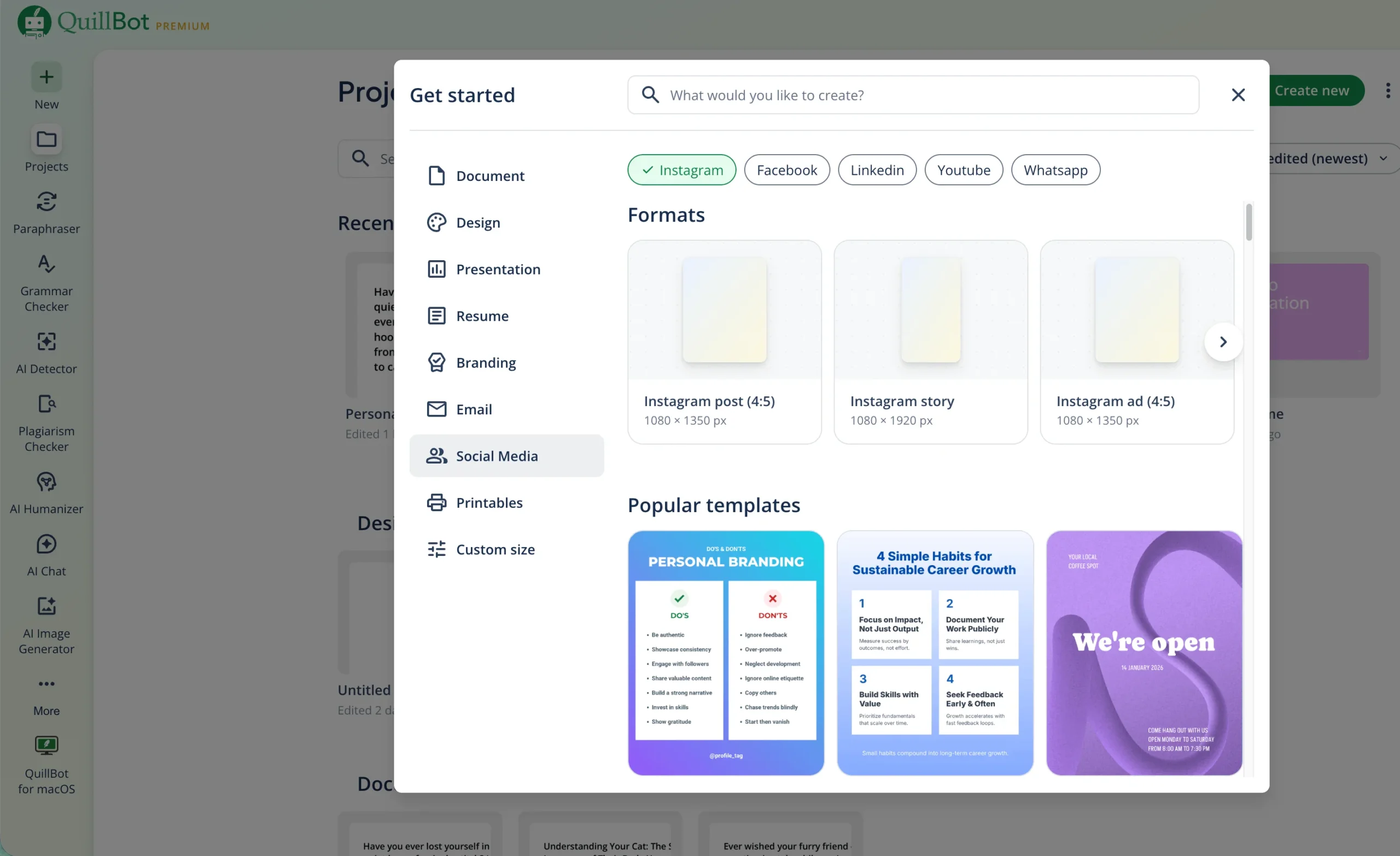
QuillBot has various tools that can help you when creating content. Using tools like this can help speed up the content creation process. Just remember: The final decisions are ultimately yours. These tools can assist, but when working with them, you are the editor-in-chief.
| Tool | What it does | Example use case |
|---|---|---|
| AI Chat | Generates text | Write five caption ideas for a social media post so you can choose the best and edit it for tone of voice |
| Grammar Checker | Finds and fixes any spelling, grammar, or clarity errors | Check that a blog post is error-free before publishing it comes across as credible and professional |
| Paraphraser | Rewrites text with a different tone or style | Take a paragraph that feels long-winded and rewrite it using “Simple” mode |
| Humanizer | Makes AI-generated text sound more human | Give a more human touch to an AI-generated podcast script before doing final edits yourself |
| Projects | Allows you to create social media and email content, documents, and presentations using pre-made templates | Create slides to use in an Instagram carousel post, changing template elements to match your brand identity |
| Image Generator | Generates images based on a text prompt | Create an abstract background in your brand colors to use in social media posts |
| Color Palette Generator | Generate a color palette based on a photo | Upload your brand logo to generate a color palette you can reuse across blog graphics and social media posts |
| Color Wheel | Find complementary colors according to different types of color harmony | Choose complementary colors for a blog infographic |
| Emoji Picker | Find, copy, and paste any emoji to use in your content. | Quickly find and copy emojis to add personality to a social media caption or newsletter |
| Emoji Generator | Create custom emojis from a text prompt or by mixing existing emojis. | Generate a custom branded emoji to use in social posts, customer service chats, or marketing graphics |
As content is created, add links to the relevant assets directly in the calendar. These might include draft documents, design files, images, videos, or final published URLs. Keeping everything connected to the calendar helps collaborators quickly locate the correct version of a piece of content and reduces confusion about where files are stored.
At this stage, it’s also important to update the status of each item as it moves through the workflow. For example, a blog post might move from Idea → Draft → Editing → Approved → Scheduled → Live. Regularly updating these statuses allows teams to see which pieces are in progress, which are ready for publication, and which have already gone live.
Over time, this data helps you refine your content strategy, prioritize high-impact ideas, and make informed decisions about what to create next. Consistent tracking ensures your content calendar evolves from a planning tool into a results-driven roadmap.
Frequently asked questions about content calendar
- What is an editorial calendar?
-
An editorial calendar is essentially the same thing as a content calendar: a strategic schedule of what content you’ll publish where and when.
It typically includes content themes, formats, topics, publication deadlines, assigned owners, status updates, and supporting details like metadata or captions.
The key benefits of an editorial calendar are consistent publication, better organization, smoother collaboration, and greater efficiency when creating content.
To learn more about editorial calendars, ask QuillBot’s AI Chat.
- Can I use an AI content idea generator for long-term content planning?
-
Yes, you can use an AI content idea generator for long-term content planning, such as developing article topics for a blog series or clusters of related content (e.g., FAQs, how-to articles, a vlog series, and case studies).
Once you generate ideas, it’s best to slot them into a content calendar. This will help you see if there are any gaps in your content strategy.
QuillBot’s free AI content idea generator is a quick and painless way to get long-term content creation ideas. This is one of QuillBot’s many AI content creation tools.
- What is a content publishing workflow?
-
A content publishing workflow is the step-by-step process of creating content. Content publishing workflows vary based on the type of content and organization, but generally, they look like this:
- Ideation and strategy
- Briefing and planning
- Creation
- Editing and review
- Approval
- Publishing
- Promotion and analysis
The best way to keep track of which stage of the content publishing workflow a specific piece of content is in is with a content calendar.
QuillBot has many tools to help you throughout your content publishing workflow, like AI Chat for generating ideas and Grammar Checker for editing and review.
Cite this QuillBot article
We encourage the use of reliable sources in all types of writing. You can copy and paste the citation or click the "Cite this article" button to automatically add it to our free Citation Generator.
Santoro, K. (2026, March 17). Content Calendar | Complete Guide, Tips & Tools. Quillbot. Retrieved March 17, 2026, from https://quillbot.com/blog/content-writing/content-calendar/