
20 Creative Presentation Ideas to Engage & Inspire
Creative presentation ideas can turn an ordinary slide deck into a memorable experience. Whether you’re presenting for your classmates, colleagues, or people in your community, creative techniques keep your audience engaged. From meaningful stories and unexpected color schemes to custom illustrations and interactive icebreakers, the creative presentation ideas in this article will enrich and enliven any presentation you need to make.
This article covers 20 creative approaches to content, design, audience participation, and sound. Quillbot’s free presentation maker will jump-start the process. Generate a first draft with a simple prompt, and layer in the creative ideas that will resonate with your audience.
Creative content techniques for presentations
Creative presentations use compelling content formats to keep audiences curious, engaged, and inspired. The way that you frame, reveal, and reinforce information plays a major role in whether your message sticks.
Creative presentation title slide
A creative presentation title slide sets the tone for what your audience can expect and helps capture interest before you even begin speaking. Instead of using generic or overly descriptive titles, aim for one that sparks curiosity while clearly hinting at your main idea. Use these tips to get started:
- Place your presentation title in bold lettering on the first slide.
- Directly beneath it, include a subtitle that describes your main idea a bit further.
- Put your name, the date, and similar details in small lettering at the bottom of your title slide.
Presentation title slide example

Creative hooks
If you’re working on a presentation, you probably already know to start a presentation with a hook (aka attention-grabber). The challenge is finding a hook that’s creative rather than generic or overused. Here are creative presentation ideas for three types of hooks.
- Ask a surprising question: Choose an open-ended question that challenges expectations and sparks critical thinking rather than a “have you ever” or other “yes/no” question (e.g., “How many energy drinks do you consume in a typical week?” rather than “Do you enjoy energy drinks?”).
- Open with a short anecdote: Use a brief, specific story (ideally one that starts in the middle of the action) that directly supports your message (e.g., “It was 10 minutes before a final, and I had just downed my third energy drink of the day”).
- Use a surprising statistic or fact: Lead with a data point that immediately shows your topic’s relevance. Avoid dictionary definitions and overgeneralizations.
Storytelling frameworks
Structuring your content as a story helps it flow naturally and resonate emotionally. Some effective presentation storytelling frameworks include:
- Problem-tension-solution: Highlight a challenge, build suspense, and then provide the resolution in your presentation’s conclusion.
- Before-during-after: Show a transformation over time to make your points more relatable.
- Challenge-insight-outcome: Present a problem, reveal your insight, and demonstrate the results or impact.
- Challenge: Lucia begins the presentation by describing her past challenges with paying for groceries and consuming enough protein on a limited budget.
- Insight: In the body of her speech, Lucy provides facts and details about the cost and nutritional value of plant-based and animal-based foods.
- Outcome: Lucia ends the presentation with the outcome of her original story. After replacing some of the meat/dairy in her diet with plant-based options, her grocery bills are lower, and her health has improved.
Relatable examples
A great way to make a presentation more creative is by using relatable examples. You can make your ideas more relatable by:
- Supplementing facts and data with personal stories or experiences
- Highlighting case studies that are relevant to your topic
- Using everyday analogies that simplify complex concepts
When you include examples in your presentations, you only need to list them on your presentation slides. Use your slides to show your audience which point you’re developing, and use your words to fully develop the point.
Expert tips and supporting evidence
Credible evidence makes your content more persuasive, and the right evidence doesn’t have to be boring. Here’s how to approach it creatively:
- Look beyond the obvious: Instead of only citing well-known figures in your field, explore niche voices, independent researchers, or emerging thought leaders. Their insights can be fresh, unexpected, and more relatable to your audience.
- Use multimedia sources: Incorporate video interviews or podcast clips to bring expert voices directly into your slides. Hearing an expert in their own words adds authenticity.
- Leverage trending topics: Search for experts who are actively discussing current events, viral trends, or recent breakthroughs to make your presentation timely.
Famous quotes
Quotes from well-known figures add authority, spark thought, or inject personality. Here are some ways to use quotes effectively:
- Place a famous quote on your title slide to set the tone and build anticipation.
- Pair quotes with images (e.g., a photograph on the left and a quote on the right).
- Use quotes as discussion prompts to open a section of your presentation.
- Combine contrasting quotes to highlight multiple perspectives or provoke curiosity.
- Use a different colored font for the most important word or phrase.
Quotes in presentations example

Creative presentation design ideas
Visual design plays a major role in how audiences perceive and process information. Thoughtful use of illustrations, motion, typography, and color helps ideas stand out while keeping slides clean, cohesive, and easy to understand.
Custom illustrations
Custom illustrations are one of the most effective ways to make presentations feel original and engaging. Luckily, there are tools for creating unique presentation images, like Quillbot’s free image generator. Simply type in your AI image prompt, and let Quillbot take care of the rest. Some of the many possibilities include:
- Silhouette illustrations for minimalism and clarity
- Cartoon illustrations to inject personality and humor
- Abstract illustrations to add intrigue
Real-world photography
High-quality photography can make your presentation feel grounded and relatable. Use photos that reinforce your story, support your examples, and create emotional resonance with your audience.
For example, if you’re teaching your audience how to do something, photographs will make each step in the process more concrete. You can also use real-world photography to highlight people, places, or moments connected to your topic.
When choosing photos, prioritize clarity and relevance over decoration. Each image should serve a purpose and strengthen your message.
Creative presentation ideas example

Relevant screenshots
Visual evidence reinforces key points, and screenshots can be more creative and engaging than standard bullet points. Some creative ways to use screenshots include:
- Apps, websites, or software to illustrate steps or examples
- Recent news articles or trending social media posts to make your topic timely
- Graphs and tables from credible outside sources
Presentation slide background images
When done well, a background image can make a presentation more creative and visually appealing. Here’s how to do it right:
- Choose background images with large shapes, a consistent texture (or a subtle gradient), and minimal detail.
- Use a strong color contrast between your text and the background, such as white, gray, yellow, or neon colors over dark background images.
- Reserve background images for slides with minimal text.
- Use large font sizes to improve the text’s readability.
Background image example

You can also create a custom background with Quillbot’s free background generator.
Creative font pairings
Typography communicates your presentation’s personality and makes slides easier to scan. A simple rule is to use two fonts: one for headings and one for body text. Creative pairings include:
- Montserrat + Lato
- Playfair display + Open Sans
- Yellowtail + Open Sans
- Poppins + Roboto
- Merriweather + Lato
Unique color schemes
Colors play a powerful role in shaping the mood of a presentation and influencing how your audience perceives your message. Creative presentations go beyond safe, predictable color combinations. By pairing colors in unexpected but intentional ways, you can elevate your design and make your presentation more memorable.
Whether you’re making a custom color scheme or choosing from the many templates in Quillbot’s presentation maker, choose colors that support the tone and purpose of your content. Certain colors naturally communicate professionalism, energy, calm, or urgency. Here are some creative color schemes, along with the moods they naturally convey.
- Midnight blue and electric cyan: Energetic and future-focused
- Sage green and charcoal: Calming and neutral
- Black and white with strong red accents: Dramatic and attention-grabbing
- Forest green and sand with rust accents: Natural and grounded
- Terracotta and cream with deep navy accents: Warm and inviting
Transition slides
Transition slides make a presentation creative and easy to follow. Each time you’re about to begin discussing a new point or subtopic, display the subtopic title on its own slide to reset your audience’s attention and to reinforce your presentation’s structure.
Use the same colors, font sizes, and background design on all of the transition slides to help your audience understand when each transition is happening. An effective transition slide includes:
- Large, readable text
- Minimal text (5–10 words)
- Strong color contrast between the text and background
- A simple background design or solid background color
Creative presentation ideas for audience participation
Presentations are more creative and memorable when they directly engage the audience. Instead of relying solely on slides and narration, consider using one of these techniques for audience participation.
Icebreakers
An icebreaker is a short activity or prompt that gets people talking and thinking. Icebreakers set a welcoming tone, help your audience feel comfortable, and create an interactive environment. Ideas include:
- Quick polls
- Two truths and a lie relevant to your topic
- Fill-in-the-blank prompts on the screen (e.g., “The biggest challenge I face with [topic] is _____”)
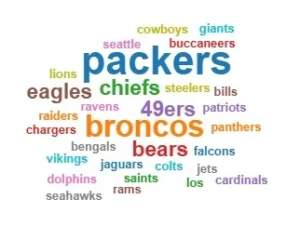
Word clouds
A word cloud (a cloud-shaped collection of important words) is a fun way to display your audience’s ideas. Here’s how to incorporate a word cloud into a presentation:
- Ask audience members an open-ended question that they can answer with a single word (or a short phrase). For example, you could ask each person to share an adjective that they associate with your topic.
- Add the responses to Quillbot’s free word cloud generator (or another tool of your choice).
- The tool will arrange the responses into a word cloud with the most common responses in a larger font size.
- Share the word cloud with your audience to help them visualize the range of responses.
Q & A sessions
Allowing space for questions ensures that your audience stays engaged and invested in the topic. For long presentations, schedule mini Q & A breaks after each main section so that you can check for understanding and clarify complex points before moving to the next section. This approach makes your presentation feel more conversational.
Gamification
Game-like elements like quizzes, challenges, and prizes can also make a presentation more creative and fun. Gamification motivates your audience, reinforces key messages, and creates a memorable experience. For example, you might award prizes for answering quizzes correctly or challenge participants to solve a problem in small teams.
Creative ways to use sound in presentations
Sound can subtly enhance your presentation when used thoughtfully. Adding audio elements draws attention, reinforces messaging, and makes slides more dynamic.
Intro music
Starting with music sets the tone and captures your audience’s attention. It’s also a perfect way to keep attendees engaged while they’re waiting for everyone else to arrive. Choose a track that reflects the mood of your presentation, such as:
- Upbeat tracks for innovation, marketing, or tech presentations
- Calm, instrumental music for educational or reflective talks
- Theme music that matches your company or brand identity
Soft background music
Playing gentle music during sections where your audience is reading slides, watching a demonstration, or reflecting on information can maintain energy without being distracting. Opt for low-volume instrumental tracks or nature sounds.
Sound effects for transitions or reveals
Use brief sound cues, like chimes or swooshes, to emphasize transitions between topics or to reveal key points on a slide. This creative presentation technique can create a sense of anticipation and highlight important moments. Do use this technique sparingly, though, so that your presentation doesn’t feel gimmicky.
Frequently asked questions about creative presentation ideas
- What are some funny presentation topics?
-
Funny presentation topics are light-hearted, relatable, or unexpected subjects designed to make an audience laugh. Here are some funny presentation topic ideas you can use for school, work, or public speaking:
- Overrated fashion trends
- Unwritten rules of group chats
- Top 10 music festival hacks
- Signs you’re officially getting old
- 10 ways to lose Instagram followers
- Jobs that sound fake but somehow exist
When you’re ready to make a funny presentation, Quillbot’s free presentation maker can show you some creative presentation ideas.
- What are some persuasive presentation topics?
-
Persuasive presentation topics are about convincing your audience to take a specific action or agree with your opinion. For example, a persuasive presentation might convince your audience to:
- Rethink their relationship with energy drinks
- Buy second-hand clothing instead of fast fashion
- Support local farmers and farmers markets
- Take at least one art class during college
- Start and maintain a regular yoga practice
- Drive more slowly in residential areas
- Start using a new approach or tool at work
When you’re ready to make a persuasive presentation, Quillbot’s free presentation maker can show you some creative presentation ideas.
- How can I improve my presentation skills?
-
Improving your presentation skills comes down to consistent practice and mastering key presentation techniques. Here are practical tips you can focus on:
- Rehearse your presentation several times, paying attention to your delivery and timing.
- Record yourself to evaluate your body language, voice projection, and pacing.
- Ask for feedback from friends, colleagues, or mentors to spot what’s working and what needs adjustment.
- Practice important presentation techniques like storytelling, making eye contact, and using effective pauses.
- Consider joining groups like Toastmasters or taking public speaking courses to build confidence and refine your skills.
When you’re ready to design your slides, Quillbot’s AI presentation maker can help you create professional, polished decks.
- How can I make my presentation look good?
-
Creating an appealing presentation means combining effective presentation techniques with smart design. Here are some simple tips to make your slides stand out:
- Use clean, simple layouts with consistent fonts and colors to ensure readability.
- Choose high-quality images and visuals that enhance your message without distracting.
- Keep text minimal—use key phrases instead of full sentences to avoid clutter.
- Apply visual hierarchy by emphasizing important points with size, color, or placement.
- Use a tool like Quillbot’s AI presentation maker to create eye-catching, professional slide designs quickly and easily. You can also try Quillbot’s free AI image generator to create eye-catching visuals for your presentation.
- What are some interactive presentation techniques to engage my audience?
-
Engaging your audience is key to a successful presentation. Here are some effective interactive presentation techniques you can use:
- Ask open-ended questions to encourage participation and invite discussion.
- Use live polls or quizzes to make your presentation more dynamic and gather instant feedback.
- Incorporate short activities or brainstorming sessions to involve your audience actively.
- Encourage nonverbal responses like nodding or hand-raising to maintain connection.
- Use storytelling and relatable examples to draw listeners in and keep their attention.
- Invite questions throughout or set specific Q&A moments to foster interaction.
These techniques help maintain audience interest and make your presentation more memorable. For support in creating engaging slides that complement your delivery, try Quillbot’s AI presentation maker.