
How to Use an AI Detector & When You Should
Generative AI tools make it easier than ever to create content at scale. But with convenience comes a challenge—how do you know whether content is human-written or AI-generated?
That’s where AI content detectors come in.
These tools analyze text and estimate whether it was likely created by a human or an AI model. While not foolproof, they can offer helpful insights in academic, professional, and creative settings.
This post covers how to use QuillBot’s AI content detector and explores a few real-world examples where it’s especially useful.
What Is an AI Content Detector?
An AI content detector is a software tool designed to identify characteristics typical of AI-generated text. These tools evaluate features like:
- Repetitiveness
- Predictability
- Sentence structure and vocabulary
- Perplexity (how surprising a sentence is)
- Burstiness (variation in sentence length and complexity)
They analyze these features and predict the likelihood that a text was generated by AI.
How to use an AI content detector
Most AI detectors follow the same general process, and they are quite intuitive to use.
1. Choose a Tool
Select a reputable AI detection tool. If you’re working with sensitive or proprietary text, make sure the tool has strong privacy protections.
There are many content detectors available online. Some are free, and some require payment (typically in the form of purchasing a monthly subscription or credits). QuillBot’s AI Detector is free for texts of up to 1,200 words, and QuillBot Premium users enjoy unlimited AI content detection.
2. Paste or Upload Text
Most tools let you paste the content directly into a text box. Some, like QuillBot’s, allow document uploads (like .docx or .pdf files).
3. Run the Detection
Click the detection button and wait a few seconds while the tool analyzes the content.
4. Interpret the Results
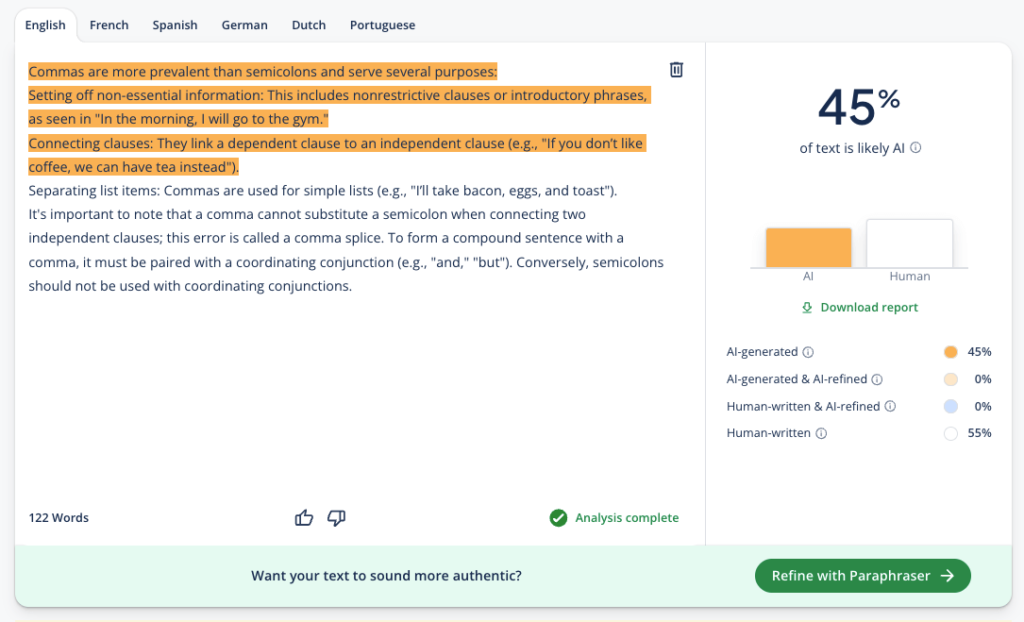
The results usually appear as a probability or a percentage score (e.g., “87% likely AI-generated”). Some tools also highlight specific sections that seem machine-written.
Interpretation of results is where QuillBot’s tool stands out from the competition. In addition to differentiating AI-generated and human-written text, it also identifies text that is “AI refined” (e.g., through the use of a paraphrasing tool). This provides greater context for evaluating the authenticity of a text.
Keep in mind that no AI content detector is 100% accurate. They can generate false positives and false negatives. Human review and contextual judgment are essential, especially when consequences are high.
Always pair detector results with a conversation or further investigation. AI-generated content isn’t inherently bad—it just needs to be used transparently and ethically.
When is an AI content detector useful?
Whether you’re an educator, editor, employer, or content creator, learning to use AI content detectors can help you uphold originality, clarity, and trust in the content you encounter.
1. Education
Educators and administrators use detectors to identify potential AI-written assignments or essays.
That said, results should be interpreted carefully and discussed with students—false positives are possible.
2. Content marketing
Content agencies and freelance editors use AI detectors to ensure originality and human tone in blogs, product descriptions, and ad copy.
3. Journalism
News outlets use AI detectors to validate whether sources or submissions were written by real people—particularly when receiving tips, op-eds, or guest content.
4. Job applications and college admissions
Colleges and employers are beginning to screen personal statements, cover letters, and essays to ensure authenticity.
5. Legal or research settings
In fields where originality and human reasoning are critical, such as legal writing or scientific research, AI content detection can help ensure that material hasn’t been generated without proper citation or review.
Frequently asked questions about how to use an AI detector
- How do I check if a document is AI generated?
-
The most reliable way to check whether a document was written by AI is to run it through an AI Detector. These tools analyze patterns in the text (like phrasing, predictability, and structure) to determine whether the content is more likely to have been written by a human or generated by AI. For the most reliable results, analyze longer passages of text rather than a single sentence, since AI detectors need enough language patterns to evaluate.
You can also review the document yourself for common signs of AI writing. AI-generated text often relies on predictable sentence structures, repetitive word choices, and a neutral or overly generic tone. While these clues can be helpful, they’re not always definitive on their own. Because no detection method is perfectly accurate, it’s best to combine automated tools with manual review.
Some tools provide additional insights. For example, QuillBot’s AI Content Detector provides a detailed analysis that distinguishes between AI-generated and AI-refined text, giving you clearer insight into how a document was likely produced. This makes it easier to evaluate the originality of content and determine whether AI tools played a role in its creation.
- How do I check if AI wrote something?
-
The simplest way to check if AI wrote something is to use an AI Detector to analyze what percentage of text is AI-generated and what percentage is AI-refined.
You can also review the text manually. AI-generated content often shows predictable word choice, repetitive sentence structures, and a formal or unusually consistent tone compared with human writing.
Whatever method you use to detect AI writing, keep in mind that no approach is 100% reliable. A detailed report like the one provided by QuillBot’s AI Content Detector can provide more context for making decisions.
- What do teachers use to detect AI?
-
Teachers use a combination of strategies and tools to detect AI writing.
One method teachers use to detect AI is manual review. They look at grammar, style, tone of voice, and the overall ideas to determine whether the writing aligns with the student’s expected ability or voice. Sudden shifts in voice, overly polished language, or responses that don’t fully address the assignment can sometimes raise questions about AI use.
Teachers may also rely on AI detection tools to support their evaluation. QuillBot’s free AI Detector is one of the tools that can help teachers quickly analyze text and receive an instant assessment.
In contexts where the use of AI outputs is permitted, AI Humanizer tools can help humanize AI outputs and make the writing seem more natural and fluent.
Cite this QuillBot article
We encourage the use of reliable sources in all types of writing. You can copy and paste the citation or click the "Cite this article" button to automatically add it to our free Citation Generator.
QuillBot. (2025, November 28). How to Use an AI Detector & When You Should. Quillbot. Retrieved March 19, 2026, from https://quillbot.com/blog/ai-writing-tools/how-to-use-an-ai-detector/

