
How to Format Texts Instantly Using a Case Converter
Picture this: You paste text from an old database, and every name is SCREAMING IN CAPITALS. Or you’re a developer with 40 variable names to reformat before a code review in an hour. Either way, fixing it manually means retyping everything or wrestling with formulas. Mistakes creep in faster than you’d expect, breaking your code or leaving an embarrassing typo in print.
A case converter handles it all in one click: uppercase, lowercase, title case, and more. This guide shows you how to use QuillBot’s online case converter step by step, with examples for each text format and use case.
How to use an online case converter (step-by-step)
Here’s how to convert your text with QuillBot’s online case converter tool:
Step 1: Paste or type your text
Copy or type the text you want to convert into the input box. You can use anything from a single word to full paragraphs or even a list of variable names from a code project. This works for text copied from documents, spreadsheets, or PDFs.
Step 2: Choose a case format
Select the format you need. Most online case converters, including QuillBot’s, offer the following options:
- Sentence case – for normalizing paragraphs, notes, or essays
- UPPERCASE – great for headings, titles, or emphasis
- lowercase – useful for cleaning up data or standardizing text
- Title Case – ideal for headlines, blog titles, or document headings
- camelCase – commonly used for variable names in programming (e.g., userName)
- PascalCase – often used for class names or code elements in programming (e.g., UserName)
- snake_case – handy for database fields, file names, or coding (e.g., user_name)
- kebab-case – useful for web-friendly URLs or file names (e.g., my-blog-post)
- CONSTANT_CASE – used for constants in code, values that shouldn’t change (e.g., MAX_USERS)
- dot.case – good for structured file names or data keys (e.g., user.profile.data)
- tOgGIE cAsE – fun or eye-catching text for social posts or creative projects
- AlTeRnAtInG CaSe – another stylized option for emphasis or playful content
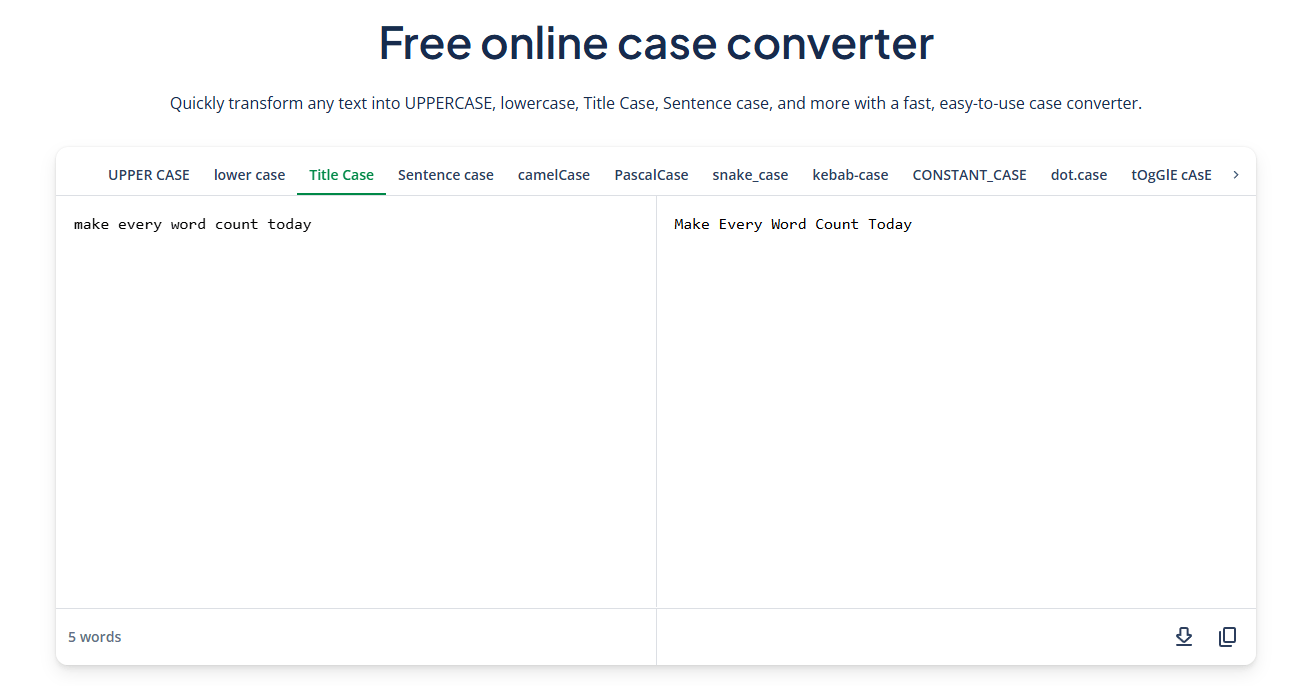
Your text updates instantly as you switch formats. For example, “make every word count today” becomes “Make Every Word Count Today” in Title Case.
Example of converting text to Title Case using QuillBot’s online case converter
Step 3: Copy or export your text
Once your text is converted, you can either copy it or export it as a TXT file and use it wherever you need. You can grab the entire batch of clean, formatted text in one click to save time and prevent mistakes.
Step 4 (Optional): Experiment with other formats
Try switching between formats such as camelCase, sentence case, or uppercase to see which works best for your project.
Case converter examples
Here’s how the same phrase looks across all available formats.
| Case Type | Example Output |
|---|---|
| Sentence case | Make every word count today |
| UPPERCASE | MAKE EVERY WORD COUNT TODAY |
| lowercase | make every word count today |
| Title Case | Make Every Word Count Today |
| camelCase | makeEveryWordCountToday |
| PascalCase | MakeEveryWordCountToday |
| snake_case | make_every_word_count_today |
| kebab-case | make-every-word-count-today |
| CONSTANT_CASE | MAKE_EVERY_WORD_COUNT_TODAY |
| dot.case | make.every.word.count.today |
| tOgGIE cAsE | mAkE eVeRy wOrD cOuNt tOdAy |
| AlTeRnAtInG Case | MaKe EvErY WoRd CoUnT ToDaY |
Frequently asked questions about case converter
- What is the difference between title Case and sentence case?
-
The difference between title case and sentence case comes down to which words are capitalized.
- Title case capitalizes the main words in a headline or title. Verbs, nouns, adjectives, and adverbs are all capitalized. Short words, like “and,” “the,” or “of,” may or may not be capitalized depending on the style guide (APA, AP, Chicago, etc.). For example, “How to Format Text Like a Pro”
- Sentence case capitalizes only the first word of the sentence and any proper nouns. It is common in casual writing, such as blog titles. For example, “How to format text like a pro.”
Need help with capitalization? Try QuillBot’s case converter and switch between different formatting styles like title case and sentence case in seconds.
- How do I convert uppercase to lowercase?
-
To convert uppercase text to lowercase, paste or type your text into an online case converter and select the lowercase option. The text updates instantly, and you avoid manual editing.
One free and easy-to-use option is QuillBot’s case converter tool. It allows you to convert large blocks of text in seconds, switch between multiple case formats, and copy or export the result with just a few clicks.
- Is there a way to capitalize text without retyping?
-
Yes. An online case converter can quickly change text to Title Case, UPPERCASE, sentence case, and more.
Simply paste or type your text, select the desired format, and it updates instantly. You can test this with QuillBot’s online case converter.
Cite this QuillBot article
We encourage the use of reliable sources in all types of writing. You can copy and paste the citation or click the "Cite this article" button to automatically add it to our free Citation Generator.
QuillBot. (2026, March 12). How to Format Texts Instantly Using a Case Converter. Quillbot. Retrieved March 13, 2026, from https://quillbot.com/blog/ai-writing-tools/case-converter/

