Published on
September 8, 2025
by
Trevor Marshall, MSc.
The greatest strength of a portable document file (PDF) document is also its greatest weakness. Its strength is that no matter what device or operating system you have, the document will look the same, because its elements are fixed in place.
This, however, also means that it is very difficult to alter the PDF once it has been finished. Made a typo? Too bad, you can’t change it. Want to suggest changes to the author? Sorry, it’s finalized.
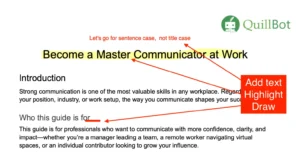
But there is hope. A PDF editor like the QuillBot online PDF editor can save the day. With the PDF editor, you can highlight, add text boxes, insert images, or draw on the PDF.
Using the QuillBot PDF editor example
Continue reading: How to Add Text to PDF | Advice & Examples
Published on
September 5, 2025
by
Trevor Marshall, MSc.
Revised on
March 11, 2026
The subject, context, and specifics like lighting, style, and camera angles are all included in a good AI image prompt to help the AI make decisions. Use descriptive elements like “cinematic lighting,” “in the style of a watercolor painting,” or “wide-angle shot” to enhance the final product and bring it closer to your intended vision.
As the capabilities of AI have increased, 2025 is perhaps the year where AI image creation suddenly became mainstream. The images have become more convincing, and it opens up a world of possibilities for creatives to include images in their work.
QuillBot’s AI image generator offers a simple and quick way of creating images from a text prompt. It’s a powerful tool that can turn your ideas into images in a matter of seconds.
The general warning with anything AI-related is that the product, or output, is only as good as the prompt you put in. There is a genuine skill involved in learning how to craft the best prompt to get the AI model to give you the results you need.
This guide will walk you through that process and leave you with 50+ ready-to-use prompts for your AI image generator adventures!
Try Free AI Image Generator
Continue reading: 50+ Creative AI Image Prompts for Any AI Generator
Published on
September 5, 2025
by
Trevor Marshall, MSc.
Planning an online event is a relatively new skill. Although they existed before Covid-19 and worldwide lockdowns, since that time they have exploded in use. There are lots of things to consider when planning an online event, including:
- Your goal
- Your audience
- Expected outcomes
- Technology platform
- Time zones
- Accessibility
- Interactivity
- Speakers
- Promotion and registration
- Online content
- Engagement
- Follow-up and success criteria
That’s a lot to consider, which is why an AI assistant like QuillBot’s free AI online event planning generator can be such a lifesaver. Tell it the details of your event, and let it do the legwork for you!
Continue reading: Online Event Planning Generator | Advice & Example
Published on
September 4, 2025
by
Trevor Marshall, MSc.
Launching a successful campaign often comes down to how well it’s planned. And often, this planning revolves around the practical “project” side of things (which is important). But the danger is that the creative process itself will become muddied or dominated by the execution side, and you’ll end up launching a creatively poor product or campaign
This is why it’s important to have a well-devised and well-written creative brief. This document helps you to define your goals, your audience, and your key messages. To do this effectively can be time-consuming and onerous.
That’s why it can make sense to turn to an AI assistant like QuillBot’s free creative brief generator. Give it the details it needs, and it will break down the elements of a creative brief for you, ready to take to your team!
Continue reading: Creative Brief | Definition, Advice & Examples
Published on
September 3, 2025
by
Trevor Marshall, MSc.
We all know the feeling: you’ve sent an email, perhaps about a job opportunity, or a potential creative collaboration, or to complain about something … and nothing. Silence. This is not great for the reputation of any organization, which is why responding to emails is so important.
Balanced against that is how time-consuming it can be. You want to avoid an automated email, but you don’t want to send a rushed one that makes no sense or is full of errors. That’s where an AI response generator can step in. Simply give it a few details in the prompt, and it will produce the response for you.
You can check out the QuillBot free AI response generator to see how it can speed up your response time while keeping it professional.
Continue reading: AI Response Generator | When & How to Use
Published on
September 3, 2025
by
Trevor Marshall, MSc.
There aren’t very many adjectives (words that qualify a noun) that start with Z. Some of the more common adjectives that start with Z are:
- Zealous
- Zen
- Zero-rated
- Zany
- Zonal
- Zillionth
This article contains lists of many more positive, negative, and neutral adjectives that start with a Z.
Continue reading: Adjectives That Start With Z | List & Examples
Published on
September 3, 2025
by
Trevor Marshall, MSc.
There aren’t that many adjectives (words that qualify a noun) that start with Y. Some of the more common adjectives that start with Y are:
- Youthful
- Yummy
- Yawning
- Yeasty
- Yucky
- Yearlong
- Yearly
- Yellow
- Young
- Younger
Continue reading: Adjectives That Start With Y | List & Examples
Published on
September 3, 2025
by
Trevor Marshall, MSc.
There really aren’t many adjectives (words that qualify a noun) that start with X, so we’ve included adjectives that contain X. Some of the more common adjectives that start with or contain X are:
- Excellent
- Excited
- Expert
- Exhausted
- Extinct
- Xenophobic
- Explicit
- Exotic
This article contains lists of positive, negative, and neutral adjectives that start with or contain X.
Continue reading: Adjectives That Start With X | List & Examples
Published on
September 2, 2025
by
Trevor Marshall, MSc.
There are many adjectives (words that qualify a noun) that start with W. Some of the more common adjectives that start with W are:
- Warm
- Wealthy
- Well
- Wise
- Witty
- Weak
- Weird
- Wild
- Wrong
- Wet
- Whole
- Wide
- Windy
This article contains lists of many more positive, negative, and neutral adjectives that start with a W.
Continue reading: Adjectives That Start With W | List & Examples
Published on
September 1, 2025
by
Trevor Marshall, MSc.
There aren’t that many adjectives (words that describe a noun) that start with V. A few of the most common adjectives that start with V are:
- Valuable
- Versatile
- Vibrant
- Vital
- Vivid
- Vague
- Vain
- Violent
- Vulgar
- Visual
- Voluble
- Vulnerable
This article has lists of adjectives that start with V, divided into positive, negative, and neutral.
The QuillBot AI chat is an easy way to find the adjective you want or to check a word’s meaning.
Continue reading: Adjectives That Start With V | List & Examples

