
Character Design Prompts | Ideas & AI Tools
Visualizing your hero (or villain) is the first step to bringing any story to life. Whether you’re a novelist, a gamer, or a digital artist, the right character design serves as the foundation for your entire narrative.
Stop settling for “close enough” with stock images, and use QuillBot’s AI design generator to bring exactly who or what you’re imagining to life. In this article, we’ll go over how to create the perfect character design prompts that this tool can transform into stunning, high-fidelity characters.
How to prompt a character design generator
The secret behind designing a character that feels real instead of generic is to describe them with specific visual anchors. The more detail you add, the more intricate and lifelike your character becomes. Below, we’ve laid out some key traits to think about when building a prompt for a character design generator.
Physicality (age, gender, build)
Don’t just say “man.” Think about your character’s overall appearance and be as specific as possible, for example, “a wiry, middle-aged man” or “a sturdy, athletic teenage girl.”
Hair and facial features
Mention length, texture, color, and style. Are they clean-shaven or with a bushy beard? Is their hair pulled back in a neat bun or a mess of curls? Do they have a strong, sharp jawline or a soft, rounded one?
Expression and mood
This tells the character’s story. Are they “smirking mischievously,” “looking weary and battle-worn,” or “glowing with calm serenity”?
Clothing and armor
Describe materials and fit. “Weathered leather armor with gold filigree” or “a flowing silk robe with tattered hems.”
Posture and action
How are they standing? They might be “leaning against a tavern wall” or “crouched in a defensive stance.”
Accessories
This is often what makes a character memorable. A glowing blue amulet, a notched longsword, or a mechanical steampunk arm can add depth and intrigue to your character.
Background
Your character shouldn’t exist in a void—set the scene! Provide details about the setting, such as “a misty forest at twilight” or “the harsh neon glow of a futuristic city.”
Three character design ideas to try right now
Bring the details of your character together in a descriptive prompt that an AI tool can transform into crisp, realistic visuals. Below are some prompts and the images QuillBot’s AI design generator created with them. Adapt these prompts to build your own characters.
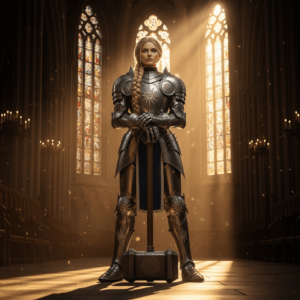
Character design generator prompt: The Paladin, a tall woman in polished silver plate armor with sun motifs, long blonde hair in a tight braid, standing tall with a massive warhammer, golden hour sunlight in a cathedral.
QuillBot design generator output
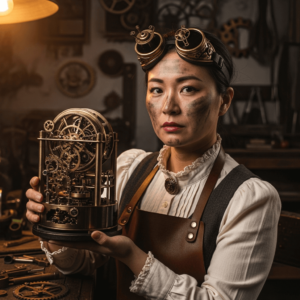
Character design generator prompt: The Steampunk Inventor, a woman with soot-stained cheeks and brass goggles perched on her forehead, wearing a leather apron over a Victorian blouse, holding a complex clockwork device.
QuillBot design generator output
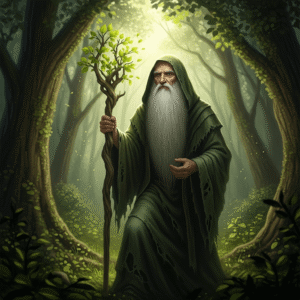
Character design generator prompt: The Hermit Wizard, an elderly man with a beard down to his waist, wearing tattered emerald robes, holding a gnarled wooden staff that sprouts fresh leaves, in a sun-drenched forest.
QuillBot design generator output
Using an AI design tool
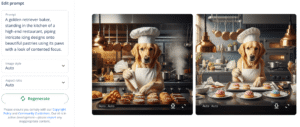
QuillBot’s AI design tool can transform your prompts into stunning images in seconds. Simply type your prompt into the text box, select your image style and aspect ratio, and let the tool do its work.
QuillBot’s design generator interface

A great feature of QuillBot’s design tool is that it will provide you with two options to choose from. You can download these images or refine your prompt and try again if you aren’t quite happy with the output.
Two outputs from QuillBot’s AI design tool
Frequently asked questions about character design prompts
- What are free tools for AI character design?
-
Often, creating strong visuals can help you get a better sense of characters as you work on a creative project.
QuillBot’s AI design generator is a fantastic tool to create new characters; simply describe their key traits and let the tool bring them to life.
- Is it ethical to use AI for creative writing?
-
The ethics depend on how you use AI and what you’re writing for. Using AI like QuillBot’s AI Story Generator for brainstorming, feedback, or editing help is generally fine—it’s similar to using spell check or asking a friend to read your work. However, you should check the rules wherever you plan to publish your story, since magazines, writing contests, and schools often have their own policies about AI use. The main thing is being honest about your process and making sure the creative ideas and decisions stay yours. When you’re not sure, it’s always safer to be transparent about how exactly you used AI to write a story.
Cite this QuillBot article
We encourage the use of reliable sources in all types of writing. You can copy and paste the citation or click the "Cite this article" button to automatically add it to our free Citation Generator.
QuillBot. (2026, January 06). Character Design Prompts | Ideas & AI Tools. Quillbot. Retrieved March 5, 2026, from https://quillbot.com/blog/image-tools/character-design-prompts/

