How to End a Presentation | Tips & Examples
Everyone wants to make a good first impression with their presentation, and it’s crucial to know how to start a presentation. But understanding how to end a presentation is equally important, as your presentation’s closing is what your audience will walk away with.
This guide goes through why the end of a presentation matters, how to end a presentation effectively (both visually and orally), and how AI tools—like QuillBot’s AI presentation maker—can help you end your presentation.
Why the end of a presentation matters
Everyone worries about first impressions, but lasting impressions are arguably more important. The end of your presentation is your last chance to leave a good one. It’s the moment to reiterate your message, make an emotional connection with your audience, and motivate them to take action.
How to end a presentation
Learning how to end a presentation effectively involves two distinct—yet equally important—parts: what you say and what you show. Both components need to reinforce what the audience should take away and what they should do next.
How to end a presentation: The final slide
Most of the presentations that you’ve seen have probably ended with a slide that says something like “Thanks!” or “Questions?”, perhaps with an image or emoji. Neither of these leaves the audience with something actionable, memorable, or relevant.
Instead of a “dead slide,” the last slide of your presentation should do one (or more) of the following:
- Summarize your key message in a single sentence
- Display 3–5 bullet-point takeaways
- Put your call to action in large, readable text
- Include instructions for next steps (e.g., signup link, project deadline, QR code)
- End with a quote that reinforces your argument or inspires the audience
- Show a before-and-after comparison (works well in data-driven presentations)
- Provide your contact details or resource links—in a single, uncluttered format
This way, you keep your audience engaged until the last moment and give them something meaningful to walk away with. Below are some strong examples of final presentation slides and why they work well.
Example 1: Summarized key message
A project team presents to a city council to request funding for modernizing local libraries. The presentation covers current gaps (slow catalog system, outdated programs, low youth engagement), usage analytics showing declining visits, a modernization proposal, cost breakdown and projected ROI, and community benefits.
The council members are busy and sit through many proposals, so clarity at the end is critical. To reinforce the entire message succinctly, the presenter closes with this final slide:
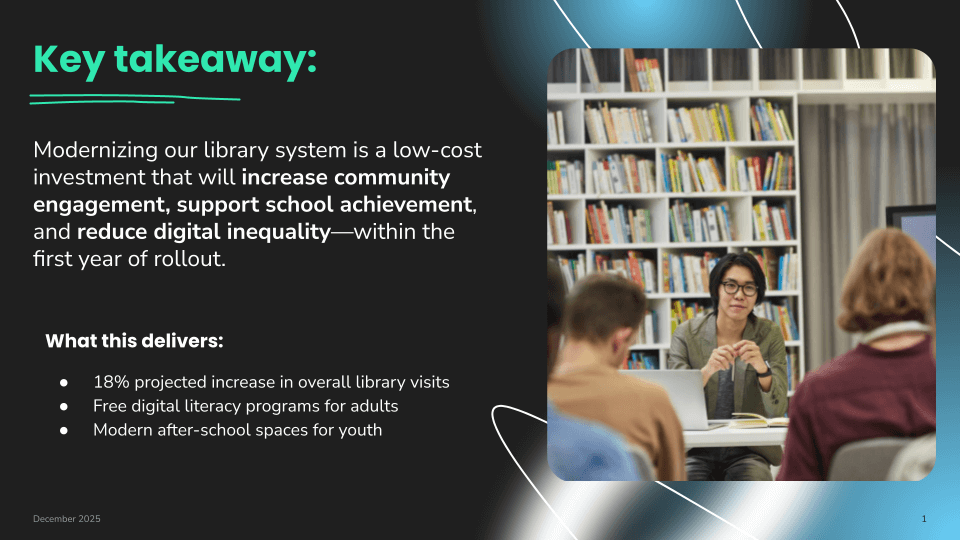
The slide crystallizes the central argument into a single sentence: The modernization provides measurable community benefit at a reasonable cost. Council members walk away with:
- The logic (“low-cost investment”)
- The reward (“increase engagement and reduce digital inequality”)
- The timeline (“within the first year”)
This type of summary slide is effective when you need to convince your audience to make a decision (especially regarding funding or approval), you’re dealing with complex data, or stakeholders may forget earlier details. It prevents the message from dissolving into numbers and charts and keeps the outcome front and center after the meeting ends.
Example 2: Next steps and call to action
A company has just rolled out a new ticket-handling workflow for their customer support department. The presenter has explained the workflow, shown examples of how to apply it, and provided a short demo inside the support platform. The session is now ending, and the presenter needs participants to actually use the process during the week so adoption sticks.
At the end of the session, the presenter shows:
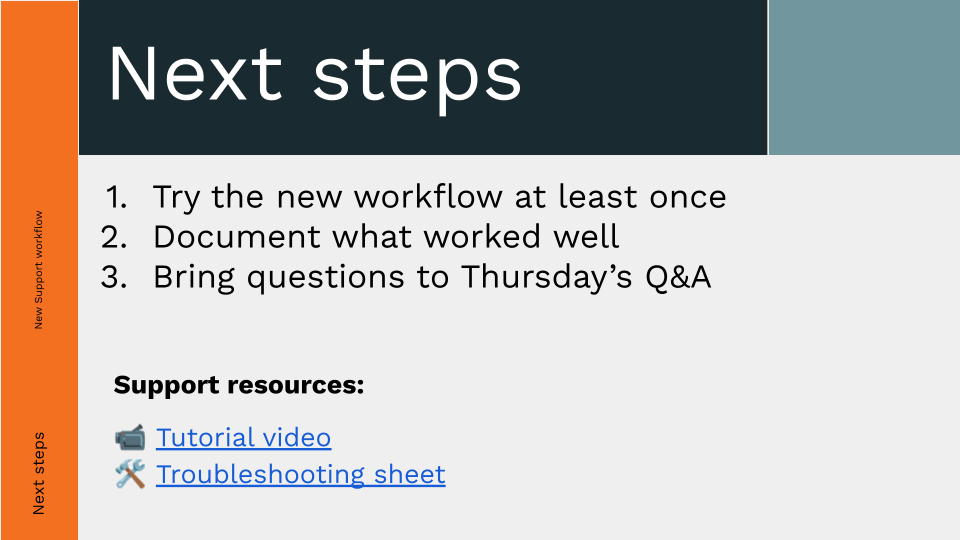
The goal of this slide is to transition the audience from passive training to active implementation. Participants leave knowing:
- Exactly what to do (test the workflow)
- How to report back (document positives and prepare questions)
- When/where to ask questions (Thursday Q&A)
- Where to get help (resources provided)
This type of final slide works particularly well for internal training rollouts, onboarding programs, system migrations, and any presentation where adoption—not just understanding—is the measurable next step.
Example 3: Inspirational quote
A consulting team hosts a half-day workshop for managers transitioning into leadership roles. The session covers leading with clarity, motivating teams through purpose, giving effective feedback, and managing change.
The presenter closes the workshop by summarizing the core ideas and reinforcing the concept of leading through intention rather than reaction. To leave participants with a memorable emotional anchor, the final slide is:
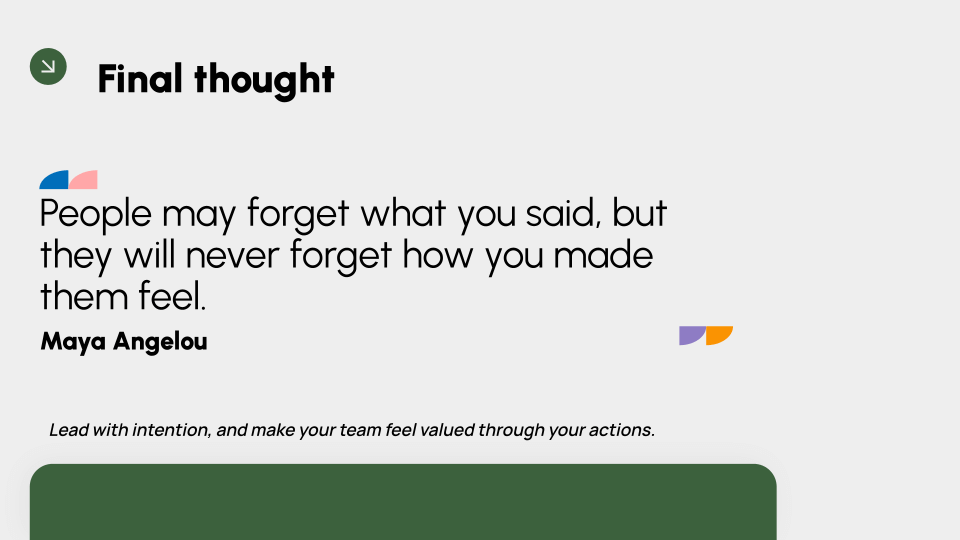
This type of closing slide fits because:
- The quote reinforces a central theme of the session.
- It ends with emotional resonance meant to inspire.
- It creates a forward-looking takeaway that participants can connect to their work.
The audience leaves not just with instructions but with a principle that frames their next decisions and prioritizes empathy, impact, and presence as leaders.
How to end a presentation: What to say
What you say at the end determines how effectively your message sticks. To end a presentation on a strong note, you should:
- Summarize the key points
- Reiterate the core message, benefit, or outcome
- Give a call to action with clear next steps
Below are some templates you can use to model your closing presentation statements. Each template shifts the focus slightly—on next steps, the “why,” and looking to the future.
Template 1: Summary + impact + call to action
“Today we covered [main points], which shows that [core finding or conclusion]. Moving forward, this means [clear impact or benefit], and the next step is to [specific instruction/action].”
Template 2: Recap + why it matters
“To recap, [point A], [point B], and [point C]. These matter because [consequence or outcome], and by applying them, we can [expected result].”
Template 3: Takeaway statement + future vision
“If you remember one idea today, it’s that [single takeaway]. By putting this into practice, [stakeholder/group] will be able to [future outcome], and we’ll be positioned to [final goal or milestone].”
What not to say
The above templates can help you prepare your closing remarks, although the exact wording is up to you. Prepare a statement that resonates with your voice and the context of your presentation (e.g., more casual language for informal settings).
That said, there are definitely some things you shouldn’t say. Avoid vague closings, filler words, and hedging language that neutralize momentum:
| Type | Phrase | Why not |
|---|---|---|
| Weak or uncertain endings | “Well, that’s it.” | Abrupt, provides no closure or reinforcement of key points |
| “That concludes the presentation.” | ||
| “That’s all we have for today.” | Sounds unprepared and underwhelming; no emphasis on takeaway | |
| “I guess this is the end.” | Unprofessional and indecisive; implies content isn’t valuable | |
| Apologetic or self-doubting language | “I hope that made sense.” | Focuses on your own anxiety and undermines authority |
| “Sorry if that was confusing.” | Draws attention to potential mistakes; reduces audience trust | |
| “I don’t know what else to say.” | Signals unpreparedness and diminishes credibility | |
| Overly polite or filler statements | “Thanks for listening.” | Polite but adds nothing to retention or action |
| “If you want, we can discuss more later.” | Passive and weak closure; relies on audience initiative | |
| “I don’t want to take up more of your time.” | Suggests that your presentation is a burden; doesn’t reinforce importance | |
| Self-undermining or patronizing phrases | “This is obvious, but… | Undermines content; implies audience won’t value your points |
| “You probably already know this.” | Patronizing; disengages audience; implies content is unnecessary | |
| “That’s how I see it.” | Undermines confidence in conclusions | |
| Vague prompts or question openers | “Any questions?” | When asked without context, leaves audience without a takeaway if no one asks; feels like a dead stop |
| “I guess you know what to do now.” | Informal and dismissive; unclear guidance on next steps | |
| “Feel free to reach out if needed.” | Passive; doesn’t explicitly motivate or direct immediate action |
- Speak clearly and project your voice
- Be mindful of your pacing—not too fast or too slow
- Use confident and relaxed body language to instill trust
- Use transition words to help orient the audience
- Use strong, specific action verbs whenever possible
- Time your presentation and cut any filler or fluff
- Rehearse in front of others (or record yourself to watch back)
How AI can help you end a presentation
Ending a presentation effectively requires clarity, focus, and impact. AI tools can make this easier by helping you craft memorable closing slides, concise takeaways, and actionable next steps. Here’s how:
- AI presentation makers (like QuillBot’s free presentation maker) can generate presentation endings quickly, so you can spend less time setting up slides and more time refining your message and visuals.
- AI writing tools (like Paraphraser) help you find the right words, length, and tone for your slide content and your spoken presentation. Try choosing “Simple” or “Shorten” modes. Likewise, proofreaders (like Grammar Checker) can spot and correct any spelling or grammar errors in your presentation content.
- AI image generators (like QuillBot’s free AI image generator) allow you to create customized, unique images for your presentations.
- AI-supported image editing tools (like a background remover) help you edit images quickly and easily right from your browser so they look clean and professional when you add them to your presentation.
- Chatbots (like AI Chat) are able to assist with various presentation tasks, like:
- Brainstorming ideas
- Ordering your content and slides
- Summarizing key points and messages
- Suggesting quotes or visuals for added impact
- Giving you tips for presenting
- Proposing questions the audience may have and evaluating your replies
Frequently asked questions about how to end a presentation
- What are some interactive presentation techniques to engage my audience?
-
Engaging your audience is key to a successful presentation. Here are some effective interactive presentation techniques you can use:
- Ask open-ended questions to encourage participation and invite discussion.
- Use live polls or quizzes to make your presentation more dynamic and gather instant feedback.
- Incorporate short activities or brainstorming sessions to involve your audience actively.
- Encourage nonverbal responses like nodding or hand-raising to maintain connection.
- Use storytelling and relatable examples to draw listeners in and keep their attention.
- Invite questions throughout or set specific Q&A moments to foster interaction.
These techniques help maintain audience interest and make your presentation more memorable. For support in creating engaging slides that complement your delivery, try QuillBot’s AI presentation maker.
- How can I improve my presentation skills?
-
Improving your presentation skills comes down to consistent practice and mastering key presentation techniques. Here are practical tips you can focus on:
- Rehearse your presentation several times, paying attention to your delivery and timing.
- Record yourself to evaluate your body language, voice projection, and pacing.
- Ask for feedback from friends, colleagues, or mentors to spot what’s working and what needs adjustment.
- Practice important presentation techniques like storytelling, making eye contact, and using effective pauses.
- Consider joining groups like Toastmasters or taking public speaking courses to build confidence and refine your skills.
When you’re ready to design your slides, QuillBot’s AI presentation maker can help you create professional, polished decks.
Cite this QuillBot article
We encourage the use of reliable sources in all types of writing. You can copy and paste the citation or click the "Cite this article" button to automatically add it to our free Citation Generator.
Santoro, K. (2025, December 08). How to End a Presentation | Tips & Examples. Quillbot. Retrieved March 10, 2026, from https://quillbot.com/blog/ai-writing-tools/how-to-end-a-presentation/