
AI Script Generator: How to Write Better Scripts Faster
You’re a social media manager at a small agency. It’s Monday, and two clients need scripts by Friday: a 30-second TikTok ad that has to stop thumbs mid-scroll, and a one-minute podcast spot that should sound like a friend recommending a product. The briefs are vague at best: “make it fun,” “drive conversions,” and your inbox keeps filling with other tasks. You open a blank document, the cursor blinks, but inspiration is nowhere to be found.
This is the common squeeze: each platform needs something different, but you don’t have time to write ten versions. Writing scripts that sound natural requires a particular cadence, and when deadlines are tight, it’s easy to either rush something forgettable or get stuck trying to find the right words.
Luckily, you don’t have to wrestle with the blank page all by yourself. AI tools like QuillBot’s script generator can help you get a solid draft down fast, so you have something to build on instead of starting from zero.
That way, those Friday scripts won’t feel so last-minute.
How to write a script
Writing a script for short videos or audio spots is all about creative hooks and clear messaging. Here are four simple steps to get you started:
1. Start with a hook
Your opening line determines whether people keep watching or scroll away. Lead with curiosity, urgency, or a relatable problem. For example, instead of “Today I want to talk about productivity apps,” try “I used to waste three hours every day on tasks that should take 30 minutes.”
The best hooks make people think, “That’s exactly my problem,” or “I need to know how this ends.” Avoid generic introductions; jump straight into something that matters to your audience.
2. Deliver your core message
Once you have their attention, get to the point quickly. Whether you’re explaining a product feature, sharing a tip, or telling a story, your main message should be crystal clear within the first 15-20 seconds.
Structure your content logically. For promotional scripts, this might be problem → solution → benefit. For educational content, it could be hook → main point → supporting details. Keep sentences short and conversational—write like you’re talking to a friend, not reading from a textbook.
3. Include a clear call to action (CTA)
Every script needs a specific next step. Don’t just ask people to “check out” your product or “learn more,” tell them exactly what to do. Use action words like “Download,” “Start,” “Join,” or “Try.”
Make your CTA feel natural, not forced. Instead of awkwardly inserting “Link in bio!” at the end, work it into your narrative: “I’ve been using this app for three months, and you can try it free for 30 days—link’s in my bio.”
4. Keep it conversational
Great scripts sound like natural speech, not formal writing. Use contractions, simple words, and short sentences. Read your script out loud—if it sounds stiff or doesn’t flow naturally, rewrite it.
Match your tone to your platform and audience. A LinkedIn video can be more professional-sounding than a TikTok, but both should feel authentic to your voice. Avoid jargon unless your audience expects it, and always prioritize clarity over cleverness.
Using a script generator
An AI script generator like QuillBot’s can speed up your process by giving you a starting draft, but it’s not magic; it still needs your input and editing to make it truly work. Here’s how to get the most out of it:
- Be specific with your input
The more details you provide, such as the platform, audience, tone, and key points, the better the draft will match your needs. Vague prompts get you generic scripts, so spend a little time clarifying what you want.
- Use the draft as a foundation
Think of the AI-generated script as a rough sketch, not a finished product. Review it carefully and adjust the language, pacing, and calls to action to fit your brand and voice.
- Add your personal touch
AI can’t capture your unique style or storytelling flair. Add your examples, humor, or brand voice to make the script feel authentically yours.
- Read it aloud and revise
Scripts are meant to be spoken. Reading your draft out loud helps spot awkward phrases or pacing issues that might not be obvious on screen. Edit until it feels natural.
Using an AI script writer can save time and help you overcome the blank page, but it works best when combined with your creativity and judgment.
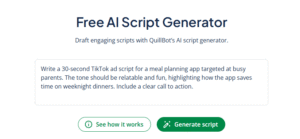
Here’s how you can prompt QuillBot’s AI script generator to draft a TikTok script:
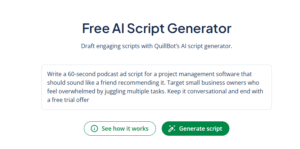
And here’s an example of a prompt for a podcast commercial:
That way, the next time you’re staring at a blank page with a Friday deadline looming, you’ll already know where to begin.
Frequently asked questions about script generators
- What content types can AI script writing be used for?
-
AI script writing works well for a variety of formats, including short videos, podcast ads, marketing videos, training materials, and even longer formats like movie or play scripts. The complexity and style will vary depending on the type of content, but AI tools can help draft scripts across these different uses.
If you want to see how AI can help with your scripts, QuillBot’s AI script generator is easy to use and free.
- How do I write a script for a short video or podcast ad?
-
Start with a strong hook that grabs attention quickly. Then, deliver your main message clearly and keep sentences short and conversational. End with a specific call to action telling your audience what to do next.
Remember to read your script aloud to ensure it sounds natural. If you need help getting started, tools like QuillBot’s script writer can provide a simple draft you can customize.
- Can I use a free AI script generator for my marketing scripts?
-
Yes, there are free AI script generators that can help you create basic drafts for marketing scripts. Different tools offer various options when it comes to customization, length, and output quality.
QuillBot’s AI script writer is a free option you can use to quickly generate a draft and start shaping your script.
Cite this QuillBot article
We encourage the use of reliable sources in all types of writing. You can copy and paste the citation or click the "Cite this article" button to automatically add it to our free Citation Generator.
QuillBot. (2025, August 18). AI Script Generator: How to Write Better Scripts Faster. Quillbot. Retrieved April 12, 2026, from https://quillbot.com/blog/ai-writing-tools/how-to-write-a-script-with-ai-script-generator/

