Top Ways to Use an AI Image Detector
You’re grading assignments when a student submits digital artwork that gives you pause. It’s impressive, but unlike anything they’ve submitted before. In a different situation, you’re scrolling through social media and see photos from what looks like an exclusive event, yet something doesn’t quite add up. Or you’re following breaking news and can’t shake the feeling that the dramatic images being shared might not be real.
In everyday situations like these, deciding what’s real isn’t always straightforward. As AI-generated images become harder to spot with the naked eye, AI image detectors are quickly becoming part of basic digital hygiene—simple checks that help people question images thoughtfully instead of taking them at face value.
What is an AI image detector?
An AI image detector is a tool that helps you determine whether an image was generated by artificial intelligence or captured with a real camera. It looks closely at tiny details you might miss, such as:
- Weird pixel patterns
- Textures that seem too smooth
- Lighting that doesn’t quite match reality.
These clues can show when an image was created by AI tools like Midjourney or DALL·E, which often leave behind subtle signs.
Image detectors focus on how a picture is put together. Real photos usually have small imperfections, such as:
- Grainy spots
- Lens reflections
- Uneven shadows
AI images, on the other hand, often look almost too perfect or repeat certain patterns.
Understanding these differences is key to knowing how to spot AI images. That said, detectors can give you a good idea whether something’s fake or not, but they can’t guarantee it. They work best when you use them alongside other ways to double-check before making a call.
Practical ways to use AI image detectors
AI image detectors come in handy more often than you might think. Whether you’re a teacher, marketer, or just someone who’d rather not be outsmarted by an algorithm, these tools help you figure out what’s real and what might not be.
Here are some practical ways to use them in everyday life:
- Spotting deepfakes and subtle AI visuals
- Verifying viral news images
- Protecting brand and professional images
- Deciding what’s real on social media
- Maintaining academic integrity
1. Spotting deepfakes and subtle AI visuals
Deepfakes aren’t always the dramatic stuff of spy thrillers. Sometimes they’re just a politician’s face that looks slightly waxy, a background that doesn’t quite match the lighting, or an image that your brain flags with a quiet “huh, weird.”
AI image detectors help you turn that vague suspicion into something more concrete. They scan for patterns and visual quirks commonly found in AI-generated images, such as:
- Repeating textures
- Overly smooth surfaces
- Inconsistencies in shadows or fine details.
These are the kinds of things you might not consciously notice while scrolling, but the tool is trained to pick up.
2. Verifying viral news images
Catching deepfakes is one thing, but AI-generated images also appear in fast-moving news stories, racking up thousands of shares before anyone has verified they’re authentic. That dramatic photo of a natural disaster, celebrity scandal, or political event might be real—or it might be an AI creation.
AI image detectors can quickly scan these visuals for telltale signs of synthetic generation. They aren’t a substitute for traditional fact-checking, like checking sources, tracing the original upload, or consulting credible news outlets. However, they do provide a useful first check that helps you pause and think before sharing or acting on an image.
3. Protecting brand and professional images
If you work in content marketing, manage branded content, or oversee a company’s reputation, AI-generated images appearing where they don’t belong can be a real problem.
Fake screenshots of your CEO, doctored product images, or AI visuals passed off as authentic photography can spiral quickly. They can confuse your audience, damage your reputation, or pushyou into damage-control mode before you’ve even had your morning coffee.
AI image detectors act as a practical early warning system. You can run a quick scan on suspicious visuals flagged by monitoring tools, vet user-generated content (UGC) before featuring it in campaigns, or double-check images from contributors.
AI image detectors serve as a simple checkpoint that helps you catch potential fakes early and decide whether to use an image with confidence or take a closer look. This helps you keep things transparent when your audience expects the real thing.
4. Deciding what’s real on social media
Not every AI-generated image is designed to deceive you. Sometimes people create synthetic visuals for fun, for art, or just to see what they can make. The problem is that these images blend seamlessly into your feed alongside real photos, with no easy way to tell the difference at a glance.
AI image detectors help you build a healthier skepticism. Before you share that incredible photo or let it shape how you think about an event, you can take a moment to check. It’s not about being cynical, it’s about developing the same critical eye for visuals that you’d use for any other information online.
In a world where images carry enormous persuasive weight, knowing how to question what you’re seeing is just basic digital literacy.
5. Maintaining academic integrity
Students have access to the same AI image generation tools as everyone else. While there’s nothing wrong with using AI as a learning tool, passing off AI-generated work as your own crosses a line. For educators, this creates a practical challenge: how do you verify submitted work when a student’s abilities suddenly seem to leap forward?
AI image detectors can help you figure this out. If someone who typically submits beginner-level sketches suddenly turns into gallery-quality digital art, a quick scan can confirm your instincts. The goal is to maintain standards, ensure fair assessment, and start meaningful conversations about academic honesty, proper attribution, and the ethics of AI use in education.
How to use an AI image detector effectively
When an image looks suspicious, or you just want to double-check, using an AI image detector is quick and easy. Here’s how you can check any image using QuillBot’s free online AI image detector:
- Upload your image. The tool supports the most common formats like JPEG, PNG, and WebP.
- Let the tool analyze. It scans for subtle patterns and clues that may indicate AI generation.
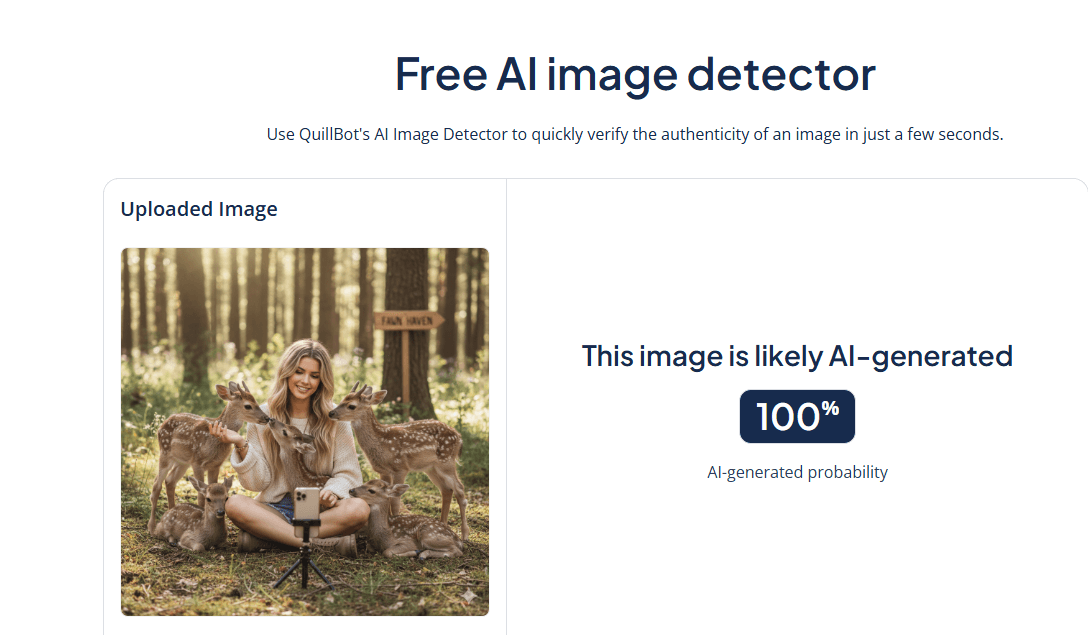
- Review the results. You’ll see a percentage indicating how likely the image is AI-generated.
- Apply your judgment. Combine the detector’s insights with context, sources, and your own critical thinking before sharing or publishing.
Remember to treat these results as one piece of information, not a definitive answer. AI detectors work best as a first checkpoint, helping you decide what deserves deeper investigation.
Your friend swears their favorite influencer really hung out with baby deer? Time to burst that bubble.
Frequently asked questions about AI image detector
- How can you check if an image is AI generated?
-
There are a few ways you can check if an image is AI-generated.
First, review the image for anything that doesn’t look quite right. AI-generated images often have distorted text, patterns, or human features (especially faces and hands).
Second, check for metadata information. Some AI image generators use specific filenames or imprint a watermark on their images.
Third, understand how AI detectors work and how you can use them to analyze the probability that an image was generated by AI. One helpful tool is QuillBot’s AI image detector, which makes it easy to check images quickly.
And if you need help detecting texts generated by AI, QuillBot’s free AI Content Detector is one option.
Want to test your skills at spotting AI-generated content? Try our Human or AI quiz and see if you can tell what’s real and what’s made by AI.
- How accurate are AI image detection tools?
-
AI image detection tools have improved a lot, but they aren’t perfect. They can usually identify many AI-generated images by spotting common visual clues, but sometimes they may miss subtle fakes or wrongly flag real photos.
Using tools like QuillBot’s free AI image detector alongside visual checks and source verification gives you the best chance of spotting AI-generated content accurately.
- What’s the difference between deepfakes and AI-generated images?
-
Deepfakes are a specific type of AI-generated content designed to imitate a real person, usually to mislead. They typically involve face swaps, recreating someone’s likeness, or generating realistic visuals that make it look like a person said or did something they never actually did.
Other AI-generated images are created from scratch using text prompts: things like fantasy art, stock-style photos, or conceptual illustrations. They’re synthetic, but they’re not pretending to be real people or events.
In short, all deepfakes are AI-generated, but not all AI-generated images are deepfakes.
Not sure if an image is real? Run it through QuillBot’s AI image detector for a quick percentage score showing how likely it is to be AI-generated.
Cite this QuillBot article
We encourage the use of reliable sources in all types of writing. You can copy and paste the citation or click the "Cite this article" button to automatically add it to our free Citation Generator.
Nikolopoulou, K. (2026, February 18). Top Ways to Use an AI Image Detector. Quillbot. Retrieved April 6, 2026, from https://quillbot.com/blog/image-tools/top-ways-to-use-an-ai-image-detector/