Thank You Slides | Best Practices & 10 Ideas
A thank you slide is the last slide of a presentation, meaning it’s the final impression the audience will take with them. For this reason, it’s important that your thank you slide is concise, focused, and aligned with the overall tone and purpose of your presentation.
In this guide, learn how to create a thank you slide that won’t be a dead end. Discover the point of a thank you slide, what to include, and how to design it. Then, when you’re ready to create your slide, kickstart the process with one of Quillbot’s pre-designed, customizable Presentation Templates.
Key takeaways
- A thank you slide provides closure to your presentation, expresses gratitude to your audience, and creates a final impression that reflects your presentation’s purpose and tone.
- Adapt your thank you slide to the presentation context: You might invite questions, summarize key findings, share resources, or encourage your audience to take a specific action.
- Keep your slide concise, visually consistent with the rest of your presentation, and aligned with your branding and audience expectations.
- Explore thank you slide ideas for different presentation types—from academic presentations and school projects to product launches, pitch decks, and quarterly reviews—to find inspiration for your own closing slide.
What is the purpose of a thank you slide?
The purpose of a thank you slide is to show gratitude to your audience for their time and attention and to indicate that your presentation is ending. As your ending slide, a thank you slide can also invite questions, share contact information, or provide next steps.
Depending on the context of your presentation, you may choose to skip a thank you slide and instead use the last slide of a presentation to display key takeaways or reinforce your main points. Use your ending slide strategically given your situation. For example, a student finishing a class presentation may want to thank their classmates and teacher for their time, while a professional addressing executives may want to stress the core findings of the presentation.
What to include on a thank you slide
Thank you slides typically contain some combination of these elements:
- Closing message: A brief note appropriate for the setting and tone, like “Thanks for your time” or “Questions welcome”
- Presenter details: The presenter or presenters’ name(s), title(s), and, if necessary, team(s) name
- Contact info: An email address, website, LinkedIn profile, or phone number that allows your audience to follow up with or reach out to you
- Resource link or QR: A link or a QR code so participants can complete your desired CTA (QRs work great for in-person presentations, as the audience can scan them at the moment. For presentations delivered remotely or slide decks sent via email, a link is more efficient.)
- Key takeaways: The most important points from your presentation, presented as a concise summary so the audience has it in mind during the questions session or when they walk away from your presentation
- Next steps: What should happen as a result of the presentation, such as stakeholders approving a budget, a team implementing a new strategy, or participants completing an assigned task
- Call to action (CTA): The immediate action you want your audience to take, such as booking a call, reviewing a proposal, signing up for a newsletter, or downloading a resource
- Key visual: A relevant visual that fits with the theme and/or topic of the presentation
- Quote or tagline: A relevant quote or saying that directly relates to the presentation and encourages the audience to continue thinking about it after it ends
Which elements you include in your thank you slide depends on the context in which you’re giving the presentation and what you want the audience to take away or do next. In the table below, find a few examples of how you can combine these elements to create a thank you slide for different types of presentations.
Example thank you slide structure based on context
| Context | Elements included | Example slide content |
| Quarterly performance review | Key takeaways | Q3 performance at a glance
|
| Next steps | Q4 priority: Improve retention and expand enterprise sales. | |
| Contact info | Questions? Contact Sarah Lee, Head of Sales sarah.lee@company.com |
|
| Sales pitch or proposal | Closing message | Ready to move forward? |
| CTA | Schedule your kickoff call: | |
| QR code | [QR code to scheduling page] | |
| Contact info | John Smith | Account Manager john@business.com (111) 222-3344 |
|
| Academic or research presentation | Key takeaways | Key findings:
|
| Closing message | Questions & discussion welcome | |
| Presenter details | Maria García Department of Urban Studies XYZ University |
|
| Client onboarding presentation | Next steps | Your first 30 days
|
| CTA | Next step: Book your onboarding session | |
| QR code | [QR code to booking page] | |
| Contact information | Support: help@brand.com | |
| Training or educational presentation | Closing message | You’ve got this! |
| Key takeaways | Your Excel shortcuts to remember
|
|
| Resource link | Practice with the downloadable workbook:
[Link to workbook download] |
|
| Presenter details | Training Team | training@co.com | |
| Key visual | Company logo | |
| Project proposal for stakeholders | Next steps | Three decisions needed to move forward:
|
| CTA | Review project timeline and budget breakdown: | |
| Resource link | [Link to proposal] | |
| Presenter details | Emma Wilson | Project Manager | emma@project.com |
Best practices for a great thank you slide
If you want to make a great thank you slide, there are some best practices you should follow:
- Include only the essential details: In most cases, include 2–4 of the elements mentioned above, prioritizing the most important information. If your thank you slide contains all of the components mentioned above, it’s going to be too cluttered.
- Don’t introduce new details: A thank you slide is not the place to bring up a finding or idea you haven’t already discussed. Only include takeaways you’ve already presented.
- Write for conciseness: In line with the above best practice, keep your copy as brief as possible. Cut any verbiage, use active voice, prioritize specific action verbs over vague and weak verbs, and remove redundant phrases.
- Keep your formatting consistent: Your thank you slide should have the same styles as the rest of the slides in your presentation.
- Apply your branding design: If you have corporate branding or personal branding standards, all the slides in your presentations should uphold your visual identity, using the same color palette and typography as your website, marketing materials, etc. If you don’t have one already, set up a “presentations” section in your brand guidelines so your team members know exactly how to brand company presentations.
- Use an appropriate tone: If you’re delivering an informal team workshop, it might be fine to include a funny GIF or image to close out the presentation. If you’re presenting a proposal to upper management, it’s probably not. Build your thank you slide around what your audience needs to know and the tone they expect of your message
Thank you slide ideas
All these thank you slide ideas were made with Quillbot. To use one of these thank you slides (and the other slides that appear in the same deck), click the image to open and customize the template:
- Open house presentation
- Class introduction
- School project
- Thesis defense
- Product launch presentation
- Operations and HR workshop
- Pitch deck
- Quarterly review
- Case study
- Photography portfolio
Open house presentation thank you slide
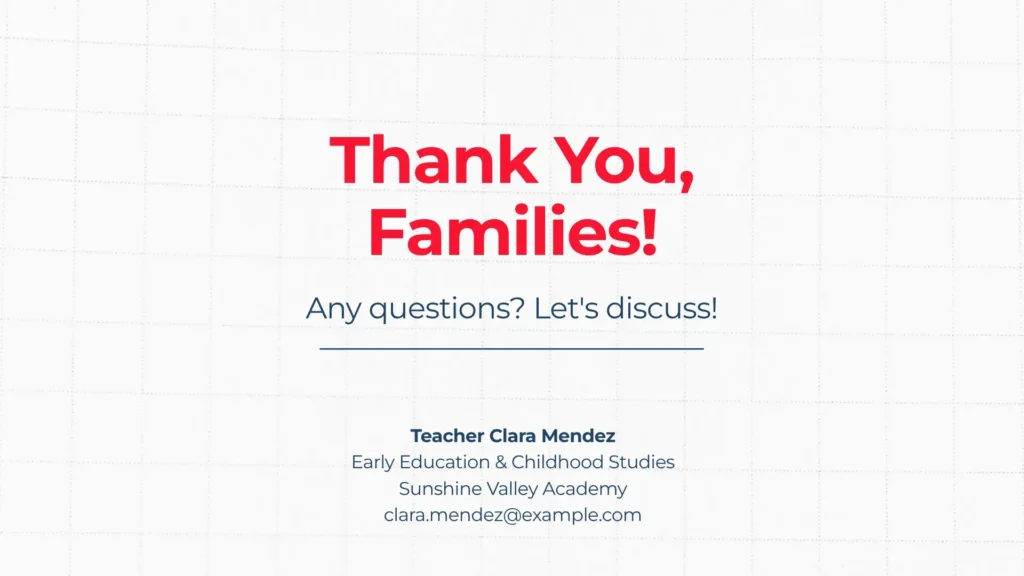
It’s normal for parents to have questions after listening to a presentation from their child’s teacher. This open house presentation thank you slide uses cheerful colors and a warm tone, thanking families for their time and inviting questions.
Class introduction thank you slide
Teachers often create presentations to welcome their students to a new course or class. This thank you slide includes bold typography and graphics for energy and a positive message to encourage students to have a great year.

School project thank you slide
A high school class works on a group science presentation about metallurgy. Their thank you slide includes minimal text, the group name, and visual elements related to their topic. It thanks their classmates for listening, encourages questions, and reflects the tone and aesthetics of teenage students.

Thesis defense thank you slide
This thank you slide at the end of a thesis defense presentation keeps it simple, includes the presenter details and contact information, and uses muted blue and yellow tones appropriate for academia.

Product launch presentation thank you slide
This slide thanks the audience for listening to a beverage brand’s presentation to launch a new matcha product. It includes a closing message that evokes the core aspects of the product branding and the company contact details, which gives café owners the why and how needed to get them to stock this new matcha.

Operations and HR workshop thank you slide
A company’s operations and human resources teams collaborated on a workshop to present suggested improvements to the wider team. With the last slide, they thank team members for their time, state the date of next review, reinforce the goals to achieve before then, and include a link so team members can access an internal portal with the relevant next steps.

Pitch deck thank you slide
A digital branding and marketing agency pitches its services to potential clients and uses this ending slide to thank them for their time and reinforce their CTA: to connect and grow the client’s brand. Since this is a pitch deck, it’s also crucial to include contact information.

Quarterly review thank you slide
A company presents its quarterly review. Its ending slide, instead of focusing on a thank-you message, summarizes the most important takeaways from the Q3 business report. It also includes buttons so remote participants can submit questions during the live presentation and anyone can review the full report once they get the slides in their inbox.

Case study thank you slide
A healthcare services consultancy creates a slideshow case study to use as a lead generation asset. On the final slide of the presentation, they include a CTA for potential leads who want to achieve results similar to those outlined in the case study. The ending slide also includes three clear ways to contact the consultancy.

Photography portfolio thank you slide
This portfolio presentation ends with a slide that thanks the viewer for reviewing the photographer’s work and encourages them to reach out via one of the linked contact methods. Moreover, the bold font, vivid colors, and informal tone of the CTA match the expectations in this creative industry.

Frequently asked questions about thank you slides
- How do you create a professional thank you slide?
-
To create a professional thank you slide, follow these tips:
- Keep the thank you message concise and semi-formal (e.g., “thank you” over “thanks!”).
- Summarize the presentation’s most important points (e.g., key takeaways or necessary next steps).
- Include a call to action (e.g., a QR code, link to a key resource, or prompt for feedback).
- Apply your organization’s branding design so the presentation has a consistent visual identity across all slides.
- Balance visuals and text with white space so your slide doesn’t look cluttered.
Use Quillbot’s Presentation Templates to create a professional thank you slide in moments.
Other interesting articles
If you want to know more about colors, letters, or the meaning of emojis, make sure to check out some of our other articles with explanations and examples.