Emoji Tool | Free Emoji to Copy & Paste
If you’ve engaged in any type of digital communications, by now you’ll have seen emoji—maybe a heart emoji ❤️🩷🤍, a thumbs up emoji 👍, a laughing emoji 🤣, or a crying emoji 😭.
Emojis have become more than just playful icons. They’re a universal language that conveys emotion, tone, and context in seconds. But with thousands of emojis to choose from and subtle differences across devices and platforms, finding the right one can be tricky.
That’s where an emoji tool comes in, making it fast and easy to find and use emojis.
Copy and paste emoji for free with QuillBot’s free emoji picker.
Understanding emoji
An emoji is a small digital icon used to represent emotions, objects, ideas, or symbols in text. The first emojis were created in Japan in the late 1980s and have since become increasingly popular in messages, social media posts, marketing, and digital content.
Emojis help convey tone, clarify intent, and make communication more engaging. For younger generations, they even sometimes function like slang words (e.g., the skull emoji 💀 can mean “I’m dead” or that you find something very funny or shocking”).
Some emojis may have clear meanings (e.g., the Christmas tree emoji 🎄), while others have more nuanced meanings or can carry connotations that aren’t obvious at first glance. For example, all heart emojis transmit affection, but the color you choose may subtly alter your message: the red heart emoji ❤️ may be perceived as romantic, the pink heart emoji 🩷 is more playful, and the white heart emoji 🤍 can convey pure love or sympathy.
Emojis are being studied as an element of sociolinguistics. One interesting linguistic element of emojis is that they tend to be repeated to intensify the message of the base emoji. For example, the face with tears of joy emoji 😂 means something is funny, while “😂😂” means it’s “very funny,” and “😂😂😂” means it’s “extremely funny,” and so on.
How to use an emoji tool
An emoji tool is most often a tool—or, more accurately, a website—that allows you to select emojis via copy and paste. You can use an emoji tool to:
- Search for a specific emoji using its name or a keyword (e.g., “star”)
- Browse emojis to see which ones are out there
- Copy and paste emojis directly using a web interface
- See which emojis are currently trending
- Preview how emojis look on different devices
An emoji tool is particularly useful when working on a computer, as computer keyboards don’t usually have the same emoji keyboard that mobile phones have.
Emoji use examples
Emojis are used in many types of content nowadays—from personal messages to marketing emails to employee handbooks. Below are some examples.
Emoji use examples
| Context | Message | Why the emoji helps |
| Email subject line | Reminder: Team meeting today at 3:00 ⏰ | Makes timing visually clear; draws attention in crowded inboxes |
| Social media caption | New blog post is live 🎉 Read it now👇 | Signals excitement; directs reader action visually |
| Task confirmation | Report uploaded—ready for review ✅ | Confirms completion instantly and clearly |
| Status update | Working remotely today 🏠 | Replaces longer explanation with a simple icon |
| Event promotion | Book club meets Thursday! 📚📅 | Highlights event type and timing at a glance |
| Customer support | We’re checking on that now 😊 Thanks for waiting | Softens tone; conveys friendliness |
| Personal text | Made it home safely 🚗💨 | Adds clarity without extra text |
| Announcement | New feature release today 🚀 | Communicates something new, innovative, or exciting |
| Instructional step | Step 1: Download the file 📥 | Makes steps easier to scan in a long guide |
| Appreciation message | Thanks again for your help today 🙌 | Shows gratitude visually and directly |
| Love message | You are everything to me ❤️ | Adds warmth and affection in an easily recognizable way |
An emoji tool can help you plan, prepare, and execute all these types of content (and more).
Using QuillBot’s emoji tool
QuillBot’s emoji picker is free, browser-based, and has a clean, user-friendly design. Unlike some other emoji tools, it doesn’t take a long time to load and isn’t full of spammy ads, meaning it won’t slow you down or overwhelm the senses.
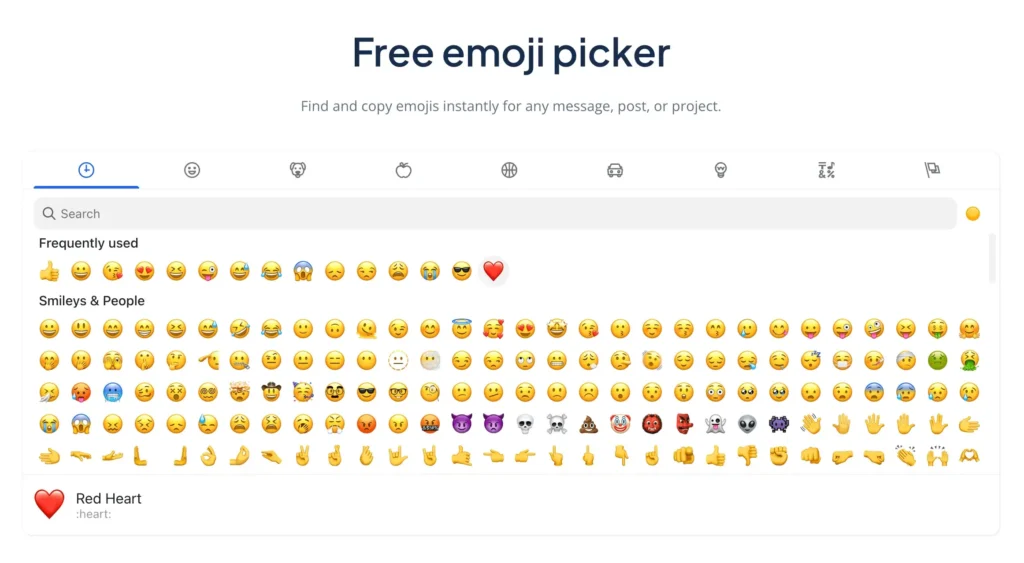
Here are a few quick tips for using QuillBot’s free emoji picker:
- You can click the tabs at the top to see different categories of emojis (e.g., people, food, objects)
- Write a word or phrase in the search bar to search for related emojis (e.g., “pizza,” “sky,” “love”)
- Change the skin color of people emojis by clicking on the small yellow circle at the right of the search bar
- Check the name of an emoji at the bottom of the picker when you highlight it (in the above example, the red heart emoji ❤️ is selected)
Best practices for using emoji
When using emoji, there are some best practices to keep in mind if you don’t want to potentially offend or make your recipient feel uncomfortable:
- Be aware of your audience: The same emoji may be interpreted differently by boomers, millennials, and Gen Zers. Likewise, emoji that feel appropriate in a casual message may be out of place in a client email. For professional or unfamiliar contacts, stick to neutral, commonly understood emojis like ✔️, 🙂, 📌, or 📅.
- Consider the cultural context: Emojis that are considered positive or acceptable in one country or religion may be considered inappropriate by another. For example, 👌 generally means “okay” in English-speaking countries, but that’s not the case in Brazil or Turkey.
- Avoid emojis that have alternate meanings: Some emojis (e.g., 🍑 or 💀) carry slang interpretations that go beyond their literal image. If the desired meaning isn’t very clear to your recipient from the context of the message and your relationship, don’t use these emojis.
- Don’t replace entire messages with emojis: Emojis should support meaning, not substitute for it. Avoid messages like 🔥🚀🙌; instead, write something like “Our launch numbers exceeded projections 🚀🔥.”
- Limit volume: Using multiple emojis in a single message dilutes clarity and can appear childish. A good rule of thumb is to use one emoji per sentence unless the message is celebratory or very casual. Another reason to limit emoji volume is accessibility, as users who rely on screen readers hear the name of an emoji each time it appears. For example, “Thanks again 😊❤️” would be read as “Thanks again, smiling face with smiling eyes, red heart.”
- Use emoji to clarify tone: When tone could be misread as harsh, adding a light emoji softens it. For example, “Can you send that again?” comes across as neutral, but “Can you send that again? 😊” reads as warm. This is often effective in remote team communication, customer service, and onboarding sequences.
Frequently asked questions about emoji tool
- What’s the tool emoji?
-
“Tool emoji” could refer to any emoji that represents a tool, like:
- The hammer emoji 🔨
- The wrench emoji 🔧
- The screwdriver emoji 🪛
- The clamp emoji 🗜️
- The axe emoji 🪓
- The hook emoji 🪝
- The pick emoji ⛏️
- The nut and bolt emoji 🔩
- The hammer and pick emoji ⚒️
- The hammer and wrench emoji 🛠️
- The toolbox emoji 🧰
Find these tool emojis and more using QuillBot’s emoji tool.
- What’s a random emoji picker?
-
A random emoji picker shows you a random emoji. This is different from a regular emoji picker—like QuillBot’s emoji tool—that lets you browse and select the emoji you want.
For a random emoji, try telling QuillBot’s AI Chat, “Show me a random emoji.”
Cite this Quillbot article
We encourage the use of reliable sources in all types of writing. You can copy and paste the citation or click the "Cite this article" button to automatically add it to our free Citation Generator.
Santoro, K. (2025, December 12). Emoji Tool | Free Emoji to Copy & Paste. Quillbot. Retrieved December 16, 2025, from https://quillbot.com/blog/image-tools/emoji-tool/