
How to Make WhatsApp Stickers from Photos (Online for Free)
Some photos are too good to use just once. Turning them into WhatsApp stickers lets you reuse your favorite reactions, faces, and moments anytime you need them. That’s why learning how to make WhatsApp stickers from photos has become so popular. It’s a fun and easy way to personalize every chat.
The only thing standing between a great photo and a great WhatsApp sticker is the background. Once you remove it, turning a photo into a clean, sticker-ready image is surprisingly simple. With QuillBot’s background remover, turning your favorite photos into WhatsApp stickers has never been easier.
Keep reading to discover why photos make such great WhatsApp stickers and how to use QuillBot’s free online tool.
What are WhatsApp stickers? (and why photos work best)
WhatsApp stickers are image-based reactions you can send in chats, similar to emojis, but bigger and more expressive. While WhatsApp includes default sticker packs, many people prefer to make WhatsApp stickers from photos because photos capture candid expressions, real moments, and inside jokes that emojis can’t.
When a photo is turned into a sticker with a transparent background, it blends naturally into conversations. That’s what makes photo-based WhatsApp stickers feel more personal.
How to make WhatsApp stickers with a background remover
If you’re looking for the simplest way to make WhatsApp stickers from photos, this method takes just a few minutes and doesn’t require any design experience.
1. Upload your photo
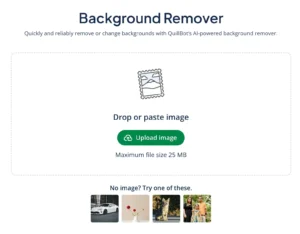
Start by uploading your image to QuillBot’s free background remover. This can be a selfie, pet photo, or any image you want to turn into a sticker.
QuillBot’s free online background remover
2. Remove the background
When you upload your image, QuillBot removes the background, and you’ll have a clean cutout that’s perfect for a custom WhatsApp sticker.
3. Download the image as a transparent PNG
Once the background is removed, download your image as a PNG with a transparent background. This format is essential for making WhatsApp stickers that look clean and professional.
WhatsApp sticker made with QuillBot’s background remover

4. Add the sticker to WhatsApp
Upload the PNG to WhatsApp directly, or import it into a sticker maker app to save it as a custom sticker.
Frequently asked questions about how to make WhatsApp stickers
- What are some WhatsApp sticker ideas?
-
The possibilities are endless when it comes to WhatsApp sticker ideas! Some popular choices include:
- Facial expressions: Photos of friends, pets, or yourself making exaggerated faces
- Gestures: Photos of people making thumbs up, facepalms, high fives, or other common gestures
- Pets and animals: Dogs, cats, or any cute critter doing something silly or expressive
- Inside jokes: Personal photos or moments that only your group chat understands
- Seasonal or holiday themes: Cutout images of holiday, birthday, or seasonal traditions, such as opening a gift or blowing out candles
The key is choosing images or moments that are expressive, relatable, and easy to recognize at a small size and removing the background. QuillBot’s free background remover will transform your photos into clean images with transparent backgrounds.
AI-generated images can also make great WhatsApp stickers. Try QuillBot’s free AI image generator to show you images of people or animals with transparent backgrounds.
- How do you make a PNG transparent?
-
To make a PNG transparent, you have to remove the image’s background. PNG is a file type that supports transparency, so remove the background, save the image, and you’ll have a transparent PNG.
The easiest way to remove a PNG’s background is with QuillBot’s free online background remover.
Cite this QuillBot article
We encourage the use of reliable sources in all types of writing. You can copy and paste the citation or click the "Cite this article" button to automatically add it to our free Citation Generator.
QuillBot. (2025, December 19). How to Make WhatsApp Stickers from Photos (Online for Free). Quillbot. Retrieved March 28, 2026, from https://quillbot.com/blog/image-tools/how-to-make-whatsapp-stickers/

