Coral Color Meaning | Connotations, Palettes & Hex
#FF7F50
If you need a color palette that feels warm, friendly, or optimistic but with a contemporary twist, coral could be the color to build it around.
Read on to learn how to use coral to shape a visual identity, browse coral color palettes, and view different shades of coral with their color codes.
If you’ve found an inspiring image featuring a shade of coral, upload it to Quillbot’s free online Color Palette Generator to find out the hex codes of the colors in its color scheme.
Key takeaways
- Coral is a medium-light color between orange and pink.
- Coral can give branding or interiors a welcoming yet subtly energetic feel.
- More pink-leaning variations are often described as coral pink.


What color is coral?
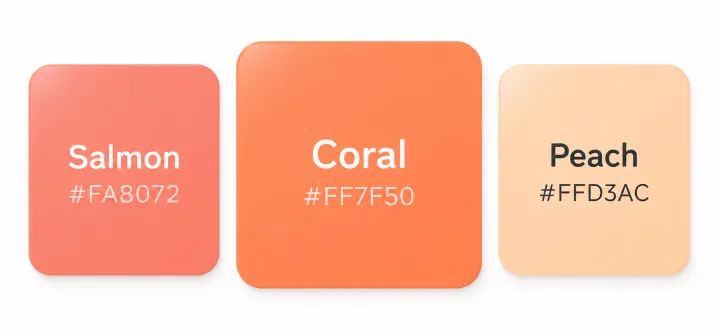
The color name “coral” describes colors located between orange and pink on an RGB color wheel like Quillbot’s free Color Wheel. Shades of coral are typically medium-light, often darker and more saturated than colors described as “peach,” and more orange than colors called “salmon.”
What does coral symbolize?
As a medium-light orange-pink, coral is associated with warmth, optimism, and friendliness.
In branding design, you can use coral to:
- Create a welcoming, approachable visual identity
- Communicate energy and positivity without the intensity of bright red or orange
- Add a playful, contemporary character to a brand palette
In interior design, you can use coral to:
- Create a warm, friendly atmosphere
- Add an uplifting pop of color to a neutral room
- Bring energy to spaces as a lighter, fresher alternative to deep reds or browns

Coral hex code
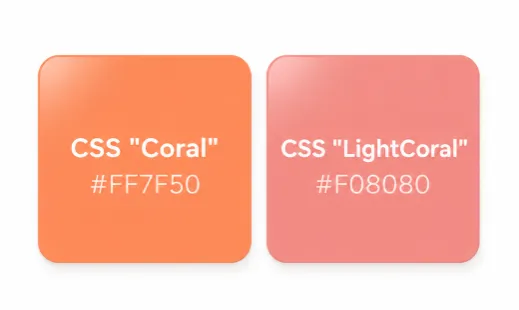
The hex color code for the named CSS color Coral is #FF7F50. The CSS color “LightCoral” produces a shade of pink-leaning coral and has the hex code #F08080.
Coral pink color
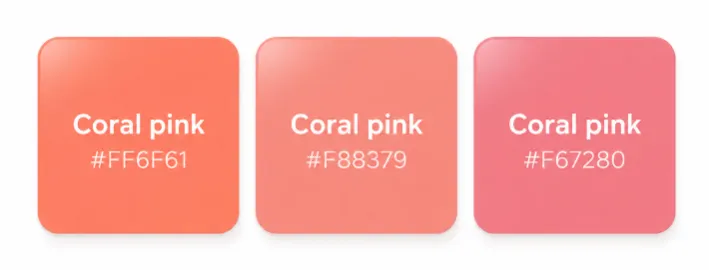
Pink-leaning shades of coral are often described as coral pink. Here are three coral-pink hex codes that you can view and adjust in Quillbot’s Color Wheel tool.
- #FF6F61
- #F88379
- #F67280
Color conversion
#FF7F50| Format | Value |
|---|---|
| HEX | FF7F50 |
| RGB | 255, 127, 80 |
| RGB Percent | 100%, 50%, 31% |
| CMYK | 0, 0.5, 0.69, 0 |
| HSL | 16°, 100%, 66% |
Color variations
Tints
- #ff9670 • Click to copy
- #ffad8f • Click to copy
- #ffc3ad • Click to copy
- #ffdacc • Click to copy
- #fff0eb • Click to copy
- #fff0eb • Click to copy
- #fff0eb • Click to copy
- #fff0eb • Click to copy
Shades
- #ff6933 • Click to copy
- #ff5314 • Click to copy
- #f54100 • Click to copy
- #d63900 • Click to copy
- #b83100 • Click to copy
- #992900 • Click to copy
- #7a2100 • Click to copy
- #5c1800 • Click to copy
Tones
- #c23400 • Click to copy
- #c93c08 • Click to copy
- #ce4412 • Click to copy
- #d34d1d • Click to copy
- #d65729 • Click to copy
- #cf663f • Click to copy
- #c97454 • Click to copy
- #c48168 • Click to copy
Coral color palette
Explore these coral color combinations for ideas when creating your own color palette.
Coral, cream, sage green, and brown taupe for welcoming and approachable
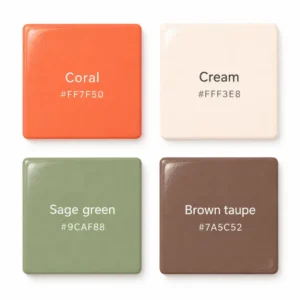
Use Quillbot’s free online Color Wheel tool to create your own version of this color palette. Adjust the colors using the codes #FF7F50 for coral, #FFF3E8 for cream, #9CAF88 for sage green, and #7A5C52 for brown taupe.
Coral, golden yellow, muted teal, and off-white for subtle energy and positivity
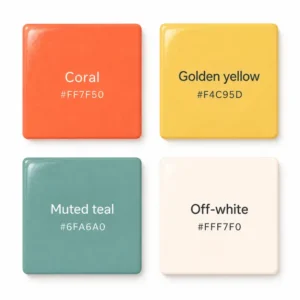
To enter these colors in Quillbot’s free online Color Wheel, use the hex codes #FF7F50 for coral, #F4C95D for golden yellow, #6FA6A0 for muted teal, and #FFF7F0 for off-white.
Coral, cobalt blue, lilac, and warm white for playful and contemporary
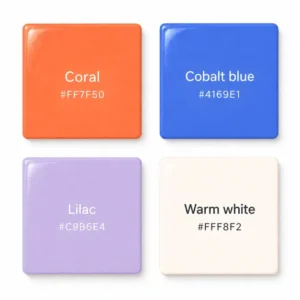
To enter these colors in Quillbot’s free online Color Wheel, use the hex codes #FF7F50 for coral, #4169E1 for cobalt blue, #C9B6E4 for lilac, and #FFF8F2 for warm white.
- Mono
- Analogous
- Complementary
- What is a light coral color?
-
Colors described as coral are typically medium-light, so for a light coral color, also try searching under color names like peach, salmon, and apricot.
To find the perfect light tint of coral for your project, enter the hex code #FF7F50 into Quillbot’s free online Color Wheel and adjust the settings.
Other interesting articles
If you want to know more about colors, letters, or the meaning of emojis, make sure to check out some of our other articles with explanations and examples.