
Remove the Background From a Signature | Steps & Free Tools
Let’s face it—in today’s digital age, you’re probably signing more digital documents than paper ones. Signing a PDF or online document generally requires a digital signature, but trying to sign with your computer mouse usually results in something that looks less like handwriting and more like chicken scratch.
Often, the best option to create a polished, professional digital signature is to upload a scan or photo of your handwritten signature. However, this comes with its own problem: the background of your handwritten signature will likely be a clunky-looking white or off-white box that may block other elements on the form.
Fortunately, tools like QuillBot’s AI-powered background remover let you remove that pesky white background from your signature with ease. Read on to learn more about creating a beautiful, background-free signature in seconds.
How to create a digital signature
1. Take a photo of your handwritten signature
The first step to digitizing your signature is to write it out on a piece of paper. For best results, use a blank sheet of white paper and a black pen for maximum contrast between your signature and the background.
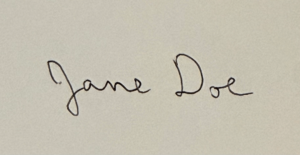
Once you’re happy with your signature, take a picture of it with your phone or webcam or scan it into your computer. If you’d like, you can crop the photo or rotate it so your signature is straight and centered, but this isn’t strictly necessary. Note that even if you used a plain white sheet of paper, the lighting conditions may result in a background that isn’t quite white, as in the example below.
A photo of a handwritten signature
2. Remove the background
Your signature has been successfully uploaded to your computer—now what? You could paste it directly into your document, but if it’s anything like the example above, there might be an off-white background that will contrast with the white of the PDF or document you’re signing.
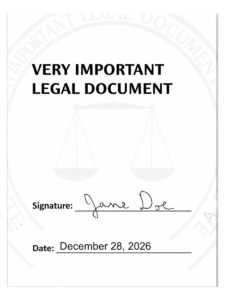
Fortunately, there are many free online tools that will render the background transparent in seconds. For example, QuillBot’s AI-powered background remover was able to easily remove the background from our “Jane Doe” signature (in the image below, the transparent background is represented using a grey and white grid).
Signature with background removed

3. Paste your background-free signature into your digital document
Once the background has been removed, your signature is ready to go! Either save it as an image to upload into your document, or copy-paste it in directly. You can now use it whenever you have a digital form to sign.
Signing an e-document is easy with a digital signature!
Using a background remover
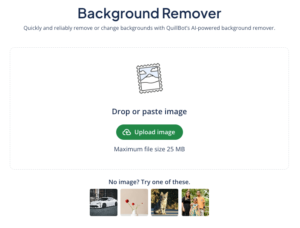
There are many easy-to-use background removers available online. QuillBot’s AI-powered background remover couldn’t be simpler to use. All you have to do is upload your image or paste it into the tool, and voila! A background-free image, ready for you to download and use right away.
The interface of QuillBot’s background remover
Frequently asked questions about removing the background from a signature
- How do I remove the background from a signature in a PDF?
-
To create a background-free signature for use in a PDF, follow these simple steps.
- Write your signature on a blank piece of paper.
- Take a photo of your signature or scan it into your computer.
- Use a free background remover like QuillBot’s AI-powered background remover to make the background transparent.
- Paste your background-free signature into your PDF or other digital document.
- Can I remove the background of my signature for free?
-
Absolutely! Many free online tools let you remove the background from a photo or scan of a handwritten signature with just the click of a button.
QuillBot’s AI-powered background remover lets you quickly and reliably remove the background from your digital signature or any other image.
- Is the QuillBot background remover free?
-
Yes, QuillBot’s background remover is free to use.
When you’re logged in, you can use it up to five times a day for free. If you’re a Premium QuillBot user, you can use it as many times as you want.
Cite this QuillBot article
We encourage the use of reliable sources in all types of writing. You can copy and paste the citation or click the "Cite this article" button to automatically add it to our free Citation Generator.
QuillBot. (2026, March 17). Remove the Background From a Signature | Steps & Free Tools. Quillbot. Retrieved April 10, 2026, from https://quillbot.com/blog/image-tools/how-to-remove-background-from-signature/

