APA Essay Format | Step-by-Step Guide, Examples & Template
Writing an essay in APA style means following a specific set of formatting rules that affect how everything looks on the page.
APA essay format includes specific rules for everything from the font and title page to the headings and reference page. Although it seems like a lot at first, setting up a paper in APA style is easier when you go step by step. Once the APA formatting is in place, you can focus on developing your ideas.
This guide breaks down the APA essay format for student papers in simple steps. You’ll learn how to set up your document in Microsoft Word or Google Docs with examples and a free template to help you follow APA formatting rules with confidence and ease.
Need help citing your sources? Use Quillbot’s APA Citation Generator to quickly create accurate citations.
Key takeaways
- APA style uses specific formatting requirements for student papers, including rules for fonts, margins, spacing, page numbers, headings, and reference pages.
- A well-formatted APA essay typically includes a title page, the main body of the paper, and a reference page, each with its own formatting conventions.
- APA citations consist of both in-text citations and reference entries, with formatting that varies depending on the source type and citation style used.
- Step-by-step instructions, examples, and a free template can make it easier to create an APA-formatted essay in Microsoft Word or Google Docs.
APA essay formatting at a glance
Before you dive into specifics, here’s a quick overview of the key APA formatting rules.
| Formatting element | APA requirement |
|---|---|
| Font | Times New Roman, Arial, Calibri, Verdana, (or other plain font) and 11–12-point size |
| Margins | 1 inch |
| Line spacing | Double |
| Paragraph indent | 0.5 inches |
| Page numbers | Top right, starting with the title page |
| Level 1 headings | Bold, centered, title case |
| Level 2 headings | Bold, flush left, title case |
| In-text citations | (Author, year) |
| Reference entries |
Last. F. (2024). Title in sentence case. Other details depending on the type of source. Formatted with a hanging indent.
|
How to format an APA essay step by step
Follow the steps below to set up an essay in APA format, using Google Docs or MS Word.
Step 1: Set the paper size, margins, font, and line spacing
APA requires specific settings for paper size, margins, font, and line spacing:
- Letter size layout (8.5 x 11 inches)
- 1-inch margins on all sizes
- Double spacing for the whole document
- A professional font, like Arial or Times New Roman, in 11–12 point size
The chart below shows how to adjust these settings in Google Docs and MS Word.
| Google Docs | MS Word | |
|---|---|---|
| Paper size | File → Page setup → Paper size → Letter (8.5 x 11) | Page layout → Size → Letter |
| Margins | File → Page setup → Margins → 1 inch on all sides | Page layout → Margins → 1 inch on all sides |
| Double spacing | Format → Line & paragraph spacing → Double | Home → Paragraph → Line spacing → Double |
Step 2: Add page numbers
In an APA format essay, the page numbers go at the top right of every page. You don’t need a running header for APA student papers. Here’s how to set up page numbering:
- Google Docs:
- Double click at the top of the page.
- Change the alignment to Right.
- Go to Options → Page numbers, and start numbering at 1.
- Change the font of the page number to match the rest of the paper.
- MS Word:
- Open the Insert menu in the top toolbar.
- Select Page Number → Top of Page → Plain Number 3 (or whichever option shows the page number in the top right corner).
- Double click on the number, and change the font and size to match the rest of the paper.
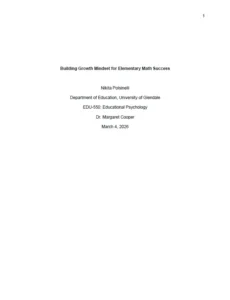
Step 3: Create the APA title page
The first page of an APA format essay is the title page. Everything on the title page needs to be centered. To set up center alignment in Google Docs, hit the center align icon or use Ctrl + Shift + E. In MS Word, use the center icon or Ctrl + E.
Now you’re ready to add the information that goes on the title page.
- Hit the Enter key 4 times to bring your cursor about ⅓ of the way down the page.
- Hit the bold icon or use Ctrl + B to make your title bold.
- Type your title on the first line, and use APA capitalization rules for title case:
- Capitalize the first word and all of the words except articles (e.g., “a,” “an,” and “the”) and any prepositions (e.g., “to”) or conjunctions (e.g., “and”) that have fewer than four letters.
- Capitalize prepositions and conjunctions that have four or more letters (e.g., “with” and “because”).
- If your paper has a subtitle, type it on the next double-spaced line.
- Hit Enter twice to make an extra space before the rest of your title page.
- Change the font to plain (instead of bold).
- Type in each of these details on a separate line:
- Your full name
- Your class’s academic department and your school, separated with a comma
- The course number and course name, separated with a colon
- Your instructor’s full name, including “Dr.” for anyone with a Ph.D.
- The assignment due date in your country’s date format
APA title page example
- Is (verb)
- Eye (noun)
- Low (adjective)
Step 4: Format the first page of the essay
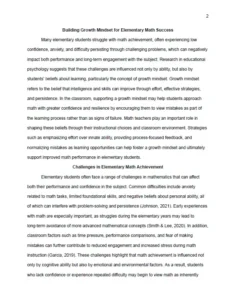
The essay begins on Page 2 of an APA format document. To format the text of your essay:
- Use center alignment and bold font to repeat the paper’s title at the top of the page.
- Start your introduction on the next line in plain font (not bold).
- Change the text alignment to left.
- Set up 0.5-inch indentations for all of the paragraphs.
| Google Docs | MS Word |
|---|---|
|
|
APA essay format for Page 2
Step 5: Add APA headings
If you’re breaking a longer paper into sections or subsections, APA has special formatting rules for those headings.
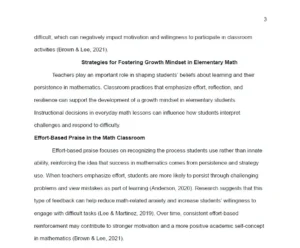
- Level 1 headings should be center aligned, bold, and title case (just like your essay’s title). Use this type of heading for the conclusion, reference page, and any major sections in the body of your paper. (Shorter essays don’t tend to have separate sections for the body paragraphs.)
- Level 2 headings are left-aligned, bold, and title case. You only need these if you’re breaking down major sections into subsections, which is common for longer research papers or dissertations, but not 3–5-page essays.
APA Level 1 and Level 2 headings
Step 6: Create the reference page
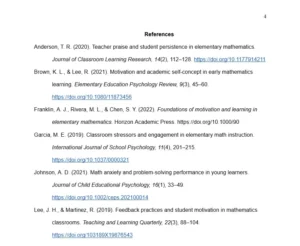
If you used outside sources in your essay, a reference page starts on the next page after your essay’s conclusion. The reference page is an alphabetical list of all the authors you cited in your essay. To set up your APA reference page:
- On the center of the first line, type the Level 1 heading “References” in bold.
- Move to the next line, and switch the text alignment to Left.
- Your reference entries begin here, with one entry per source, in alphabetical order. Each reference entry needs a hanging indent.
| Google Docs | MS Word |
|---|---|
|
|
For each outside source, you need a reference entry with specific details, which vary depending on the type of source.
APA references page formatting
APA citation format
APA has special formatting guidelines for in-text citations and reference entries. Each sentence that summarizes, paraphrases, or quotes an outside source needs an in-text citation, and each source you cite goes on the reference page.
APA in-text citation format
APA in-text citations include the author’s last name and the year when the source was published. The in-text citation format depends on whether you’re using a narrative citation or a parenthetical citation and whether you’re paraphrasing/summarizing or quoting
| Type of citation | Explanation | Example |
|---|---|---|
| Narrative, paraphrase | When the author’s name is part of a signal phrase, put the year in parentheses after the author’s name. | Kwan (2025) explained that students are more likely to persist through challenges when teachers emphasize effort. |
| Narrative, quote | Put the year in parentheses after the author’s name and the page number in another set of parentheses after the quote but before the period. | Kwan (2025) explained, “Quote” (p. 23). |
| Parenthetical, paraphrase | Put the author and year together in parentheses, separated by a comma, at the end of the sentence (before the period). | Students are more likely to persist through challenges when teachers emphasize effort (Kwan, 2025). |
| Parenthetical, quote | Put the author, year, and page together in parentheses, separated by commas, at the end of the sentence (before the period). | “Quote” (Kwan, 2025, p. 32). |
- Use a “p.” with a period after it to cite a page number.
- Put the sentence’s period after a parenthetical citation (not before it).
- Place a comma between the author, year, and page number.
- If the source has two authors, use “and” between their names in parenthetical citations and “&” in parenthetical citations.
Quillbot’s Grammar Checker is a fast and free way to ensure that your punctuation is error free.
APA reference entry format
APA references begin with an author’s last name, followed by a first initial, the publication year in parentheses, and the title in title case. The details that go after that vary, depending on whether you’re citing a journal article, book, or other type of source. Separate each element in a reference entry with a period.
| Type of Source | Reference entry |
|---|---|
| Journal article |
Morris, A. S., & Hays-Grudo, J. (2023). Raising a resilient child in a world of adversity: Effective parenting for every family. American Psychological Association. https://doi.org/10.1037/0000385-000
|
| Book |
Yamaguchi, T. (2024). Practice and relevance of sports psychiatry in promoting athletes’ mental health in Japan. Sports Psychiatry: Journal of Sports and Exercise Psychiatry, 3(2), 91–99. https://doi.org/10.1024/2674-0052/a000077
|
APA essay template
To get a jump start on formatting an essay in APA style, customize this free APA essay template with your own details to the title page, headings, and references.
Frequently asked questions about APA essay format
- What are APA capitalization rules?
-
APA capitalization rules depend on what part of a paper you are writing. In the body of the text, standard capitalization rules should be followed (e.g., capitalize proper nouns and lowercase common nouns).
For titles of works and headings, APA Style uses two types of capitalization:
- In title case, all words are capitalized except for articles and prepositions and conjunctions of three letters or fewers.
- In sentence case, only the first word and any proper nouns are capitalized.
Title case vs sentence case in APA Style Use Examples Title case Titles of articles, books, and other works in the body of the text Freud’s The Interpretation of Dreams was a seminal influence … The title of the paper itself Depression and Anxiety in Students Experiencing Homelessness Headings and figure and table titles Theoretical Background Titles of journals and other periodicals on the reference page Journal of Personality and Social Psychology Sentence case Titles of articles, books, reports, and webpages on the reference page Stellar, J. E., & Willer, R. (2018). Unethical and inept? The influence of moral information on perceptions of competence. […] Table column headings and entries, table and figure notes Number of participants - Is APA double spaced?
-
Yes, essays and other documents in APA style are double spaced. This includes the title page, the text of your paper, and the reference page.
Quillbot’s APA Citation Generator automatically double spaces reference entries for you so that you can follow the APA essay format with ease. Plus, it’s completely free to use.
- Do all APA papers need an abstract?
-
No, APA papers don’t always need an abstract. APA doesn’t require abstracts for student essays and other school assignments. APA only requires abstracts for professional journal articles and other documents for publication.
The only time you need an APA abstract for a school assignment is when the instructor requires one. Check with your instructor or academic department if you’re in doubt.
If you do need to write an abstract, Quillbot’s free Summarizer can help you get started so that you can focus on APA essay format and other details.
Other interesting articles
If you want to know more about colors, letters, or the meaning of emojis, make sure to check out some of our other articles with explanations and examples.Cite this Quillbot article
We encourage the use of reliable sources in all types of writing. You can copy and paste the citation or click the "Cite this article" button to automatically add it to our free Citation Generator.
Routh, N. (2026, August 31). APA Essay Format | Step-by-Step Guide, Examples & Template. Quillbot. Retrieved September 15, 2026, from https://quillbot.com/blog/education/apa-essay-format/