MLA Essay Format | Step-by-Step Guide, Examples & Template
If you’ve ever opened a writing assignment and wondered, “What’s an MLA essay?” you’re not alone. MLA format isn’t about what you write in your essay but rather how your essay looks on the page. Even though MLA style involves lots of little details, it gets easier with practice.
An MLA format essay follows specific guidelines for everything from 1-inch margins and double spacing to a document header, running head, and citations. All of these guidelines are based on the MLA Handbook (ninth edition). Once you’re familiar with these requirements, setting up an MLA paper becomes a straightforward process.
Whether you write your essays in Microsoft Word or Google Docs, this guide shows you exactly what steps to follow, with sample MLA pages and a free MLA template.
And when you’re ready to cite sources, Quillbot’s free Citation Generator helps you create a flawless works cited page in just a few clicks.
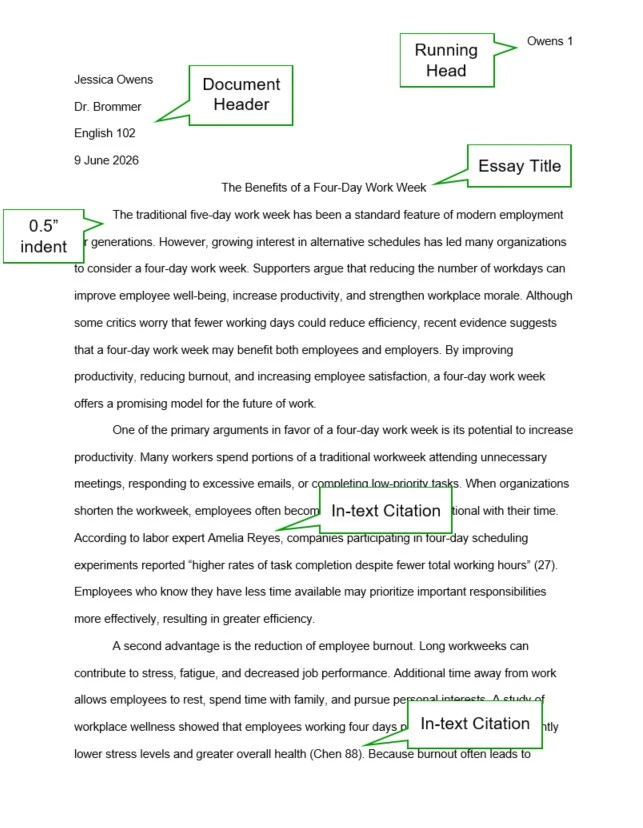
MLA essay format example
Key takeaways
- MLA format standardizes how your essay looks, including page layout, citations, and the works cited page.
- Use 1-inch margins, double spacing, a readable 11–12 point font, and a running head on every page.
- MLA papers typically include a document header instead of a separate title page.
- This guide walks you through every step of MLA essay format in Google Docs and Microsoft Word, with examples and a free template.
MLA essay format at a glance
MLA format is a set of guidelines developed by the Modern Language Association for formatting academic papers and citing sources. It standardizes elements such as margins, font, spacing, headings, in-text citations, and works cited entries. MLA style is most common in composition, literature, and other humanities courses.
Before you explore the finer details of MLA formatting, here’s a quick overview.
MLA essay formatting requirements
| Formatting element | MLA requirement |
|---|---|
| Font | Times New Roman, Calibri, Arial, Verdana (or other plain font) and 11–12-point size |
| Margins | 1 inch |
| Line spacing | Double |
| Running head | Your last name and a page number in the right margin section of every page |
| Document header | Your name, instructor’s name, course, and date (in day-month-year format), each on a separate double-spaced line on the left side of the first page |
| Title | On the next line after the document header, centered and in plain font, following MLA capitalization rules |
| Paragraph indent | 0.5 inches |
| In-text citations | (Author page number) |
| Works cited entries |
Author’s Last Name, First. Title of Source or “Title.” Other details depending on the type of source. Publication date. URL or academic database, if applicable. Formatted with a hanging indent.
|
How to format an MLA essay step by step
The steps below cover everything you need to know to follow MLA essay format, using Google Docs or MS Word.
Step 1: Set the paper size, margins, font, and line spacing
Start by using these settings for the paper size, margins, font, and line spacing:
- Letter paper size (8.5 x 11 inches)
- 1-inch margins on all sides
- Double spacing for the whole document, including the title and works cited list
- A professional font, like Arial or Times New Roman (with clear contrast between italics and plain styles), in 11–12 point size
The chart below shows how to adjust these settings in Google Docs and MS Word.
MLA paper size, margins, font, and line spacing
| Google Docs | MS Word | |
|---|---|---|
| Paper size | File → Page setup → Paper size → Letter (8.5 x 11) | Page layout → Size → Letter |
| Margins | File → Page setup → Margins → 1 inch on all sides | Page layout → Margins → 1 inch on all sides |
| Double spacing | Format → Line & paragraph spacing → Double | Home → Paragraph → Line spacing → Double |
Step 2: Add a running head
An MLA essay also needs a running head with your last name and a page number in the top right margin of every page. Here’s a breakdown of how to set that up using Google Docs or MS Word.
- Google Docs:
- Double click at the top of the page.
- Change the alignment to Right.
- Go to Options → Page numbers, and start numbering at 1.
- Double click to the left of the number 1 on the first page, and type your last name.
- Change the font of the page number to match the rest of the paper.
- MS Word:
- Open the Insert menu in the top toolbar.
- Select Page Number → Top of Page → Plain Number 3 (or whichever option shows the page number in the top right corner).
- Type your last name before the number 1.
- Change the font and size to match the rest of the paper.
Step 3: Create a document header
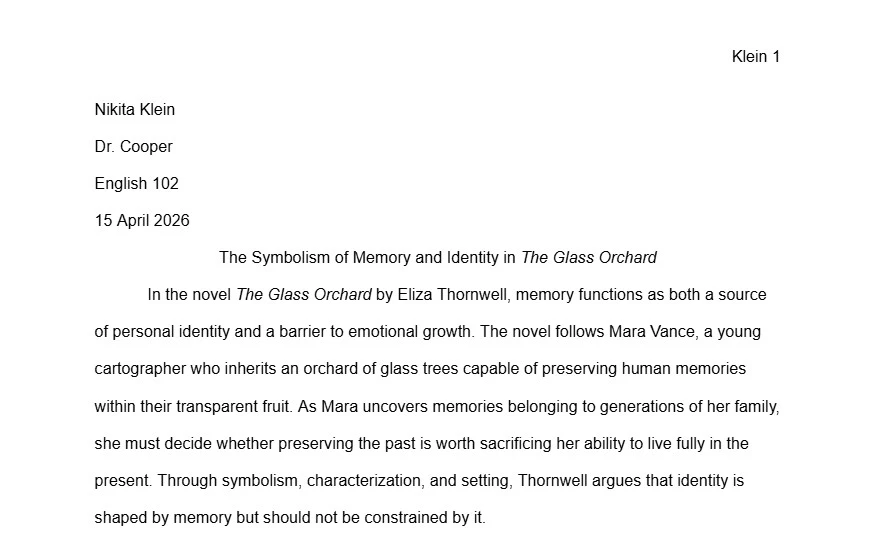
An MLA document header includes details about who wrote the essay, which instructor and class it’s for, and when it’s due. At the top left of the page, type each of these details on a separate double-spaced line:
- Your full name
- Your instructor’s title and last name, like “Dr. Fratelli” or “Professor Powell”
- Course name, like “English 101,” with words spelled out in full
- Date in day-month-year format with the month spelled out in full (e.g., “28 February 2026”)
MLA header example
- Art History 101-23556
Step 4: Type your essay title in MLA format
The title of your essay goes on the next double-spaced line after your document header.
- Use Ctrl + Shift + E or the center align icon to center your title on the line.
- Type the title in plain font (no bold or underlining).
- Capitalize the first word and all of the other words except articles (“a,” “an,” or “the”), coordinating conjunctions (like “and” or “but”), and prepositions (like “through” or “with”).
Step 5: Indent paragraphs 0.5 inches
Start your introduction on the next double-spaced line after your essay title, and indent each paragraph 0.5 inches. You can manually indent each paragraph with the tab key, but there’s also a way to set up paragraph indentations before you write the essay.
How to set up 0.5-inch indentations in Google Docs and MS Word
| Google Docs | MS Word |
|---|---|
|
|
Step 6: Format the works cited page
If you used outside sources in your essay, include a works cited list on the next page after your essay’s conclusion. Include a separate works cited entry for each source that you cited in your paragraphs. To format your works cited page correctly:
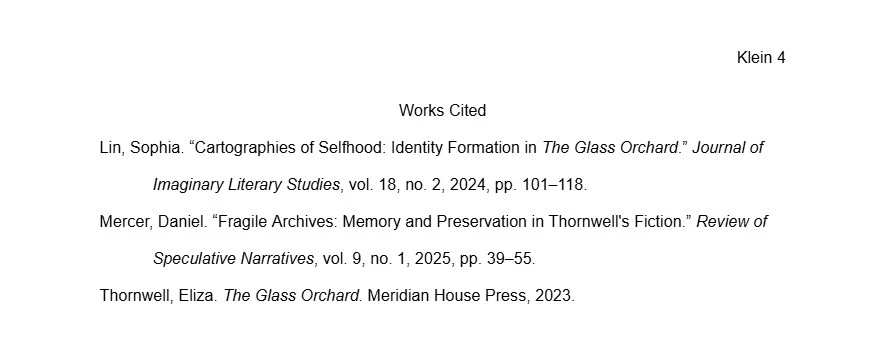
- On the center of the first line, type the heading “Works Cited” in plain font.
- Move to the next line, and switch the text alignment to Left.
- Your works cited entries begin here, with one entry per source, in alphabetical order. Each entry needs a hanging indent. The details that go in each entry vary for each type of source.
How to set up hanging indentation in Google Docs and MS Word
| Google Docs | MS Word |
|---|---|
|
|
MLA works cited example
MLA citation format
MLA has special formatting guidelines for in-text citations and works cited entries. Each sentence that summarizes, paraphrases, or quotes an outside source needs an in-text citation, and each source you cite goes on the works cited list.
MLA in-text citation format
MLA in-text citations always include an author’s name, and they usually include a page number, unless the source doesn’t have numbered pages. The two main types of in-text citations are narrative citations and parenthetical citations.
MLA in-text citation examples
| Type of citation | Explanation | Example |
|---|---|---|
| Narrative, paginated source | Use the author’s name in a signal phrase and put the page in parenthesis before the sentence’s period. | Schwartz attributes the low ticket sales to a shift in consumer priorities (145). |
| Narrative, nonpaginated source | Only cite the author’s name in a signal phrase. | In a recent blog post, Valerie McKinsey describes a profound concert experience at Sphere in Las Vegas. |
| Parenthetical, paginated source | Put the author’s last name and page together in parentheses before the period. | Millennials seem far more interested in music festivals than Gen Z (Kwan 34). |
| Parenthetical, nonpaginated source | Put the author’s last name in parenthesis (no page number). | The venue offers a 4D experience with temperature and humidity changes to accompany the visual scenery (McKinsey). |
- Parenthetical citations don’t need commas.
- Always place a sentence’s period after the closing parentheses.
- In the first narrative citation for a source, spell out the author’s full name.
Works cited entry format
A works cited entry usually begins with an author’s last name, first name and the source title. The details that go after that vary, depending on what type of source you’re citing (e.g., journal article or poem). Separate each element with a period, and use the same MLA title format as your essay title.
MLA works cited examples
| Type of Source | Works cited entry |
|---|---|
| Journal article |
Chakravarty, Devpirya. “Popular Musics of India: An Ethnomusicological Review.” Journal of Ethnic and Cultural Studies, vol. 6, no. 3, Dec. 2019, pp. 111-22. JSTOR, https://www.jstor.org/stable/48710235.
|
| Book |
Gladwell, Malcolm. Revenge of the Tipping Point: Overstories,
Superspreaders, and the Rise of Social Engineering. Little, Brown, 2024. |
MLA essay template
To start using MLA essay format, customize this free MLA essay template by adding your own details to the running head, document header, and works cited.
Frequently asked questions about MLA format essays
- Is MLA double spaced?
-
Yes, everything in an MLA format essay is double spaced. This includes the document header, the text of your paper, and the works cited entries.
Quillbot’s free Citation Generator automatically double spaces works cited entries to help you follow MLA essay format.
- What’s the date format for an MLA header?
-
The date format for an MLA header on the first page of your paper is day-month-year. MLA date format also requires you to spell out the full name of the month in your document header (e.g., “September,” not “Sept.”).
MLA heading example Saanvi MehtaProfessor Bennett
Composition I
30 September 2024
If you include dates in the main text of an MLA format essay, you can use either day-month-year or month-day year order as long as you use the same format throughout. If any of the works cited entries include full dates, use day-month-year (like the document header), but abbreviate months that are more than four letters long (e.g., 20 Oct. 2022). Quillbot’s free Citation Generator can help you with correct MLA date format on the works cited page.
- Does MLA require a title page?
-
MLA doesn’t require a title page for documents with one author. When you’re writing an MLA format essay, put your name, your instructor’s name, the course number, and the date in a header in the top left corner of the first page.
MLA only requires a title page for group projects with multiple authors. The title page has the same information as the document header in the top left corner, but there’s a separate line for each author, like this example:
Shay Weng
Michael Berblia
Dustin Flay
Rick Bargatti
Dr. Tomlin
Art History 212
30 May 2026
The title of the paper is in the middle of the title page and centered on the line.
Whether your MLA format essay is an individual or group project, Quillbot’s Grammar Checker can help you proofread it for free.
- How do you write a title in MLA format?
-
To write a title in MLA format, you need to know which words to capitalize and which words to keep lowercase.
- Capitalize all of these words:
- The first word
- Verbs (even short ones like “Do”)
- Nouns and pronouns (e.g., “They”)
- Adjectives and adverbs (e.g., “Tall” and “Quickly”)
- Subordinating conjunctions (e.g., “Because”)
- Don’t capitalize these words, unless they’re the first word or the first word after a colon:
- Prepositions (e.g., “with” and “through”)
- Articles (“a,” “an,” “the”)
- Coordinating conjunctions (“for,” “and,” “nor,” “but,” “or,” “yet,” and “so”)
When you’re writing an MLA format essay, Quillbot’s Citation Generator can help you format titles correctly on your works cited page.
- Capitalize all of these words:
Other interesting articles
If you want to know more about colors, letters, or the meaning of emojis, make sure to check out some of our other articles with explanations and examples.Cite this Quillbot article
We encourage the use of reliable sources in all types of writing. You can copy and paste the citation or click the "Cite this article" button to automatically add it to our free Citation Generator.
Routh, N. (2026, August 30). MLA Essay Format | Step-by-Step Guide, Examples & Template. Quillbot. Retrieved September 17, 2026, from https://quillbot.com/blog/education/mla-essay-format/