10 Newsletter Examples | Visuals & Why They’re Good
Newsletter examples can help you get an idea of how to create a newsletter that resonates with your audience. Email newsletters are one of the main types of content marketing, and print newsletters can be a great way to keep in touch with family, friends, and other communities.
Whether you’re looking to create an email or printed newsletter, checking out newsletter examples can guide you with respect to writing copy, creating a visual template, and applying your brand identity.
To that end, this article contains 10 newsletter examples and why they’re good. All these examples were created with Quillbot’s Newsletter Templates, so if you see an idea that inspires you, you can start recreating and customizing it in just a few clicks.
Key takeaways
- See what makes a great newsletter. Explore 10 newsletter examples—from marketing campaigns to school, company, and community updates—to spark ideas for your own.
- Learn the strategies behind each example. Discover why each newsletter works, including effective subject lines, clear layouts, strong branding, and compelling calls to action.
- Apply proven newsletter best practices. Get practical tips for writing engaging content, designing for readability, personalizing messages, and tracking performance so your newsletters achieve their goals.
- Customize templates instead of starting from scratch. Every example is built with Quillbot’s Newsletter Templates, making it easy to adapt ideas into newsletters that fit your brand and audience.
How do you make a good newsletter?
Before you dive into newsletter examples, do you know how to make a good newsletter? Every case is different and depends on the goal of the newsletter, the sender, and the target audience, but in general, these are some newsletter best practices you should follow:
- Prioritize conciseness, clarity, and value: Keep readers engaged by getting to the point and sharing relevant content.
- Use a scannable design: Visual hierarchy helps readers skim your newsletter to better understand the structure and digest the information.
- Apply branding strategy: Consistent branding helps your audience recognize your newsletter and builds trust in your relationship. Even a family newsletter can benefit from consistent branding. Apply your branding design (e.g., colors and typography) and brand messaging (e.g., brand voice, tone, and content pillars).
- Personalize as much as possible: Personalized content builds a stronger connection with your readers. For a printed newsletter, this may mean handwriting the names of the recipients, and for email marketing, it often means using variable fields to add content unique to each recipient (e.g., name or past purchases).
- Include a strong CTA: A call to action (CTA) tells your audience exactly what you want them to do next. In email marketing, this may be to read more or make a purchase. In a printed newsletter, a CTA may be to scan a QR code or use a discount code.
- Write a clear subject line: Your email newsletter is worthless if it doesn’t get opened. A clear subject line sets expectations and delivers some value that makes the recipient open the email.
- Consider mobile responsiveness: Nowadays, most people open emails on their phones, so make sure your newsletter design works on mobile devices, too. Authenticate your domain: When sending emails, the worst possible outcome is that your newsletter never arrives. This could be because it ends up in spam. To prevent this, authenticate your domain by adding SPF, DKIM, and DMARC records to your DNS provider.
- Understand newsletter KPIs: Key performance indicators (KPIs) are a marketing fundamental. They help you track the performance of your content and see how you can improve. A few KPIs you should analyze for newsletters are open rate, click-through rate, unsubscribe rate, and bounce rate.
Email newsletter examples
All of these examples were made with Quillbot’s Newsletter Templates, so if you see one that you like, you can recreate and customize it in just a few clicks. These are email newsletter examples (so you can also see example subject lines and preheaders), but with Quillbot’s Templates, you can export any newsletter as a PDF to easily print.
Marketing newsletter examples
Marketing newsletters help businesses promote products, share updates, and build stronger relationships with customers. Here are a few marketing newsletter examples that engage subscribers while supporting different goals.
Promotional newsletter example
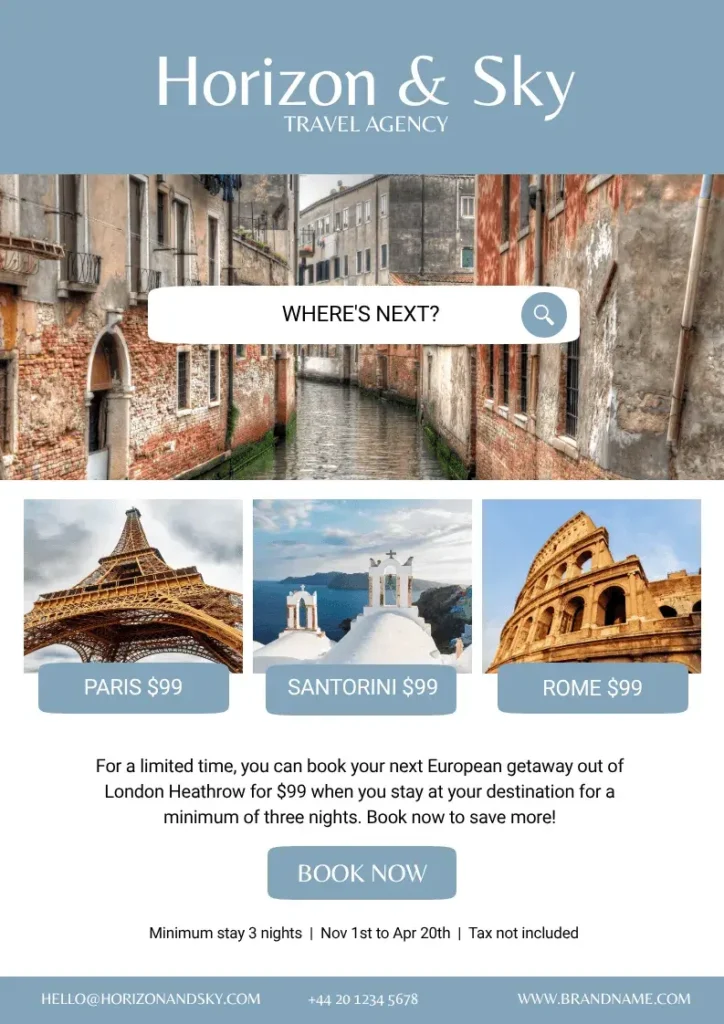
Horizon & Sky is a London-based boutique travel agency that regularly offers deals to their existing clients and newsletter subscribers. The goal is to promote sales.
Subject: Your next European getaway starts here ✈️🥐🍝
Preheader: $99 getaways to Paris, Santorini, Rome, and more…
Why this newsletter example works:
- Clear branding builds recognition and trust among the audience.
- The subject and preheader immediately tell readers what to expect inside.
- The CTA is placed prominently and also just next to the text that explains the conditions of the sale, so if readers click through, they should know what they’ll find.
Product launch newsletter
Cypress Beauty is a brand that only uses natural ingredients from the Mediterranean in its products. They send out an email newsletter about an upcoming product launch, with the goal being to get qualified leads through sign-ups for a waitlist.
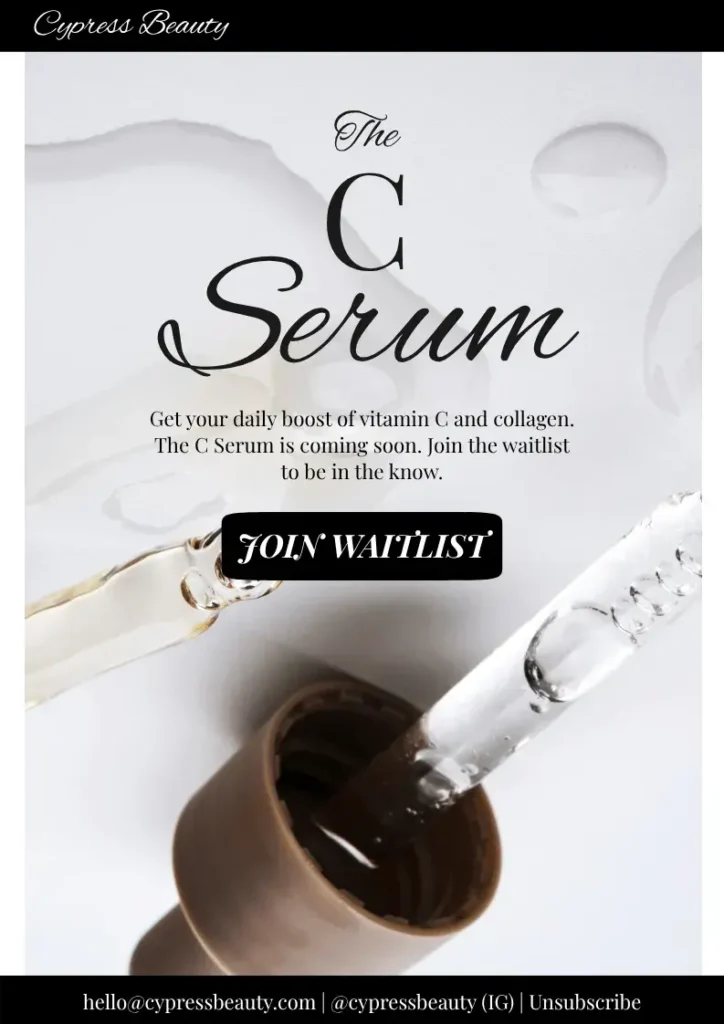
Why this newsletter example works:
- The product and its benefits are clear.
- The newsletter builds urgency and exclusivity through its messaging.
- The CTA is clear; readers know exactly what they should do.
Curated content newsletter example
Creative Notebook is a creative agency that sends out a weekly newsletter with curated content related to creativity and productivity. The goal is to give subscribers valuable resources.
Subject: Three things worth your attention this week ✨
Preheader: Read, listen, and try with these resources sourced by our team.
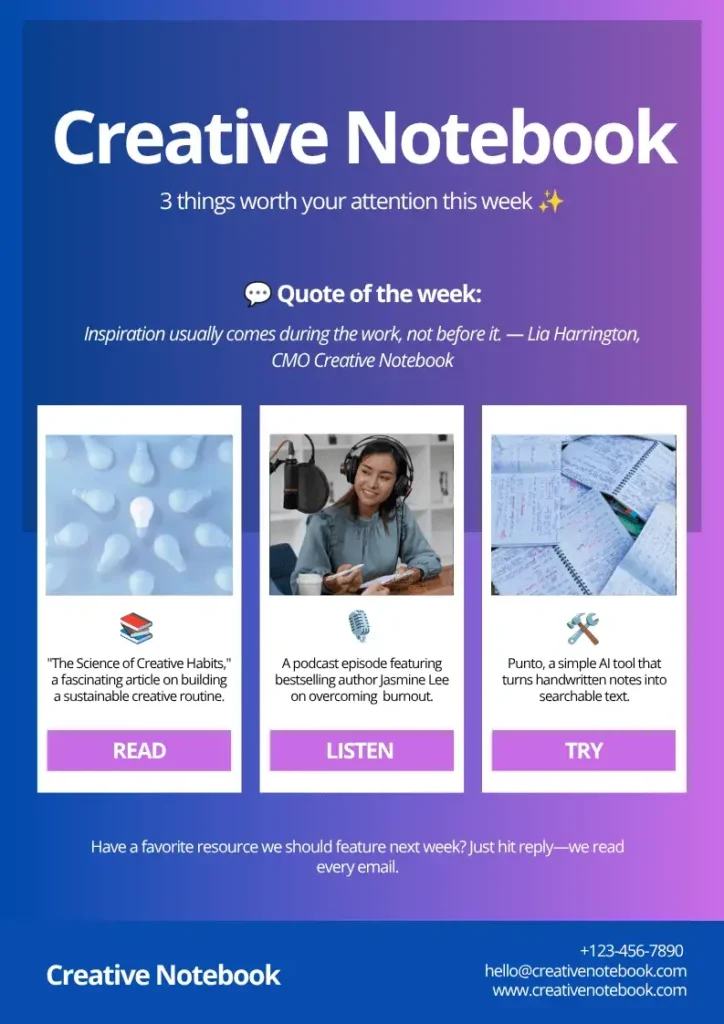
Why this newsletter example works:
- It provides value to subscribers, who don’t have to seek out resources on their own.
- The newsletter positions Creative Notebook as an up-to-date expert in their field.
- The design supports the content and makes it easy to jump right to what you want.
Educational newsletter example
MojoMail is an email marketing tool that sends a monthly educational newsletter to its subscribers promoting blog content designed to improve their email marketing strategies. The goal is to build the company’s reputation in their niche and subtly promote the brand while helping readers solve a problem.
Subject: Your welcome email could be doing a lot more 📬
Preheader: Small changes can make your welcome emails work harder.
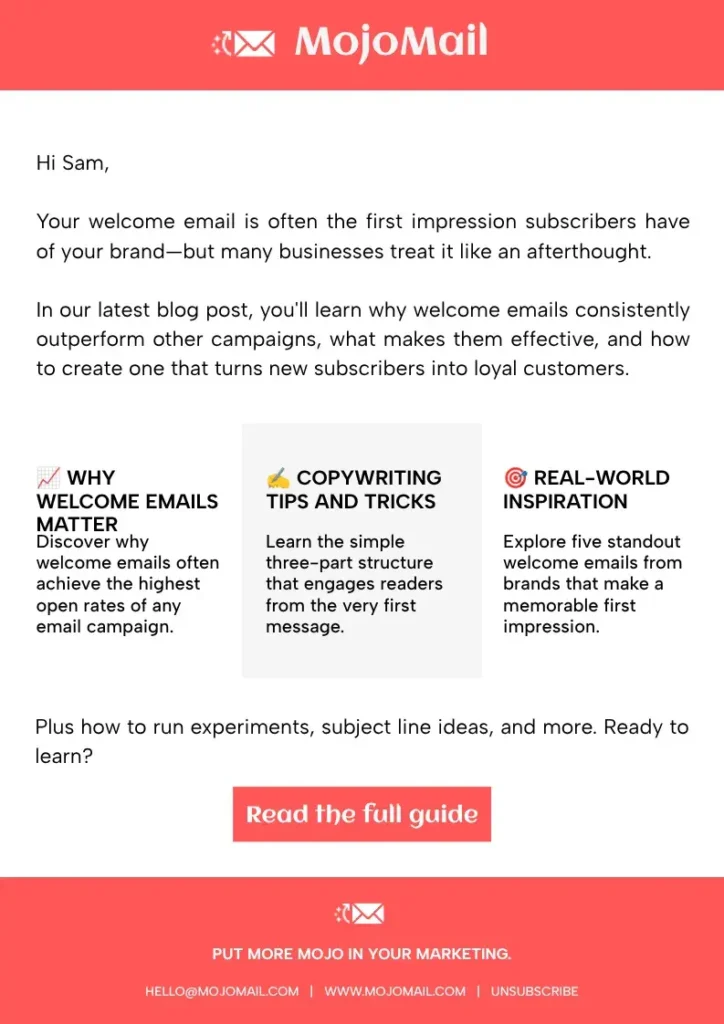
Why this newsletter example works:
- Brand identity is clear without the design being overwhelming.
- The email uses a clear CTA to direct readers to the full article.
- The newsletter includes snippets that give a preview of the content they’ll find at the CTA.
Company newsletter examples
Company newsletters keep employees informed about organizational news, celebrate achievements, and reinforce company culture. They help everyone stay aligned, especially in hybrid and remote workplaces.
Employee updates newsletter example
NorthPeak Software is a growing SaaS company with employees across Europe and North America. Every month, the HR team sends an internal newsletter highlighting company news, employee milestones, and upcoming events.
Subject: June at NorthPeak: Wins, welcomes, and what’s next 🎉
Preheader: Company updates, new team members, and important dates.
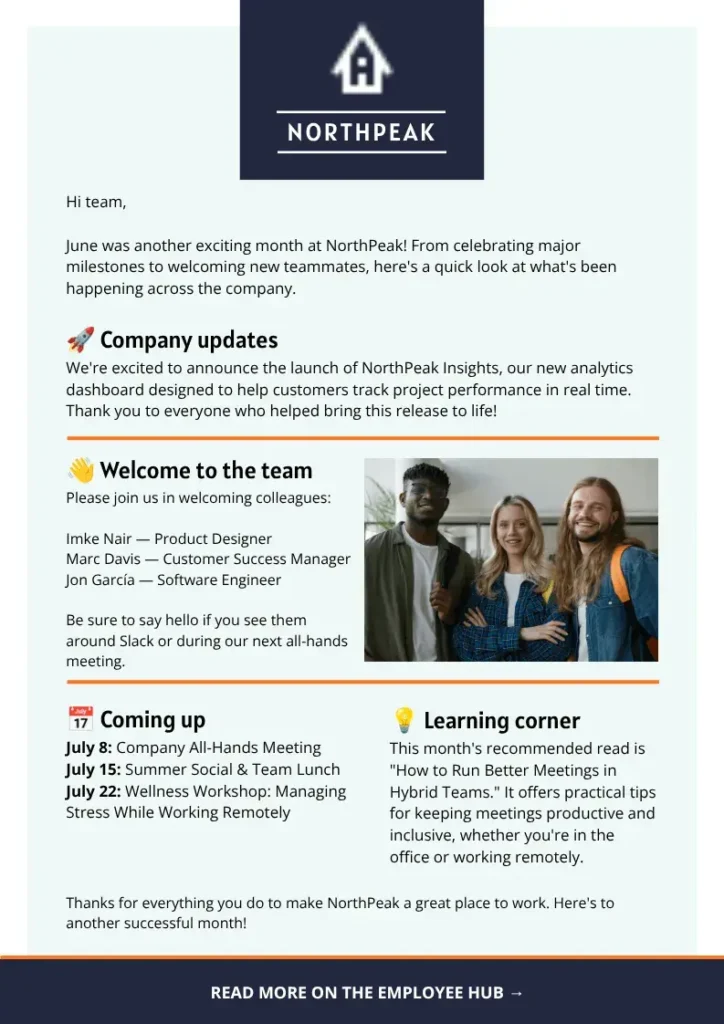
Volunteering newsletter
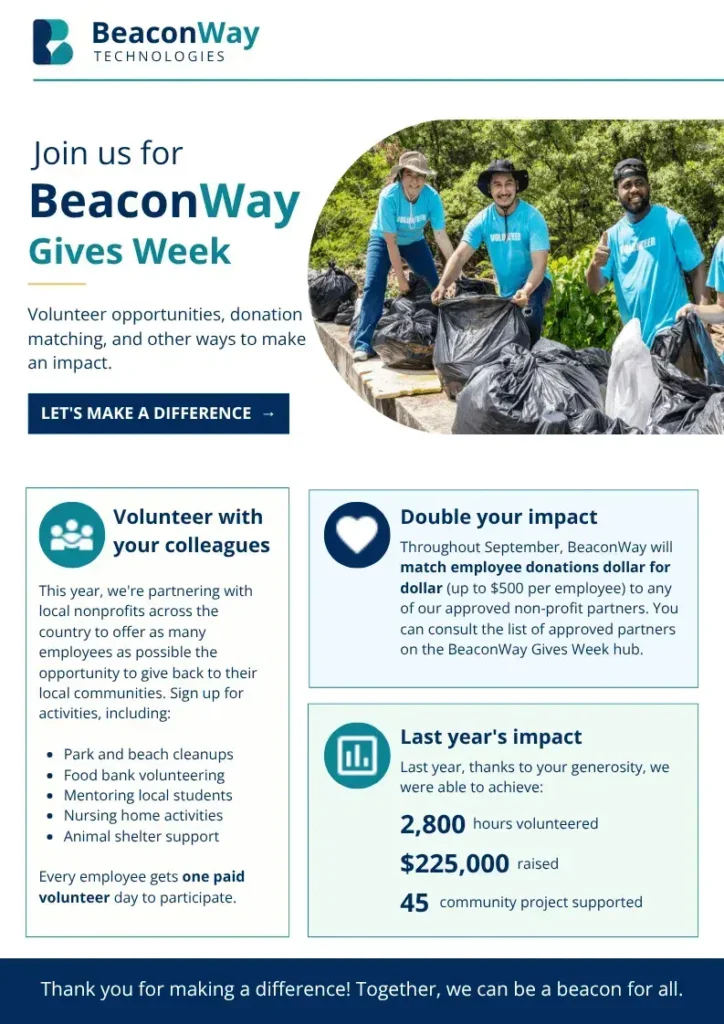
BeaconWay Technologies sends out a quarterly newsletter to inform staff about company donations and other ways to give back. This quarter, they’re announcing BeaconWay Gives Week, a volunteering week opportunity available to all employees. The goal is to get signups for the different volunteer activities available.
Subject: BeaconWay Gives Week is here!
Preheader: Check out our opportunities to see how you can give back this year.
Why this newsletter example works:
- Company branding is clear, reinforcing trust.
- Readers can easily skim for important information.
- “Last year’s impact” offers a form of social proof, showing that last year was a success and this year can be, too.
School newsletter examples
School newsletters keep students, parents, and staff informed about important announcements, upcoming events, and classroom highlights. They help strengthen communication and build a sense of community throughout the school year.
Back-to-school event newsletter example
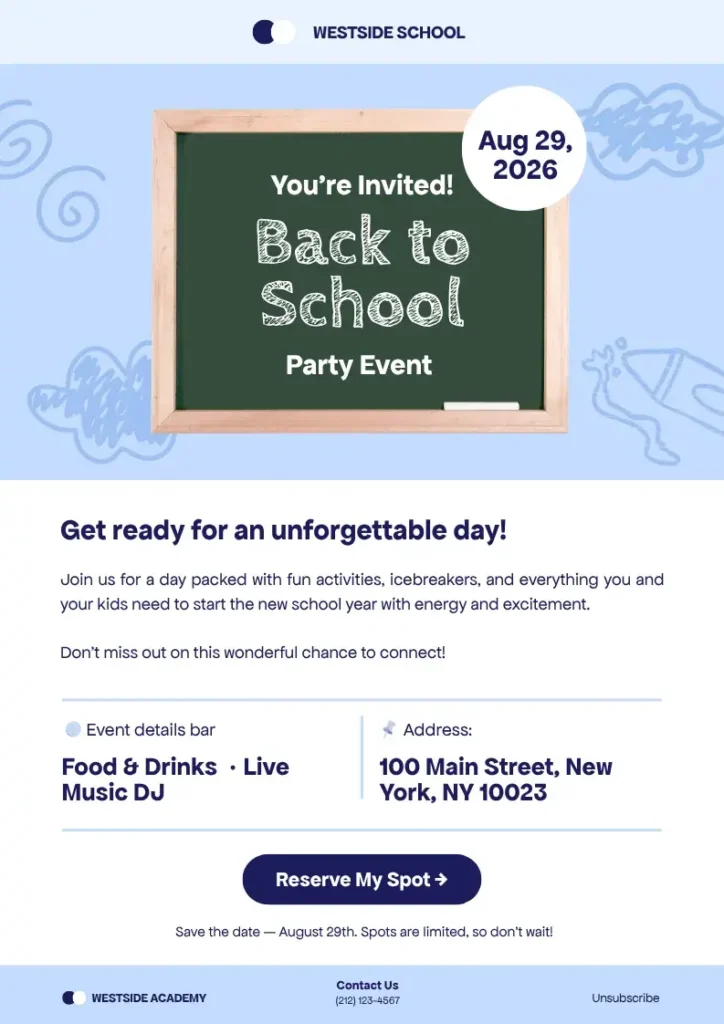
Westside School hosts a back-to-school party for students and parents every year. They send out an email newsletter to invite families to the event.
Subject: Save the date—August 30!
Preheader: You’re invited to our back-to-school party. Reserve your spot now!
Classroom updates newsletter
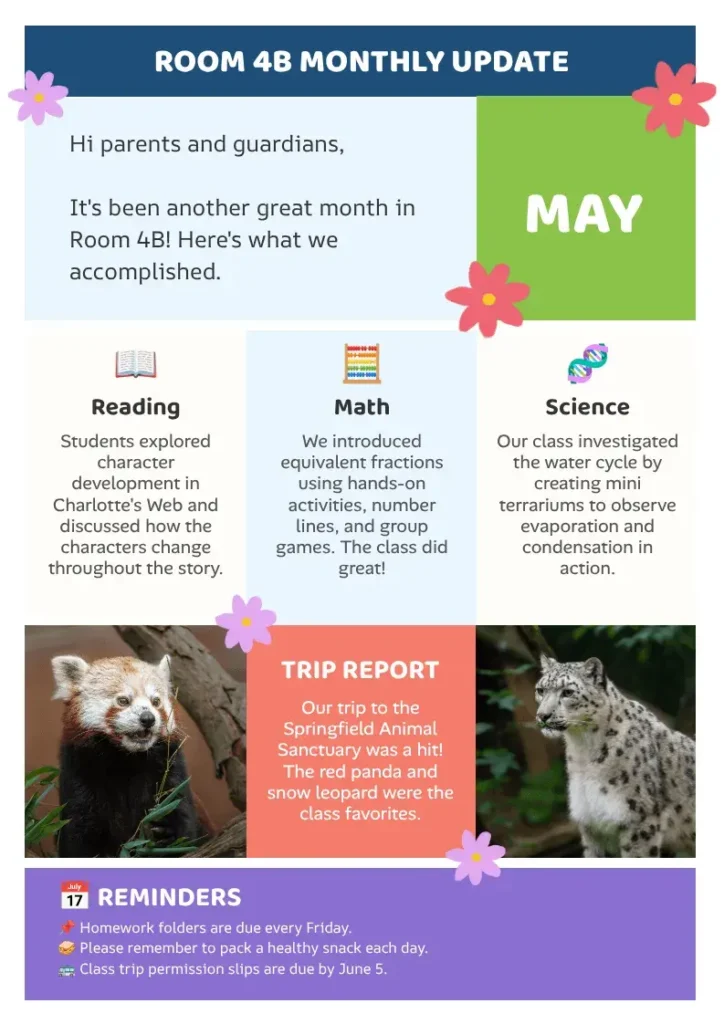
Ms. Kingston sends out a monthly newsletter about what her fourth-grade students are learning and experiencing. Her goal is to keep parents and guardians in the loop about their children’s education and foster community among her students’ families.
Subject: May Monthly Update 🌺
Preheader: See what Room 4B got up to in May!
Why this newsletter example works:
- Even though there’s no “branding,” Ms. Kingston uses consistent colors and fonts to generate recognition among her audience.
- Information is organized into clear sections, making it easy for busy parents to quickly find classroom updates, upcoming activities, and important reminders.
- It balances celebration with practical communication, highlighting student achievements alongside academic progress and logistical information.
Community newsletter examples
Community newsletters help keep members informed, engaged, and connected. Whether they’re sent by a neighborhood association, local club, or community organization, these newsletters share important updates, promote upcoming events, and encourage participation.
Book club newsletter
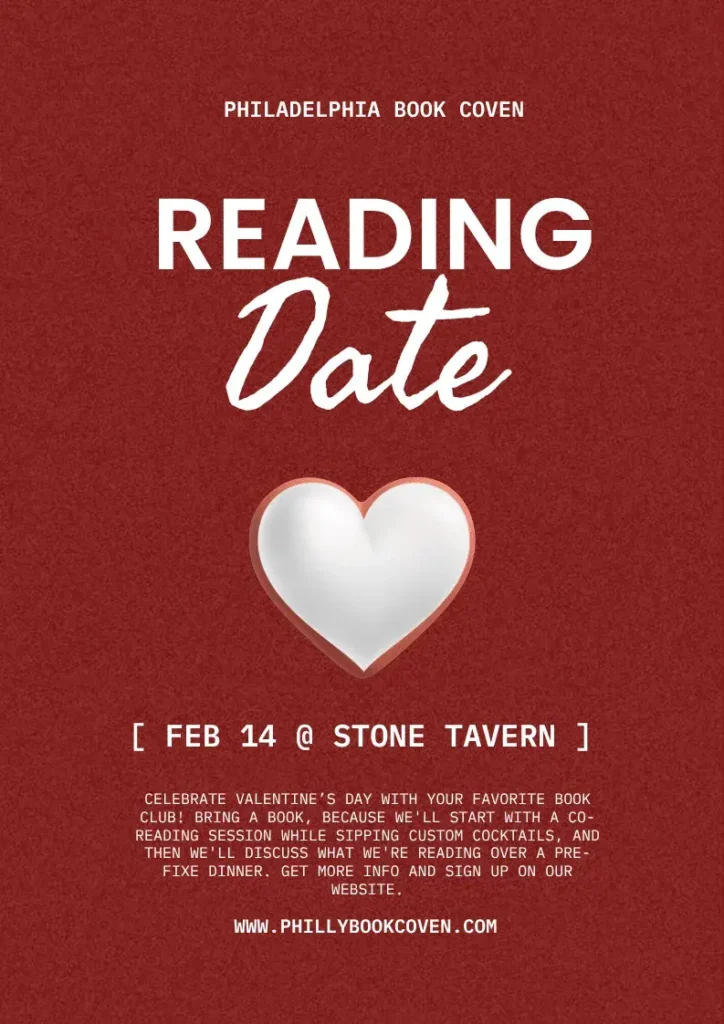
The Philadelphia Book Coven is a large book club that sends out a biweekly newsletter to all of its subscribers. In this edition, they’re promoting a Valentine’s Day event, with the goal being to get members to sign up.
Subject: It’s a date ❤️🔥
Preheader: Join us on Valentine’s Day for a special reading date.
Why this newsletter example works well:
- The design immediately suggests what the newsletter is about—Valentine’s Day.
- Details are clear so members know what to expect if they attend the event.
- The newsletter helps foster community outside of regular book club meetings.
Neighborhood newsletter
The Oakwood Neighborhood Association is the neighborhood board for Oakwood Housing Development. They send out a monthly newsletter to neighbors with key dates, important info, and upcoming events. The goal is to foster community.
Subject: 🌳 Oakwood Neighborhood Association Monthly Update
Preheader: Upcoming events, Oakwood updates, and more
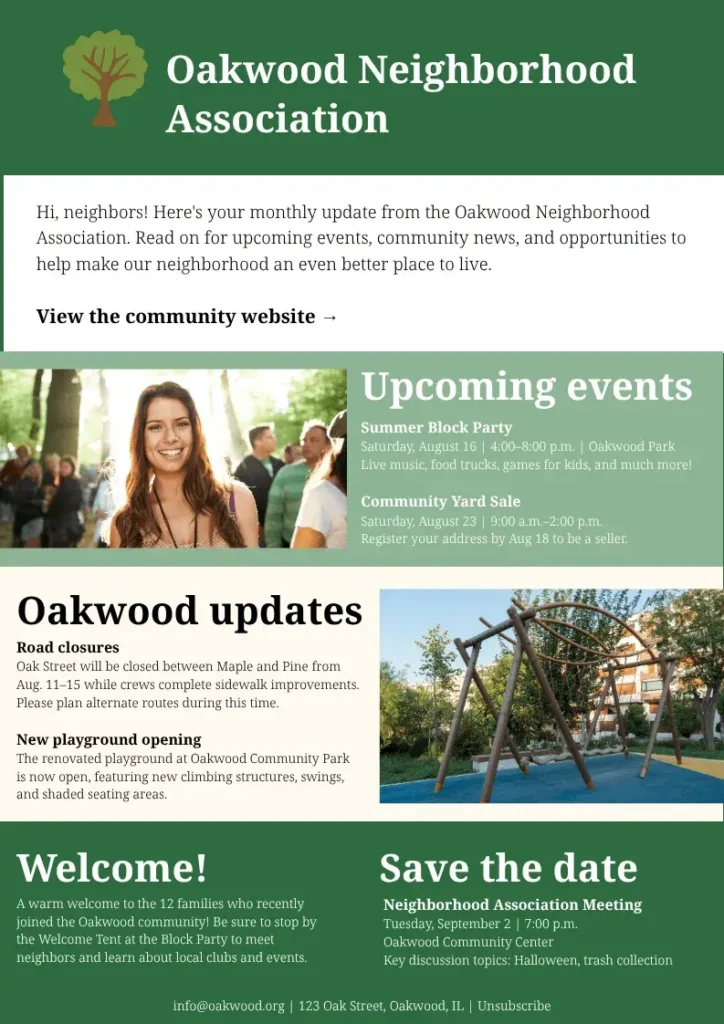
Why this newsletter example works:
- Sections are organized by topic, making it easy for residents to quickly find announcements, upcoming events, and other important information.
- It balances practical updates with community-building content, helping neighbors stay informed while encouraging them to attend events and connect with their neighbors.
- Clear calls to action and contact information make it simple for readers to volunteer, register for events, or learn more about neighborhood initiatives.
Frequently asked questions about newsletter examples
Other interesting articles
If you want to know more about colors, letters, or the meaning of emojis, make sure to check out some of our other articles with explanations and examples.