Email Marketing Campaigns | How to Create & Checklist
Email marketing campaigns may seem old-fashioned these days, especially given the buzz surrounding social media content, short-form video, and viral trends. But email marketing has one of the highest returns on investment (ROI) of all marketing channels, and unlike algorithm-dependent platforms where your reach can change overnight, your email list is a direct line of communication to an audience that has explicitly asked to hear from you.
This guide breaks down the different essential types of email campaigns, their core components, the metrics to track so you can measure your campaigns’ success, and a step-by-step process for planning and creating campaigns that land in the inbox instead of the spam folder. It also includes a campaign checklist to help you keep track of all this.
Key takeaways
- Email marketing campaigns help businesses drive sales, nurture leads, and build customer relationships through targeted, goal-oriented messages.
- Choose from campaign types such as welcome sequences, newsletters, promotional emails, abandoned cart reminders, and re-engagement campaigns to reach subscribers at different stages of the customer journey.
- Create effective campaigns by segmenting your audience, writing compelling subject lines and concise copy, including one clear call to action (CTA), and optimizing emails for mobile devices.
- Measure performance using metrics such as click-through rates, conversion rates, and return on investment (ROI). Build healthy subscriber lists, maintain email deliverability, follow applicable regulations, and use campaign data to improve future results.
Table of contents
- What is an email marketing campaign?
- Types of email marketing campaigns
- Elements of effective email marketing campaigns
- How email campaigns affect your marketing strategy
- Essential metrics to track email campaign performance
- How to create an email marketing campaign
- Email marketing campaign checklist
- Frequently asked questions about email marketing campaigns
- Other interesting articles
What is an email marketing campaign?
An email marketing campaign is a strategic message or series of messages sent to a target group of email subscribers to achieve a specific goal, like driving sales, building interest in a new product, nurturing leads, or educating users.
Email marketing campaigns rely heavily on audience segmentation to make sure that relevant information arrives to the right people. This segmentation can be based on demographics (e.g., location), customer lifecycle stage (e.g., new customer) or behavior (e.g., recently signing up for a free trial).
The typical email marketing campaign usually progresses through five stages:
- Audience segmentation: Recipients are sorted by demographics (e.g., location) and/or behavior (e.g., the last time they logged in) to make sure that relevant information arrives to the right people at the right time.
- Trigger or schedule: The campaign launches based on a specific action (e.g., signing up for a free trial) or a fixed timeline (e.g., three weeks before Black Friday).
- Message sequence: Emails arrive to recipients in a planned order, and each has a specific purpose and message that connects to the overall campaign strategy. If the campaign relies on only one email, the message clearly communicates the campaign goal.
- Tracking: Marketers measure metrics like open rate, clicks, and conversions in real time.
- Optimization: Based on data analysis, marketers adjust the campaign’s content, segmentation, timing, and other settings.
An email marketing campaign differs from a one-off email or “email blast,” which typically shares an important announcement or offers a broad promotion without applying much audience segmentation or waiting for a specific trigger.
However, when the brand undergoes a rebranding, it decides to send an email blast to tell all subscribers about this shift. This communicates the change transparently and lets people know what to expect when interacting with the brand going forward.
Types of email marketing campaigns
There are different types of email marketing campaigns for the different stages of the marketing funnel, although some types are used across all stages of the customer lifecycle.
| Type | Target customer or lifecycle stage | Primary goal | Usual trigger | Core content and strategy |
|---|---|---|---|---|
| Welcome or onboarding | New email list subscribers or customers | Onboard new subscribers, build initial trust, and deliver lead magnets | Immediately after a user opts in or creates an account | Brand story, expectations, immediate value delivery, introduction to key resources or products |
| Product launch or product update | Active customer or user | Drive awareness, immediate sign-ups, feature adoption, and showcase product evolution | When a new product is released or an existing product evolves | Highlights of what’s new, practical usage examples or tutorial, a direct call to action (CTA) to try |
| Promotional and sales | Consideration or decision stages | Drive immediate purchase or conversion | Seasonal dates or defined promo period | Problem-solution focus, urgency and scarcity, limited-time offers, prominent CTAs |
| Educational and newsletter | All stages | Maintain long-term engagement, build trust and authority, and retain subscribers | Fixed, recurring schedule | Curated content, industry tips, research results, tutorials, product updates without heavy pitching |
| Re-engagement | Inactive customers or users or unresponsive email list subscribers | Reactivate cold contacts or clean unengaged users to preserve list health | Defined inactivity threshold (e.g., subscribers who haven’t opened an email in 90 days) | Direct subject lines, special re-engagement offers, easy opt-out options |
| Abandoned cart or browse recovery | Decision stage | Recover lost sales from high-intent visitors who left before completing a purchase | A user adds items to a cart or views products without checking out | Product reminders, social proof, reviews, answers to common FAQs, discount |
| Post-purchase | Conversion or retention stages | Reduce buyer’s remorse, increase product adoption, and encourage repeat purchases | Immediately after a customer completes a purchase | Order confirmation details, getting-started guides, usage tips, review requests, or cross-sell recommendations |
| Feedback and customer research | Retention and loyalty stages | Gather user insights, collect social proof, and identify product pain points | Post-interaction, post-purchase, or defined customer tenure milestones | Short surveys, Net Promoter Score (NPS) prompts, review requests, incentives (e.g., a gift card drawing) for detailed feedback |
| Lifecycle and milestone | Retention and loyalty stages | Celebrate user accomplishments, reinforce long-term product value, and boost retention | Reaching key account dates, product usage thresholds, or personal achievements | Personalized recaps, celebratory messaging, positive reinforcement, subtle upgrade or referral prompts |
| Transactional | Any stage | Deliver critical account updates, security alerts, and real-time transaction notices | Direct user action (e.g., password reset request or billing update) or system notice | Clear, concise transactional information, security verification, high-priority account status details |
Businesses will nearly always have more than one campaign type running at a time, and certain companies may have unique campaigns not featured in these examples.
Elements of effective email marketing campaigns
Great email marketing campaigns, regardless of type or industry, almost always share these core elements:
- Segmented recipients: Great campaigns start with a highly segmented audience to ensure that relevant content arrives to the right people. Better segmentation leads to greater engagement, so make sure to start each campaign with a clear audience segment and relevant goal in mind.
- Clear, attention-grabbing subject line: Your subject line is your email’s first impression, so it must spark curiosity, demonstrate clear value, or address a specific pain point your audience is struggling with.
- Relevant preheader text: An email preheader is the snippet of text that appears below or next to a subject line in an inbox. Use this space as a secondary hook to support your subject line with a sentence that’s relevant to the message within.
- A hook: The opening line of your email should state the core message, offer, or problem immediately to make readers want to keep reading. Avoid verbiage and long pleasantries, which can cause readers to drop off before they get to the important part.
- Reader-friendly, relevant, valuable body copy: Most readers skim emails on mobile devices, and no one wants to read an email that takes more than a few minutes to get through. Write concisely and structure your text with short paragraphs, bullet points, and bold emphasis on key concepts so readers can scan them easily. Keep your email’s content and messaging relevant to your audience segment and illustrate clear value to entice them into completing the desired goal.
- One clear CTA: Every email should have one primary goal, which becomes its CTA. Whether it is clicking a blog link, booking a call, or making a purchase, guide the reader toward a single action.
- A postscript (P.S.): Studies show that the P.S. is one of the most frequently read sections of an email. People tend to skim emails and their eyes naturally gravitate toward the end, so treat the P.S. as an opportunity to restate your main offer or reinforce urgency.
- Personalization: Modern email marketing tools allow you to personalize variable fields, including recipient name, company name, location, and product recommendations. These fields are also called merge tags, and they work by pulling information from your database. The more personalized an email is, the more relevant it is, and that means there’s a greater chance the recipient takes action.
- Mobile-friendly layout and design: Most people read emails on their phones, so it’s critical that your email campaigns are mobile friendly. Use responsive design and short paragraphs to make sure your campaigns are just as effective on mobile as on desktop.
- Compliance components: Make sure to check which privacy laws and data protection regulations apply to your business and that you comply with them when sending email marketing campaigns. Two common compliance requirements are having an easy-to-find unsubscribe link and including a physical company address in the email footer, but there may be more that apply to your context.
Preheader text: [Secondary detail reinforcing subject line]
Hook:
Address a specific pain point or state a compelling idea immediately.
Body copy (scannable structure):
- Keep paragraphs to 1–3 sentences.
- Use bold lead-ins for key points.
- Focus on subscriber benefits over product features.
CTA:
[Clear, action-oriented button or hyperlinked text]
Sign-off and P.S. footer:
Reiterate the core message to offer a final incentive or reason to click.
Footer:
Include components required for compliance, like address or unsubscribe.
How email campaigns affect your marketing strategy
Most companies use various marketing strategies and channels at once, and integrated email marketing campaigns into your broader strategy can yield several benefits:
- Direct ownership and high control: With email marketing, you control the message, the timing, and the recipients. This differs greatly from channels like social media and SEO, which depend on algorithms to dictate what content they show and when. And unlike your social media followers, your email list is a first-party dataset; you own your contacts and are unaffected by social platform algorithm changes.
- High ROI: Email consistently yields a high average ROI compared to other marketing channels. 2026 benchmarks place email marketing ROI at $36 to $42 earned for every $1 spent. Compare that, for example, to social media marketing, which on average earns $3 for every $1 spent.
- Segmentation and personalization at scale: Email marketing software allows you to segment your subscribers based on behavior, demographics, past purchases, and more. You can also then build that data into your emails (e.g., showing an active customer personalized recommendations based on their past purchases). This makes sure that your audience receives content tailored specifically to their interests and needs, which in turn helps boost conversion rates.
- Automated customer journeys: Automated trigger-based campaigns help you guide each subscriber through the stages of the customer journey without adding extra work for your team. You can also use automated campaigns to nurture leads so that your lead generation strategy doesn’t just capture contact details but actually converts leads to customers.
- Better engagement for your content marketing: Email campaigns reinforce your content strategy by distributing new content and repurposing old content. They help drive predictable traffic to your blog posts and landing pages, meaning your content gets seen by people who have already demonstrated an interest in your brand and what you do.
- Clear metrics to analyze: Unlike some other marketing channels, email has very clear indicators of success. Open rates, click-through rates, and unsubscribes can all be tracked easily, and each metric tells you something explicit about how your strategy is performing. Compare this, for example, with impressions on blog posts or organic social media content, which can be difficult to tie directly to engagement or purchase intent.
Essential metrics to track email campaign performance
Measuring success is one of the marketing fundamentals, regardless of channel. So it’s crucial that you understand the key email marketing metrics to track campaign performance. Different metrics assess different aspects of your campaign, like its deliverability, subscriber engagement, and business impact.
| Type | Metric | How to calculate | What it tells you |
|---|---|---|---|
| Deliverability and list health | Delivery rate | Divide delivered emails by total emails sent, then multiply by 100. | The percentage of sent emails that successfully reached the recipient’s mail server without bouncing |
| Bounce rate | Divide total bounced emails (permanent and temporary) by total emails sent, then multiply by 100. | How healthy your contact list is; high rates signal outdated, invalid, or fake email addresses | |
| Unsubscribe rate | Divide total unsubscribes by delivered emails, then multiply by 100. | Whether your content is relevant, valuable, and appropriately timed for your target segment | |
| Spam complaint rate | Divide total spam reports by delivered emails, then multiply by 100. | If recipients feel misled or spammed, or if they didn’t explicitly opt in to receive your emails | |
| Engagement | Open rate | Divide unique opens by delivered emails and then multiply by 100. | If people are opening your emails and if your subject line, preheader, and brand recognition are effective |
| Click-through rate (CTR) | Divide unique clicks by delivered emails, then multiply by 100. | The overall proportion of total recipients who engaged with a link or CTA in your email | |
| Click-to-open rate (CTOR) | Divide unique clicks by unique opens, then multiply by 100. | How persuasive, well-structured, and relevant your email copy and offer were specifically to people who opened it | |
| Forward rate | Divide total forwards or social shares by delivered emails, then multiply by 100. | How valuable or viral your content is and which subscribers may be potential brand advocates | |
| Business impact | Conversion rate | Divide completed target actions (e.g., sales or downloads) by unique clicks, then multiply by 100. | How effectively your email copy aligns with the experience on the landing page designed to achieve your primary goal |
| Return on investment (ROI) | Subtract campaign costs from campaign revenue, divide by campaign costs, then multiply by 100. | The financial efficiency of your email campaign (expressed as a percentage return on every dollar spent) | |
| Net profit | Subtract total campaign expenses (software, labor, discounts) from total revenue generated. | The exact dollar amount left over after paying all costs associated with creating and running the campaign |
How to create an email marketing campaign
Ready to create your own email marketing campaign? Follow these 10 steps to create a strategic campaign that follows email marketing best practices.
1. Choose email marketing software
Email marketing software makes sending email campaigns a lot easier. While it may be possible to execute campaigns completely manually, the process will be much more streamlined and much less frustrating if you use an email marketing platform, especially given that there are so many options available at different price points.
When choosing email marketing software, consider which features are important to you. The following features are recommended for most use cases:
- Drag-and-drop email building
- Responsive design that adapts to different screen sizes
- Audience segmentation
- Merge tags for personalization
- Automated workflows
- CRM (customer relationship management) integration
- A/B testing
- Analytics dashboard
You may need help from your company’s IT or product team to configure your chosen email marketing software correctly. Your developers may need to integrate the software with your website, CRM, or database so that actions users take on your website (e.g., abandoning a shopping cart) trigger the appropriate emails. They may also need to add custom code to your email templates so that they reflect your branding design.
2. Ensure deliverability
Before you start building and sending your campaign, make sure that your emails will actually get delivered. There are various tasks you can do to ensure deliverability:
- Authenticate your domain: Authenticating the domain name that you’ll be using to send your email (e.g., company.com) signals to email providers like Gmail and Outlook that your emails are actually coming from your domain and that you are a legitimate sender. And that means your campaigns are less likely to end up in spam folders. Ask your developers or IT team to help you add the SPF, DKIM, and DMARC records to your domain’s DNS (Domain Name System) settings.
- Warm up new domains: If you’re just starting out and your domain is new, you should gradually increase the volume of emails you send over about 4–6 weeks. Sending a load of emails at once may lead to email providers marking your domain as spam, which means your recipients won’t land in inboxes. Start Week 1 by sending around 10–30 emails per day to engaged subscribers, as positive engagement signals tell providers that you’re a trusted sender. The following week, begin “ramping up” your sending volume until you reach your target volume during Week 4. During this process, track metrics carefully so you can resolve any domain issues as quickly as possible.
- Keep a consistent sending schedule: Email providers notice sudden spikes in email volume and can register these as spam. To avoid this, keep a consistent email schedule. This means sending emails at regular intervals, sending recurring newsletters, gradually increasing volume as your email list grows, “priming” big campaigns by increasing volume beforehand, and avoiding long periods of inactivity.
- Maintain a healthy email list: Never buy email lists; these almost always contain outdated, invalid, or irrelevant contacts whose poor engagement will damage your sender reputation. Build your list organically and use double opt-in to maintain high subscriber quality; this requires people to click “Subscribe” and then verify their email, thus performing two actions to demonstrate that they want to receive your emails. Also, make it easy for people to unsubscribe when they are no longer interested. Set up a schedule to clean your list regularly, too, so you can remove invalid and inactive emails. Your email list may be shorter after doing this, but it will also be much healthier.
- Don’t mislead or spam your readers: Your emails should be transparent and written with respect for your readers. Make sure your subject lines and preheader texts match the content inside the email, and avoid spammy, excessive language, capitalization, and punctuation (e.g., “100% FREE RIGHT NOW!!!”).
3. Identify your goal and audience segment
Once you’ve set up your software and readied your domain, begin defining the various aspects of your campaign. First and foremost, what is its goal? There should be one clear reason why you’re sending the campaign, and you need a clear definition of what success looks like. This might be:
- Driving sales
- Booking demos
- Increasing downloads of content
- Clearing out inventory using special offers
- Building hype for an upcoming product launch
- Showing new users where to find key resources and features
Or it could be something completely different. Whatever the goal, make sure it’s measurable against a target. For example, “drive sales” doesn’t say much, but “increase sales by 10%” gives you a numerical target and way to measure success. Find your goal, and use that to guide the rest of the decisions you make and tasks you complete while creating your campaign.
Your goal should directly impact the audience segment you choose to send your campaign to. Sometimes, choosing a segment is clear cut, especially when the campaign is based on a very specific trigger, like a user requesting to speak to sales. For other goals, it can require more strategic thinking.
For example, if you want to increase downloads of a free ebook, think about which specific email subscribers are most likely to take that action. Your segment should probably include active, engaged subscribers who have interacted with your content in some way before, and if possible, have expressed interest in the topic covered in your downloadable. But maybe it shouldn’t include subscribers who haven’t opened an email in 90 days, since these disengaged contacts probably aren’t going to suddenly want to download your content.
A recipient is much more likely to open and read your email if they feel that you created it just for them. So dedicate time to thinking about and defining your audience segment before moving on to the next steps.
4. Map out your campaign type and strategy
Now that you have a goal and audience segment in mind, you need to answer two other important questions:
- What type of email campaign is this? Is this a welcome sequence, a product launch, a re-engagement campaign, or something else?
- What is the overall strategy for achieving your goal? Will you share content, provide an incentive, demonstrate social proof, or showcase a limited-time offer?
When you have a clear idea of the campaign type and what the strategy involves, there are three other decisions you have to make:
- What is the trigger? Decide when and how subscribers enter your campaign. This could be event- or behavior-based, such as a campaign automatically triggering when a user creates an account, abandons a cart, or visits your pricing page. It could also be date- or schedule-based and sent on predetermined calendar dates to a static segment, like a Black Friday sale or new product announcement.
- Is one email enough or do you need a sequence? Determine if a single, targeted email is sufficient or if your goal requires a multi-touch automated sequence. Single-email campaigns are ideal for promotions of updates where a single message delivers all the needed context (e.g., a flash sale, which plays on surprise and urgency). Multi-email sequences are better for more complex objectives, like onboarding, re-engagement, or new product launches, in which subscribers need to be guided through a story or decision-making process over time.
- What is the narrative arc? If your campaign is a sequence, outline the purpose of each email. If you are launching a product, Email 1 might introduce the problem, Email 2 highlights the solution and social proof, and Email 3 drives urgency before a deadline. If your campaign is a single email, structure it so that the most important information is at the top and reiterated again in the P.S., with supporting details and a clear, visible CTA in between.
5. Design the campaign workflow
Your strategy is clear, and now it’s time to actually build the workflow for your campaign within your email marketing software. In most email platforms, you can do this visually, and mapping the sequence out beforehand is a good way to prevent logic errors and make sure subscribers have a cohesive email experience.
When building your workflow, make sure to:
- Configure the trigger or send date: For automated workflows, select the behavior-based trigger (e.g., filling out a lead form, subscribing to a list or visiting a specific landing page). For schedule-based campaigns, set the precise date and time the email should launch.
- Set cadence and delays: Set up the time interval between each email in a sequence. Sending emails too close together can overwhelm subscribers and lead to unsubscribes, while sending them too far apart can make leads go cold. If you’re not sure how to schedule this, do some research or check out campaigns of this type you’ve received from companies. A standard welcome sequence, for example, typically spreads 3–5 emails over 7–0 days (e.g., Email 1 sent immediately, Email 2 after two days, Email 3 after four days).
- Map out branching logic and conditions: Email workflows typically follow if/then conditions that move subscribers through different “routes” of the campaign depending on the actions they do or don’t perform. For example, if a recipient opens Email 1 and clicks the link, you can direct them to receive a decision-stage follow-up. If they do not open Email 1 after 48 hours, you can direct them to receive a gentler follow-up with a different subject line.
- Define exit rules: Establish clear criteria for when a subscriber should automatically leave the campaign workflow. This prevents embarrassing automated errors, such as continuing to send abandoned cart reminders to someone who has already completed their purchase or sending promotional onboarding emails to a user who unsubscribed midway through the sequence.
6. Take advantage of templates to build emails faster
Templates require a bit of time investment when you set them up, but then they speed up your work each time you create a campaign. Reusable templates also help you maintain a cohesive and consistent brand identity. Follow these best practices for great templates:
- Maintain a consistent visual identity: Apply your visual brand to your email template, including your logo, color palette, typography, and image style. Create a brand asset management plan to store and organize all your brand assets in one place so that they are easy to retrieve when needed for an email marketing campaign. Within your template, use a consistent layout, including standardized headers and footers, so readers know what to expect when they open your emails.
- Apply consistent brand messaging: Your brand should sound the same in emails as it does on your website, on social media, and everywhere else. Consistent messaging builds recognition and trust in your brand, as readers know what to expect. Set up brand guidelines so you have one source of truth for your brand purpose, brand voice, messaging, and content pillars.
- Ensure responsiveness: Responsive design automatically adjusts your email to display it on devices of different sizes. This is critical because most people read emails on their phones, so your campaigns must look good on mobile, too. To ensure responsiveness, use a single-column layout, keep font sizes to 16px and larger, and make sure your CTA buttons are clear and easy to tap.
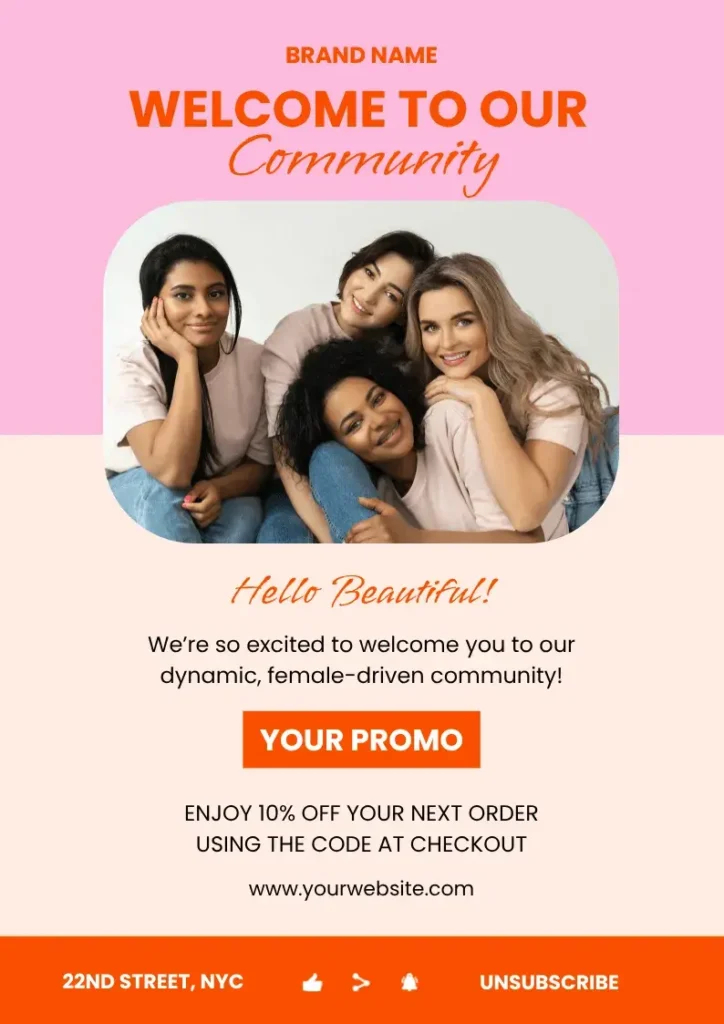
Another way to get inspiration for your templates is to look at email marketing examples you admire. For example, if you need to create a newsletter campaign, save real newsletter examples that catch your interest. What do they do well? What can you replicate in your own campaigns?
7. Write and design the emails
Your template is done, and now it’s time to add content to your campaign. Email marketing copywriting should be persuasive, concise, clear, and value-driven. Each email should have one clear message that aligns with the broader campaign goal.
Some practical tips for writing your campaigns are:
- Keep subject lines to around 50 characters so they don’t get cut off on mobile screens. Spark curiosity or introduce a problem and solution.
- Use your preheader text to complement your subject line instead of repeating it.
- Structure your body copy for scannability by using short paragraphs of 1–3 sentences, bulleted lists, and bolding on the lead-in or main point.
- Include one clear CTA that features prominently in the overall email design.
- Write in active voice and avoid passive voice, which is less persuasive.
- Get to the point and trim unnecessary fluff ruthlessly. Lead with value so the customer sees the benefit of the email immediately.
- Make sure your tone of voice and core message align with your brand guidelines.
- Use the P.S. line to reinforce the main point.
- Add tracking parameters to the URLs you include in your email so that you can later see which traffic came to your website through the campaign.
As for visual elements, only include images and videos that directly support the action you want the reader to take. Also, keep in mind that some email providers may not display media, so your message must always be clear without it. Follow these best practices when including media in your email marketing campaigns:
- Stick to a 60:40 ratio of text to media. This makes sure that even if the media doesn’t load, the reader can read and understand your email.
- Keep media to 600–650 pixels wide for optimal desktop and mobile rendering.
- Compress files to under 200 KB so that your emails render quickly.
- Use JPEGs for standard images, PNGs for graphics with transparent backgrounds or vector illustrations, and GIFs for simple animations.
8. Test before sending
Never hit “send” or set a campaign workflow live without thoroughly testing your emails. A missing or broken link, formatting error, or merge tag mishap can damage your credibility and lower your conversion rate.
Most email marketing platforms have test functions, which allow you to send a test email to yourself or your team.
When testing emails, make sure to:
- Check test emails across different clients (e.g., Gmail and Outlook), operating systems (e.g., macOS and Android) and devices (e.g., desktop and mobile).
- View emails in Light and Dark Mode to make sure they display correctly in both.
- Click every link to make sure it works and leads to the appropriate place. This goes for buttons and social icons, too.
- Make sure that tracking parameters appear on your URLs.
- Double-check that merge tags are working correctly and that there are fallback options for when a piece of data is missing. For example, “Hi {{first_name}},” should display the reader’s name, but if the name cannot be found in your database, “Hi there,” could be the fallback.
- Ensure that the unsubscribe link is visible and functional.
- Review audience segmentation and trigger settings.
9. Launch and monitor
With testing complete, schedule or activate your campaign. For scheduled campaigns, send them when your audience is most likely to check their inboxes. For B2B audiences, mid-morning hours on Tuesday, Wednesday, or Thursday often yield high engagement, while B2C audiences may engage more during evenings or weekends.
Your job isn’t finished once your campaign goes live. Instead, you must closely monitor it, especially during the first 24–48 hours, to make sure everything is working properly, specifically:
- Deliverability: Check the open and bounce rates during the first few hours of your campaign. A sudden spike in bounce rates or spam complaints could indicate an issue with domain authentication or list hygiene that requires immediate pausing.
- Engagement: Monitor click-throughs and conversions to check that landing pages are handling incoming traffic without any issues.
10. Measure, iterate, and optimize
When your campaign ends, or your automated sequence has collected enough data, analyze its performance. How do the metrics stack up to your original goal? Measure the progress you made and compare it to the costs of running the campaign to see your ROI.
You should also look at core email marketing metrics to see how well your template design, copywriting, and configuration performed:
- Open rates, click-through rates, and conversion rates can show you what parts of your campaign worked, and which didn’t. For example, if you see high open and click-through rates but a low conversion rate, your subject lines, body copy, and CTA were probably good, but your landing page may need improvement. Conversely, if your open rate was low, your subject line or send times may need testing, even if the body copy converted those who opened.
- Unsubscribe and spam complaint rates can show if a specific email in a sequence needs reworking. It may not be relevant, come too soon after another, or have a tone that doesn’t fit your brand voice.
Document your key takeaways and use your insights to optimize future campaigns. If something worked well, you can follow that strategy again. If something didn’t go well, iterate on it next time to see if you can improve.
After the campaign, you find that sales increased to $21,400, a 7% increase. Although you didn’t meet your 10% target, the campaign still contributed to sales growth. Next, review metrics such as click-through rates and conversion rates to understand how subscribers responded and identify opportunities to improve future campaigns. You can also compare the additional revenue with the campaign’s costs to assess its profitability.
Email marketing campaign checklist
Here’s a clean and concise email marketing campaign checklist you can use when creating and configuring your own campaigns.
Frequently asked questions about email marketing campaigns
- How much do email marketing campaigns cost?
-
Email marketing campaign costs depend on your subscriber list size, email frequency, and the email marketing software you use. Free plans may cover basic campaigns, while paid plans typically charge monthly fees based on contact volume or functionality.
You should also account for other costs, like copywriting, design, automation setup, and incentives or discounts offered through your email marketing campaigns.
Quillbot’s AI Chat can help you brainstorm ways to optimize your email marketing budget.
- How can I automate my email marketing campaigns?
-
You can automate your email marketing campaigns by using email marketing software to set up messages that trigger based on subscriber actions, dates, or predefined schedules.
How you automate your campaign depends on its type and goal. For example, you can set up an abandoned cart reminder to trigger when a subscriber adds items to their shopping cart but doesn’t complete a purchase. Or, for a Black Friday campaign driving sales, you may want to schedule an email sequence to begin on November 1.
Most email marketing platforms let you configure triggers, delays, and conditional workflows. Quillbot’s AI Chat can help you plan your workflow and organize your email sequence.
Other interesting articles
If you want to know more about colors, letters, or the meaning of emojis, make sure to check out some of our other articles with explanations and examples.