Email Marketing Best Practices | 35 Tips for Success
Email marketing best practices are useful knowledge for anyone in marketing or business, as email continues to be a profitable digital channel that gives you direct access to your audience without interference from algorithms.
Email marketing can help you drive sales, boost traffic, nurture leads, and build customer loyalty, but only if your emails reach your subscribers’ inboxes, encourage them to open your messages, and persuade them to take action. These 35 email marketing best practices lay out how to do just that.
To complement these best practices, Quillbot’s Email Templates make it easy to create polished and professional emails without starting from scratch.
Key takeaways
- Build a high-quality email list from the start. Grow your audience organically, always get permission before emailing, and maintain a clean subscriber list to improve engagement and deliverability.
- Send relevant, personalized emails. Segment your audience, tailor your messaging, and focus on providing value so every email feels useful—not generic.
- Optimize every part of your email. Strong subject lines, mobile-friendly design, clear CTAs, and authenticated domains all work together to increase opens, clicks, and conversions.
- Measure, test, and improve continuously. Track key email marketing metrics, run A/B tests, and use analytics and AI to refine your campaigns over time.
Email marketing best practices at a glance
This article walks through 35 email marketing best practices in greater depth below. This summary table can give you a preview of what those best practices include or serve as a handy reference chart for when you’re enacting your email marketing strategy.
| Category | Best practice | Quick takeaway |
|---|---|---|
| Email foundations | Build your email list organically. | Grow your list with interested subscribers who willingly sign up. |
| Never buy email lists. | Avoid purchased lists to protect deliverability and engagement. | |
| Always get permission before emailing. | Send marketing emails only to people who opt in. | |
| Use double opt-in. | Verify subscriptions to improve list quality. | |
| Clean your email list regularly. | Remove invalid and inactive subscribers. | |
| Make unsubscribing easy. | Offer a simple opt-out process and preference center. | |
| Audience | Get to know your audience. | Use data to understand subscriber needs and behaviors. |
| Segment your subscribers. | Group contacts to send more relevant emails. | |
| Personalize every email. | Tailor content with subscriber data and dynamic content. | |
| Reward your most engaged subscribers. | Strengthen loyalty with exclusive perks and offers. | |
| Planning | Set one clear goal for every email. | Focus each email on a single objective. |
| Focus on providing value. | Prioritize helpful, relevant content over constant promotion. | |
| Match the email type to your objective. | Choose the right format for your goal. | |
| Plan seasonal and promotional campaigns ahead of time. | Prepare campaigns early to maximize impact. | |
| Writing | Write compelling subject lines. | Increase opens with clear, benefit-driven subject lines. |
| Optimize your preheader text. | Reinforce the subject line with preview text. | |
| Write conversational, engaging copy. | Use clear, natural, audience-focused language. | |
| Keep emails concise and easy to scan. | Make content easy to read quickly. | |
| Use one clear call to action (CTA) | Guide readers toward one desired action. | |
| Send readers to relevant landing pages. | Match every CTA with the right destination. | |
| Designing | Keep your branding consistent. | Create a seamless brand experience. |
| Use responsive, mobile-friendly layouts. | Ensure emails work well on every device. | |
| Create a clear visual hierarchy. | Draw attention to key content and CTAs. | |
| Keep designs simple and uncluttered. | Remove unnecessary visual distractions. | |
| Use images strategically. | Support your message with purposeful visuals. | |
| Design for accessibility. | Make emails usable for every subscriber. | |
| Optimize emails for dark mode. | Ensure readability in light and dark themes. | |
| Deliverability | Authenticate your domain. | Use SPF, DKIM, and DMARC to verify your domain. |
| Warm up new domains. | Build sender reputation gradually. | |
| Maintain a consistent schedule. | Send emails on a predictable cadence. | |
| Protect your sender reputation and avoid spam filters. | Follow best practices to stay out of spam folders. | |
| Optimization | Automate your email campaigns. | Send timely, relevant emails at scale. |
| A/B test everything. | Continuously test and improve campaigns. | |
| Track the metrics that matter. | Measure KPIs that align with your goals. | |
| Continuously optimize using analytics and AI. | Use data and AI to improve future campaigns. |
35 email marketing best practices
These email marketing best practices are organized by category, so you can organize tips in chunks or jump to the section you need the most help with:
- Build strong email foundations
- Understand your audience
- Plan smart campaigns
- Write great emails
- Design for conversions
- Improve deliverability
- Optimize and scale
Build strong email foundations
Great email marketing begins with strong foundations. It can be tempting to jump right into copywriting and designing, but if you don’t sort out the basics, your emails won’t convert.
1. Build your email list organically
An email list is an extremely valuable asset when it’s made up of people who genuinely want to hear from you. Think of this as “quality over quantity” and focus on attracting subscribers who are already interested in your brand, products, or content. These people are more likely to convert and go on to become loyal customers.
Some effective ways to grow your email list organically include:
- Offering lead magnets like ebooks, templates, or checklists
- Incentivizing signups with a discount code
- Hosting webinars, contests, or giveaways with an email signup
- Promoting your newsletter on social media
- Adding signup forms to your website, blog, and landing pages
- Collecting email addresses during purchases or event registrations (with consent)
2. Never buy email lists
It takes time to build a strong subscriber list, and you may be tempted to opt for a shortcut, like buying email lists to inflate your audience. But this is one of the most surefire ways to harm your email marketing performance.
Purchased lists often contain outdated, invalid, or uninterested contacts who never agreed to receive your emails. As a result, emailing these contacts typically leads to low open rates, high bounce rates, spam complaints, and poor deliverability. Instead of buying a list, invest your time and budget into attracting subscribers who genuinely want to hear from you.
3. Always get permission before emailing
Permission-based email marketing builds trust, improves engagement, and complies with privacy regulations. Before receiving any promotional emails, subscribers should explicitly agree to do so.
Your email marketing subscriber forms should clearly communicate what types of emails you’ll send, how often you’ll send them, who they’ll come from, and how subscribers can unsubscribe if no longer interested. Transparency from the very beginning sets expectations and reduces the likelihood of spam complaints or unsubscribes later.
4. Use double opt-in
“Double opt-in” refers to when someone confirms their subscription twice. Typically, they fill out your subscription form and then receive an email with a confirmation link they must click before being added to your email list.
Requiring double opt-in may reduce the total number of subscribers you collect, but it improves the quality of your email list. It helps you verify that email addresses are valid, prevent fake signups, reduce spam complaints, protect your sender reputation, demonstrate compliance with privacy regulations, and improve overall engagement rates.
- Please confirm your email address
- Thanks for signing up! Please confirm your email
- We’re excited you’re here! Please confirm your email address
5. Clean your email list regularly
Don’t think of your subscriber list as a static document. It needs ongoing attention and maintenance. Over time, people change their email addresses, lose interest, or simply stop engaging with your emails.
Cleaning your email list regularly improves deliverability by removing contacts who are unlikely to open your emails and improves analysis by making sure metrics accurately reflect the performance of your campaigns.
Consider quarterly email list maintenance in which you:
- Remove invalid or bounced emails
- Suppress subscribers who repeatedly mark your emails as spam
- Identify inactive subscribers for targeted re-engagement campaigns
6. Make unsubscribing easy
Every marketing email should include a clear and visible unsubscribe link. Losing a subscriber is discouraging, but what’s worse is getting spam complaints because frustrated recipients can’t opt out of your emails. This negatively affects your sender reputation and can affect the deliverability of future emails.
In addition to an unsubscribe link, consider offering an email preference center where subscribers can reduce frequency, choose the topics they’re interested in, temporarily pause emails, and update their contact info. Giving subscribers control over how you show up in their inbox reduces unsubscribes, improves trust, and builds long-term engagement.
Understand your audience
Knowing your audience is a marketing fundamental that applies to all types of content marketing. It’s extra important here, as content that misses the mark can feel more intrusive when it’s in your audience’s inbox as opposed to hosted on your blog or social media.
7. Get to know your audience
Email marketing success hinges on understanding who you’re emailing. The better you know your audience, the easier it is to align your content strategy with their interests, questions, pain points, and goals. Use data (e.g., research and analytics) rather than assumptions to build audience personas that address the following factors.
| Audience characteristic | Description | Example |
|---|---|---|
| Demographics | Basic facts about who your subscribers are | A 35-year-old marketing manager living in Chicago who works at a mid-sized SaaS company. |
| Psychographics | Interests, values, attitudes, and motivations | Values sustainability, enjoys hiking, prefers premium products, and wants to simplify their workflow. |
| Pain points | Problems or frustrations they’re trying to solve | Struggles to generate qualified leads, doesn’t have enough time to create content, or finds project management overwhelming. |
| Goals | Outcomes or results they want to achieve | Increase website traffic, automate repetitive tasks, improve team collaboration, or save money on software. |
| Customer behavior | How they interact with your brand and make purchasing decisions | Downloads multiple guides before purchasing, shops during holiday sales, abandons carts without free shipping, or renews their subscription annually. |
| Email engagement | How they interact with your email campaigns | Opens every weekly newsletter, clicks product announcements but ignores promotional emails, or consistently opens emails sent on Tuesday mornings. |
Use email analytics, website behavior, surveys, and customer support interactions to continuously learn more about your subscribers. Audience preferences change over time, so your understanding should evolve with them.
8. Segment your subscribers
Segmenting your subscribers divides your email list into smaller groups based on shared characteristics, allowing you to send more targeted and relevant emails to each recipient. And the more relevant your emails are, the more likely subscribers are to engage.
Email marketing best practices for segmentation include:
- Choose your segmentation goal: Determine what you want to achieve, such as increasing conversions, improving engagement, nurturing leads, or reducing unsubscribes. Then segment accordingly based on engagement level, lifecycle stage, purchasing behavior, etc.
- Collect subscriber data: Gather demographic, behavioral, purchase, and engagement data through signup forms, surveys, website activity, CRM records, and email analytics.
- Create tags and dynamic segments: Organize subscribers into groups based on shared characteristics, such as new subscribers, repeat customers, inactive users, or people interested in a specific product category. Whenever possible, use dynamic segments that automatically update as subscriber data changes.
- Send targeted emails: Tailor your subject lines, messaging, offers, content, and calls to action (CTAs) to each segment’s needs, interests, and stage in the customer journey.
- Analyze and refine: Monitor metrics (like open rates, click-through rates, conversions, and unsubscribes) for each segment and use these insights to adjust your segmentation strategy.
Start with a few meaningful segments rather than creating dozens of highly specific audiences. As your list grows, you can refine your segmentation strategy over time. Advanced marketers often use behavioral segmentation, automatically triggering emails based on specific actions, like downloading a resource.
9. Personalize every email
Modern email marketing uses customer data to deliver content that feels timely, relevant, and tailored to each recipient. Personalize as much as you can, like product and content recommendations, promotions and offers, images and messaging, send times, and CTAs. For example, you might send product recommendations based on previous purchases.
Personalization is achieved through dynamic content, which personalizes emails at scale by automatically displaying different text, images, or offers to different subscribers. Just make sure your customer data is accurate and up to date, or your emails will feel thoughtless and irrelevant.
Hi {{First Name}},
We noticed you recently purchased {{Last Purchase}}, so we thought you’d enjoy these similar titles:
📖 {{Recommended Product 1}}
📖 {{Recommended Product 2}}
As one of our loyal customers, here’s an exclusive {{Discount Percentage}} discount just for you. Use code {{Promo Code}} before {{Expiration Date}}.
10. Reward your most engaged subscribers
Engaged subscribers are often valuable customers. They consistently open your emails, click your links, and probably purchase products. Recognizing and rewarding their loyalty helps strengthen that loyalty and turn them into loyal brand advocates.
Consider creating exclusive experiences for your “VIP” subscribers, like:
- Early access to product launches
- Exclusive discounts or promotions
- Loyalty rewards
- Members-only content
- Invitations to events or webinars
- Beta testing opportunities
Plan smart campaigns
Successful email campaigns are planned with a clear purpose. From choosing the right type of email to planning campaigns around seasonal events, you need to take a smart and strategic approach if you want your emails to make an impact.
11. Set one clear goal for every email
Every marketing email should have a single primary objective. Trying to accomplish too many things in one email can overwhelm readers and reduce conversions. Some email objectives are:
- Drive sales of a specific product
- Promote a webinar or event
- Encourage newsletter signups
- Announce a new feature
- Educate subscribers about a topic
- Re-engage inactive contacts
To define this, ask yourself, “What is the one action I want subscribers to take after reading this email?” That desired result is your call to action (CTA). Every element of your email—from the subject line to the copy to the images and to the CTA text—should help move your reader towards that desired result.
12. Focus on providing value
Most people don’t subscribe to your email list to receive constant sales pitches. Building trust requires balancing promotional emails with value-driven, helpful content. Depending on your audience, valuable emails might include:
- How-to guides and tutorials
- Industry news and insights
- Product tips and best practices
- Customer success stories
- Exclusive discounts or early access
- Curated resources and recommendations
Before sending an email, ask yourself, “What’s in it for the subscriber?” If the answer is nothing, don’t send the email before making it more valuable for your audience.
13. Match the email type to your objective
Different objectives require different types of emails. Choosing the right format helps your message meet subscribers’ expectations and encourages them to act on your CTA. If your goal is to nurture leads, you might send a drip campaign that provides helpful resources until they’re able to convert. But if you want to build brand awareness and educate prospects, an educational newsletter is a better choice.
Successful strategies combine email types throughout the customer journey. For example, a new subscriber might receive a welcome series, followed by educational newsletters, personalized product recommendations, and occasional promotional emails.
14. Plan seasonal and promotional campaigns ahead of time
The busiest email marketing periods, like Black Friday and Christmas, are also the most competitive. Planning ahead gives you time to create stronger campaigns, coordinate messaging across channels, and avoid last-minute mistakes or stress.
Prepare an annual marketing calendar to include major holidays, seasonal sales, product launches, industry events, awareness months, and recurring campaigns. When choosing publication dates, think about two things:
- How much time does your team need to prepare assets, schedule automation, get approval, and coordinate with other departments? Always leave a buffer to account for delays, like technical issues or team member absences.
- How much time does your audience need to complete your CTA? For example, there’s little use in sending a promotional email on December 24th to encourage recipients to buy Christmas gifts, but the same email on December 4th might convert.
Write great emails
Strategy is important, but what’s in your emails matters, too. These email writing best practices can help you increase open rates, improve engagement, and drive more clicks and conversions.
15. Write compelling subject lines
Your subject line is the first thing subscribers see, and it determines whether they open, ignore, or even delete your email. The best subject lines inspire curiosity or urgency, add value, and set clear expectations for what’s inside.
To write good subject lines:
- Be concise; stick to around 30–50 characters (or 4–7 words).
- Highlight a clear benefit.
- Create urgency when appropriate, without sounding spammy.
- Use dynamic, action-focused language (active voice and action verbs).
- Don’t use excessive capitalization, punctuation, or emojis.
- A/B test subject lines to see what resonates with your audience.
It’s often easier to summarize the most important takeaway once you know exactly what the email contains, so write your subject line after you’ve finished the email.
- School Newsletter #12
- Summer Sale
- New blog: writing emails
- 5 tips for back-to-school success
- Save 25% before our summer sale ends
- Learn how to write emails people actually open
16. Optimize your preheader text
Preheader text (also called “preview text”) is a short snippet that appears after the subject line in most email inboxes. Think of it as a second headline or an H2 that gives subscribers another reason to open your email.
To write strong preheader text:
- Write 40–90 characters.
- Complement your subject line, but don’t repeat it.
- Provide additional context or reinforce the value of opening the email.
Preheader: Download it now and start improving your email campaigns today
Subject: Your cart is waiting
Preheader: Complete your purchase before your items sell out
Subject: New arrivals just dropped
Preheader: Be the first to check out these sure-to-be best sellers
17. Write conversational, engaging copy
The way you write your emails depends on your audience and branding strategy. For example, a law firm will probably want a more formal, serious tone than a consumer cosmetics company when communicating with potential clients.
That said, generally speaking, there are some ways you can make your emails more engaging:
- Use simple, straightforward language.
- Avoid unnecessary jargon and overly “salesy” language.
- Apply consistent brand voice and brand messaging.
- Write in the second person to directly address your reader.
- Focus on benefits rather than features.
- Show empathy for your audience’s challenges.
- Strive for inclusive and respectful language.
- Our organization is pleased to announce the availability of our latest productivity solution. (feels stuffy and convoluted)
- Want to spend less time on repetitive tasks? Our newest tool helps you automate them in just a few clicks. (direct, clear, and solution-focused)
- Every businessman knows the importance of networking. (not inclusive and feels outdated)
- Every professional knows the importance of networking. (gender-neutral and consistent with current standards)
18. Keep emails concise and easy to scan
Few people read marketing emails word for word. Instead, they scan. So if your email looks overwhelming or cluttered, subscribers are more likely to abandon it.
To improve readability and scannability:
- Use short paragraphs (2–3 sentences).
- Break up content with heading, bullet points, and section dividers.
- Highlight or bold important information.
- Leave a lot of white space.
- Limit each email to one main topic.
Like with any content writing, edit rigorously. Provide just the key information and direct readers to your website if they want to learn more. If subscribers should only remember one thing after reading your email, make sure it’s immediately obvious.
19. Use one clear CTA
The CTA is the most important element in any email, as it’s the direct link (literally!) to the conversion you want your readers to complete. Whether that’s making a purchase, downloading content, or signing up for an event, your CTA should be impossible to miss.
To write strong CTAs:
- Focus on one specific goal so the reader isn’t confused about what to do next.
- Highlight the benefit of the CTA from the reader’s perspective.
- Use a strong action verb, such as “start,” “claim,” or “discover.”
- Format it as a button that’s above the fold, high contrast, and mobile friendly.
- Keep it short (2–4 words), especially when formatted as a button.
- Click here
- Learn more
- Submit
- Download your free guide
- Compare pricing plans
- Apply now
20. Send readers to relevant landing pages
When someone clicks your CTA, it should direct the user to a landing page that delivers exactly what was promised in the email. For example, a promo email should link to the featured product or sale page, while a webinar invitation should take readers to the event registration page.
Your landing page should also match your email in terms of messaging, branding design, and offer. Consistency reassures visitors that they’re in the right place and helps improve conversion rates. On the other hand, sending subscribers to your homepage or an irrelevant landing page creates friction that makes it harder for them to complete the desired action.
Design for conversions
Strategy outweighs design, always. These email marketing best practices demonstrate how to design so that your emails actually convert.
21. Keep your branding consistent
Your email should be another extension of your branding and be coherent with your website, social media, and other marketing channels. Consistent branding builds familiarity and trust, making subscribers more likely to recognize and open your emails.
Your brand identity (e.g., templates, logo, colors, typography, images) should remain consistent across every campaign. They should also be consistent with your other channels. If subscribers click through to your website or landing page, the experience should feel seamless rather than disconnected.
22. Use responsive, mobile-friendly layouts
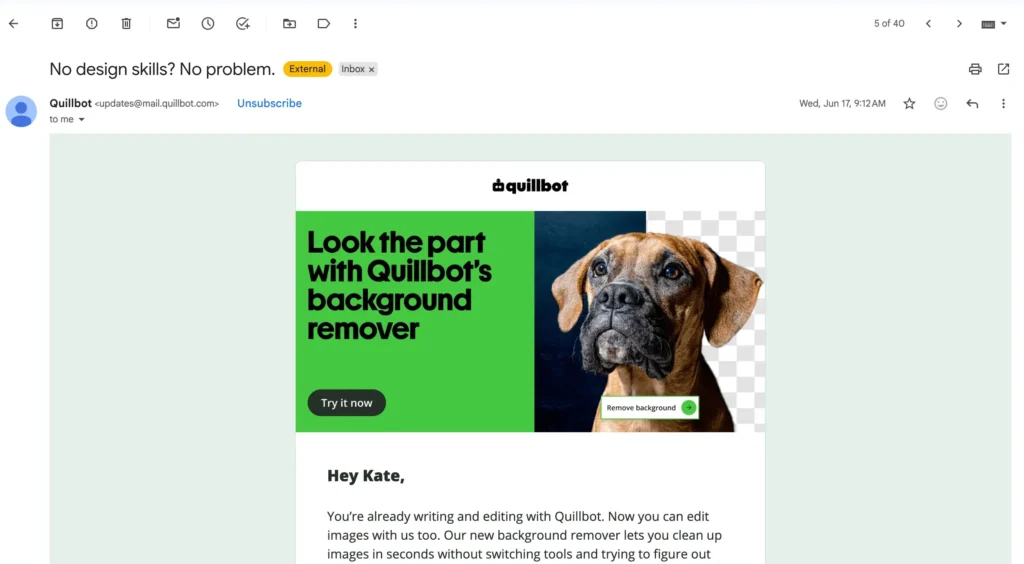
Most emails nowadays are opened on mobile devices, so you need to design your email campaigns with that in mind. Responsive email design automatically adjusts layouts, images, and text to fit different devices, meaning your email should look professional regardless of the screen size someone reads it on.
When designing responsively:
- Use a single-column format.
- Adopt a mobile-first mindset, designing for smaller devices first.
- Use a minimum font size of 16 px for body and 22–28 px for headings.
- Make buttons large enough to tap (about 44 x 44 px).
- Compress and optimize images so they load quickly on mobile networks.
- Keep subject lines and preheaders short so they don’t get truncated.
- Put the CTA as close to the top as possible so readers don’t have to scroll to find it.
Always preview your emails on multiple devices and email providers before sending. You should also check how your email looks in both portrait and landscape orientation on mobile devices.
23. Create a clear visual hierarchy
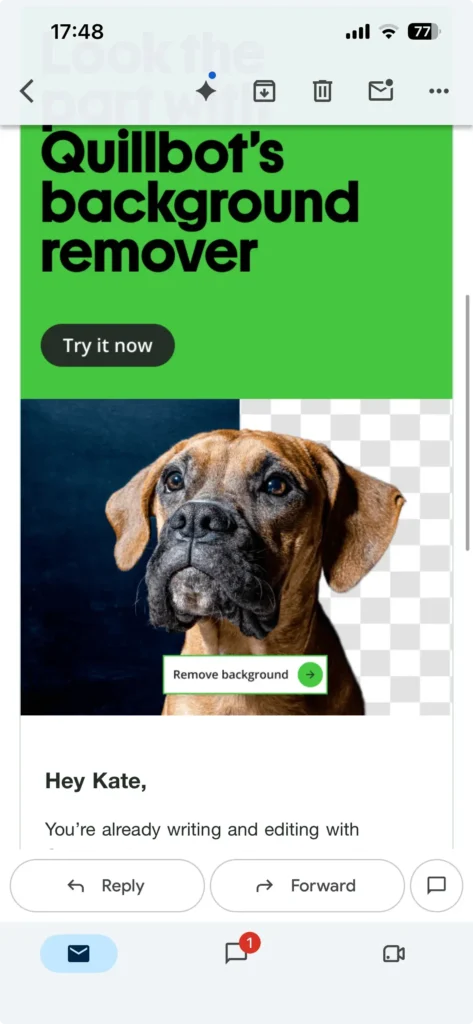
Visual hierarchy refers to the way text, images, and other design elements are organized. By strategically altering text size and weight, font faces, colors, spacing, and layouts, you can guide the reader’s eye and impact how they process your email. The typical elements used to create visual hierarchy are headings, body text, images, and buttons.
A common hierarchy is, from top to bottom, a headline, supporting visual, key message, and CTA. Other hierarchies include an inverted pyramid and a zig-zag. A few tips for creating a clear hierarchy are:
- Make the most important elements the largest.
- Use a high-contrast brand color to highlight your main CTA.
- Use varying text sizes and weights to create distinction among text sections.
24. Keep designs simple and uncluttered
Don’t fall into the trap of overdesigning your email. It can be tempting to add lots of visuals, colors, font faces, and buttons, but this will end up distracting and frustrating the reader.
A clean, focused design helps subscribers understand your message faster and reduces visual and decision fatigue. To simplify your email designs:
- Limit your text to 1–2 fonts and colors.
- Leave plenty of white space around elements so you avoid a “wall of text.”
- Make your CTA one recognizable brand color with high-contrast text.
- Avoid unnecessary animations or decorative elements.
- Remove anything that doesn’t support your goal.
If a design element doesn’t help communicate your message or encourage action, consider removing it.
25. Use images strategically
Images can engage your subscribers, but only if they support the goal of your email. Use images to showcase products, reinforce brand identity, or demonstrate how something works. Don’t use them only for decoration.
A few email marketing best practices for images are:
- Keep image sizes under 100MB for fast loading, compressing when necessary.
- Choose the right file format—PNG, WEBP, JPG, GIF—based on the context.
- Always include alt-text for accessibility and in case images don’t load.
- Never place text or a CTA over an image.
- Break large images into smaller chunks to improve loading speeds.
- Place a hero image—a compelling, high-quality image—at the top.
26. Design for accessibility
Apart from making your images accessible, you should design for accessibility in general. Accessible email design ensures everyone, including people with disabilities, can interact with your campaigns.
Some email marketing best practices for accessibility include:
- Add descriptive alt text to images.
- Use clear heading structures.
- Use sufficient color contrast between text and backgrounds.
- Avoid conveying meaning through color alone.
- Make buttons large enough to tap easily.
- Write descriptive link text instead of “Click here.”
Designing with accessibility in mind makes sure you don’t exclude readers using assistive technologies and often results in cleaner, more readable emails for everyone.
27. Optimize emails for dark mode
Dark mode has become a standard feature across many devices, especially for people who spend a lot of time looking at a screen. If your emails aren’t optimized for it, colors may invert unexpectedly, logos can sink into dark backgrounds, and text might be impossible to read.
Optimizing designs for dark mode involves:
- Using transparent PNG images
- Making sure logos look good on both light and dark backgrounds
- Creating solid-color buttons and avoiding outline-only ones
- Applying heavier font weights to compensate for light text looking thinner
- Avoiding pure black (#000000) and white (#FFFFFF), which cause visual vibration
Before sending, always preview your emails in light and dark mode across different clients and devices to make sure everything is readable.
Improve deliverability
Even if you create the greatest email ever, it’s useless if it doesn’t land in your readers’ inboxes. Follow these email marketing best practices to make sure your emails get delivered and maximize the chance they’re seen.
28. Authenticate your domain
Authenticating your domain verifies that your emails are actually coming from your domain and not from a spoof used by cybercriminals. Authentication also signals to email providers like Gmail or Outlook that you’re a legitimate sender, which means your emails are more likely to end up in inboxes than spam folders.
To authenticate your domain, you’ll need to add several DNS (Domain Name System) records to your domain’s DNS settings. These records act like digital credentials that tell receiving mail servers your email service provider is authorized to send emails on your behalf. If you send emails from more than one domain, make sure to authenticate each one and subdomains, too.
Email authentication records
| Protocol | What it does |
| SPF (Sender Policy Framework) | Specifies which mail servers are authorized to send emails on behalf of your domain |
| DKIM (DomainKeys Identified Mail) | Adds a digital signature that verifies your email hasn’t been altered during delivery |
| DMARC (Domain-based Message Authentication, Reporting, and Conformance) | Tells mailbox providers how to handle emails that fail SPF or DKIM checks and provides reports about authentication activity |
29. Warm up new domains
Warming up a new email domain involves gradually increasing the volume of emails you send over a time period, usually 4–6 weeks. This helps build a positive sender reputation with email providers. If you don’t warm up and just start sending mass amounts of emails right away, email providers may mark your domain as spam and send your emails straight to junk folders.
To warm up a new domain:
- Make sure you’ve configured your DNS records and authenticated your domain.
- Start by sending emails to your most engaged subscribers (e.g., people who have opened or clicked your emails in the last 2–3 months). These people are more likely to open your emails, and positive engagement shows email providers that you’re a trusted sender.
- Gradually increase your daily sending volume. Build a 4-week “ramp-up schedule” to slowly scale your email sending from 10–30 per day in Week 1 to the target volume in Week 4.
- Monitor key metrics like bounce rates, spam complaints, and open rates. This helps you track your domain reputation and identify any issues early on.
30. Maintain a consistent schedule
Email providers pay attention to your sending patterns, and large, unpredictable spikes in email volume can seem to them like spam and damage your sender reputation. That’s why it’s so important to maintain a consistent email schedule. Do this by:
- Sending emails at regular intervals
- Sending recurring newsletters and automated transactional emails
- Gradually increasing email volume as your subscriber list grows
- Increasing volume prior to big campaigns like Black Friday
- Avoiding long periods of inactivity followed by massive campaigns
A consistent sending schedule makes email clients see you as more legitimate. But it also helps subscribers know when to expect your emails, and this can in turn lead to better engagement with your content.
31. Protect your sender reputation and avoid spam filters
Think of your sender reputation as your marketing “credit score.” Email providers use it to determine if your emails belong in the inbox, promotions tab, or spam folder. Several factors influence this reputation, namely spam complaints, bounce rates, engagement, authentication, sending consistency, and the quality of your email list.
To protect your reputation, there are some best practices you can follow:
- Only send emails to subscribers who have opted in.
- Regularly remove invalid and inactive email addresses from your list.
- Use transparent subjects and messaging, and don’t deceive or mislead readers.
- Avoid excessive capitalization or punctuation (e.g., “100% FREE!!!”).
- Include an easy-to-spot unsubscribe link in all marketing emails.
- Make it easy to unsubscribe so readers don’t get frustrated and report you as spam.
- Monitor deliverability metrics and investigate sudden drops in opens or clicks.
Overall, focus on sending relevant, permission-based emails to an engaged audience, as this remains the most effective way to improve long-term deliverability.
Optimize and scale
Great email marketing strategies don’t have an end point. Rather, they’re cyclical systems that constantly adapt and evolve based on data and feedback. And as your business grows, so too does your email strategy. These email marketing best practices help you optimize and scale your campaigns so you stay ahead of the curve.
32. Automate your emails
Email automation allows you to send emails automatically when people take a specific action or reach a specific stage of the customer journey. Instead of manually creating each email, automated workflows deliver the right message at the right time. There are two main types of emails to automate.
Transactional vs marketing emails
| Email type | Purpose | Examples |
| Transactional | Deliver important information that the recipient expects after taking a specific action, normally related to transactions (purchases, sign-ups, etc.) and account activity | Welcome email (account creation), order confirmation, shipping confirmation, delivery notification, password reset, account verification, payment receipt, invoice, security alert, appointment confirmation, subscription renewal reminder |
| Marketing | Build relationships, educate subscribers, promote products or services, and encourage engagement or conversions throughout the customer lifecycle | Welcome email series, newsletters, promotional campaigns, product recommendations, abandoned cart reminders, drip campaigns, post-purchase follow-ups, customer review requests, birthday or anniversary emails, re-engagement campaigns, event invitations |
Almost all modern email marketing software lets you automate emails. Transactional emails are automated based on “triggers,” or moments in which a specific action happens (e.g., user requests a password change). Marketing emails are often automated based on segments or rules (e.g., a user becomes inactive for more than 60 days) or specific dates and times (e.g., a Black Friday email on November 29th at 6:00).
Automation is better for both your recipients and your team because it helps you:
- Deliver timely, relevant messages
- Create a more personalized customer experience
- Save time and reduce manual work
- Generate revenue around the clock
- Maintain consistent communication with subscribers
33. A/B test everything
An A/B test (also called a “split test”) lets you compare two variations of the same thing to see which variation performs better. You can use A/B testing for most email elements, including subject lines, preheaders, sender names, send times, CTAs, email formats, and personalization. Most email marketing platforms offer built-in A/B testing.
To get reliable results from an A/B test, follow these three best practices:
- Test one variable at a time (i.e., don’t test subjects and CTAs in the same test).
- Test on a large enough sample size (ideally 1,000–5,000 recipients).
- Measure the metrics most closely tied to your text (e.g., open rates for subjects).
Email preferences change over time, so treat A/B testing as an ongoing process instead of a one-time exercise.
Version A: Summer styles are here
Version B: ☀️ Save 20% on this week’s summer collection
Everything else in the email (the preview text, content, images, CTA, and send time) remains exactly the same. The email platform sends Version A to 10% of subscribers and Version B to another 10%.
The open rate for Version A is 24% and for Version B is 31%. Since Version B outperformed Version A, it’s automatically sent to the remaining 80% of subscribers.
34. Track the metrics that matter
Focus on the key performance indicators (KPIs) that measure email success. Further, every email campaign should have a goal, and the metrics you monitor should reflect that goal. For example, for a promotional email whose goal is to drive sales, track sales coming via email.
Email marketing KPIs
| Metric | What it tells you |
| Open rate | How effective your subject line and sender name are at encouraging opens |
| Click-through rate (CTR) | How many recipients clicked a link in your email |
| Click-to-open rate (CTOR) | How engaging your email content is after subscribers open it |
| Conversion rate | How many recipients completed the desired action, such as making a purchase or signing up for an event |
| Bounce rate | The percentage of emails that couldn’t be delivered |
| Unsubscribe rate | Whether your content or sending frequency is causing subscribers to opt out |
| Spam complaint rate | How many recipients marked your email as spam |
Looking at these metrics together can reveal deeper insights than if you focus on a single number. For example, a campaign with a high open rate but low click-through rate may have an excellent subject line but weak email content or an ineffective CTA. Comparing metrics across campaigns can also be helpful in seeing what type of content most resonates with your subscribers.
35. Continuously optimize using analytics and AI
Never consider your email marketing strategy as “complete.” Review analytics regularly to identify patterns, answer questions, and find opportunities for optimization. You might discover, for example:
- Mobile users click less often than desktop users.
- Product recommendations outperform promotional discounts.
- Subscribers engage more on Tuesdays than Fridays.
AI can help you optimize your emails, too. Many email marketing platforms now include AI to recommend subject lines, predict the best send times, optimize audience segmentation, and forecast campaign performance. Like with everything, AI should enhance—never replace—your strategy. Use it to automate repetitive tasks, uncover insights, and streamline decision making, but rely on human judgment for messaging, brand voice, and customer experience.
- Most clicks happen within the first 24 hours.
- People who receive personalized product recommendations click twice as often.
- Mobile users spend less time reading long emails.
The team uses AI to analyze engagement patterns and implement several improvements for the next campaign:
- Personalize product recommendations based on each subscriber’s activity.
- Shorten the email and move the primary CTA higher on the page.
- Schedule emails at the time AI predicts each subscriber is most likely to open it.
Frequently asked questions about email marketing best practices
- What are some B2B email marketing best practices?
-
B2B email marketing best practices overlap with general email marketing best practices, but when dealing with B2B recipients, you should specifically focus on:
- Authenticating your domain
- Segmenting your audience by customer lifecycle stage
- Maintaining a healthy email list
- Personalizing content
- Keeping email concise
- Optimizing for mobile devices
- Using one clear CTA
- Sending users to the lowest-friction landing page
- Sending sequences for longer buying processes
- Sharing useful content like case studies and testimonials
Successful B2B email marketing focuses on building trust and nurturing long-term relationships. If you need help creating professional emails that inspire trust, explore Quillbot’s Email Templates.
- What are some email marketing tips to increase sales?
-
Some email marketing tips to increase sales are:
- Follow email marketing best practices like authenticating your domain, keeping emails concise, etc.
- Send targeted campaigns instead of generic blasts.
- Segment your audience based on purchase history, interests, and behaviors.
- Personalize your emails with product recommendations or offers relevant to each recipient.
- Write clear and compelling subject lines and CTAs.
- Send subscribers to dedicated landing or product pages that match your email.
- Automate abandoned cart, welcome, and post-purchase emails.
Create high-converting emails faster with QuillBot’s Email Templates.
- What are some small business email marketing tips?
-
Some small business email marketing tips are:
- Follow email marketing best practices like building your email list organically, authenticating your domain, and keeping emails concise.
- Focus on providing personalized, value-driven content instead of constant promotions.
- Keep emails concise, optimize them for mobile devices, and include one clear call to action (CTA).
- Automate welcome emails, abandoned cart reminders, and follow-up campaigns to save time and improve consistency.
- Learn about email marketing metrics and analyze each campaign.
Create professional emails faster with QuillBot’s Email Templates.