How to Make an ATS-Friendly Resume | Template & Tips
An ATS-friendly resume can make or break your chances in today’s job market. With hundreds of applicants for every position, companies are relying on ATS technology now more than ever. By using ATS filters, recruiters can instantly find out which resumes match the job posting and which ones don’t.
An ATS scans your resume for keywords related to the job requirements. But keywords are only part of the equation. To get past the ATS and into the recruiter’s inbox, your resume needs the right keywords and an ATS-friendly resume format.
In this guide, you’ll learn how to optimize your resume for ATS with practical steps, an ATS resume template, an ATS resume checklist, and resume examples.
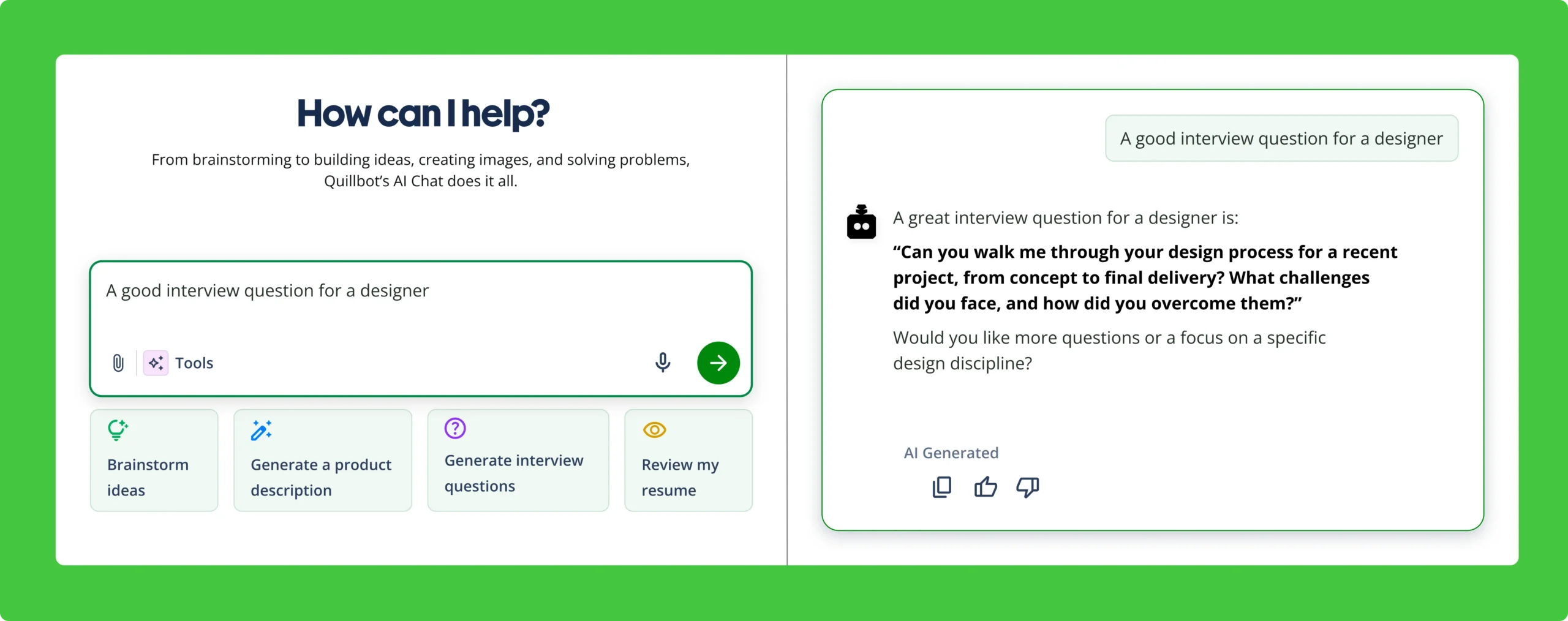
Quillbot’s free AI Resume Builder can help you quickly create an ATS-friendly resume, from finding keywords in job postings to analyzing your resume for keyword alignment.
Key takeaways
- An ATS-friendly resume needs two things: a simple, easy-to-read format and keywords that match the job description. Both help your resume pass automated screening.
- Use clean formatting with standard headings, classic fonts, and a single-column layout. Avoid tables, graphics, text boxes, and other design elements that ATS software may misread.
- Tailor your resume with relevant keywords from the job posting, especially in your summary, skills, and work history sections, to improve your chances of reaching recruiters.
- A quick ATS checklist before submitting—such as confirming date formatting, reverse-chronological order, and PDF format—can help prevent avoidable screening issues.
What is an ATS-friendly resume?
An ATS-friendly resume has two key features that improve your chances of passing the ATS screening when you apply for a job.
- A simple resume format with a one-column layout, classic fonts, clear headings, and no tables or graphics
- Keywords from the job posting about your skills and experience
Without both of these elements, even the most qualified candidates can be filtered out before the first round of interviews.
- Store all of the data about each candidate in one place (e.g., resumes, interview notes, assessments, and reference response forms).
- Search for applicants who have the qualifications for a new opening.
- Rank and rate candidates based on keywords and skills.
- Send automated emails, status updates, and reminders.
In most cases, when you apply for a job online, the application portal is an ATS.
How to format a resume for ATS
When it comes to formatting a resume for ATS, less is more. An ATS can only find keywords if you use a simple, ATS-friendly format, which is also easy for recruiters to scan. Follow these steps for an ATS-friendly resume that you can customize for different roles:
- Use a simple single-column layout. Avoid columns, text boxes, and charts. Use line breaks and bullet points instead. ATS software misreads tables and text boxes, scrambling word order.
- Avoid images and graphics, including headshots, emojis, and watermarks. Images can cause an ATS to scramble the word order or drop words.
- Use one professional typeface, such as Times New Roman, Arial, or Helvetica. ATS software is trained on standard fonts and can’t always read nonstandard fonts.
- Format headings in 14–16 point, bold, ALL CAPS and body text in 10–12 point plain font. ALL CAPS helps the ATS find your headings. The larger size and bold weight helps the recruiter who gets your resume next.
- Use standard resume headings, such as “Skills,” “Experience,” and “Education.” An ATS recognizes standard terminology more reliably than creative alternatives like “Core Competencies.”
- Format employment dates as MM/YYYY (e.g., “03/2022–Present”), which the ATS is mostly likely to recognize. Alternatives like “3/22” might not look like dates. Use a hyphen or en dash to signal date ranges.
- Arrange past jobs in reverse chronological order, which is standard practice and easiest for an ATS to parse.
- Left align all of the body text. Avoid “Justify,” which adds extra spacing and causes ATS parsing errors.
- Use a simple, ATS-friendly format when you submit your resume on the employer website or online application portal.
- Make a creative and eye-catching resume for when you’re applying through email, sending a letter of interest, or bringing hard copies to a career fair.
Quillbot’s creation ecosystem includes a variety of Resume Templates for when you need a creative and eye-catching design.
How to use ATS keywords
In addition to an ATS-friendly format, your resume needs keywords from the job posting to pass the ATS screening. The trick is to use keywords naturally and appropriately without keyword stuffing. Here’s how to do it right:
- Find the keywords in the job posting. Read the job posting carefully, and highlight the job title, plus any hard skills (e.g., required software), soft skills (e.g., problem-solving), degrees, or certificates that the job requires.
- Make a list of the keywords that apply to you. These are the skills, degrees, and certificates that are consistent with your background. Brainstorm details about how these keywords apply to your background.
- Write an ATS-friendly resume summary. Use the job title as a headline right above it. If you’re pursuing a career change, use something like “Transitioning Training Specialist & Experienced Educator.” Summarize your top achievements and expertise, using the keywords that apply.
- Incorporate keywords into the skills section, using the exact wording from the job description to help the ATS flag you as a close match.
- Use a combination of keywords and their synonyms in the work history. For example, if the job posting says “team leadership,” use that exact phrasing at least once, as well as synonyms like “managed teams” or “coaching and mentoring.” Using both exact keywords and natural variations helps your resume perform well in ATS scans while still sounding natural to recruiters.
Job description: Summit Health Insights is hiring a Junior Data Analyst to support healthcare reporting and operational analytics. The role requires knowledge of SQL, data cleaning, report automation, and dashboard development. Experience working with clinical or operations teams is a plus.
Resume summary: Data analyst who transforms complex healthcare data into reliable, decision-ready reporting through data cleaning, report automation, and dashboard development. Leveraged SQL and Python to streamline large-scale healthcare datasets, automate reporting, and reduce reporting turnaround time by 30%. Partners with clinical or operations teams to deliver accurate insights that improve day-to-day decision-making.
- Only include keywords that you can back up with real examples.
- Match the employer’s wording when it truthfully reflects your background.
- Omit keywords that don’t match your background.
For some extra tips on creating a resume that gets noticed, watch our video below.
ATS-friendly resume template
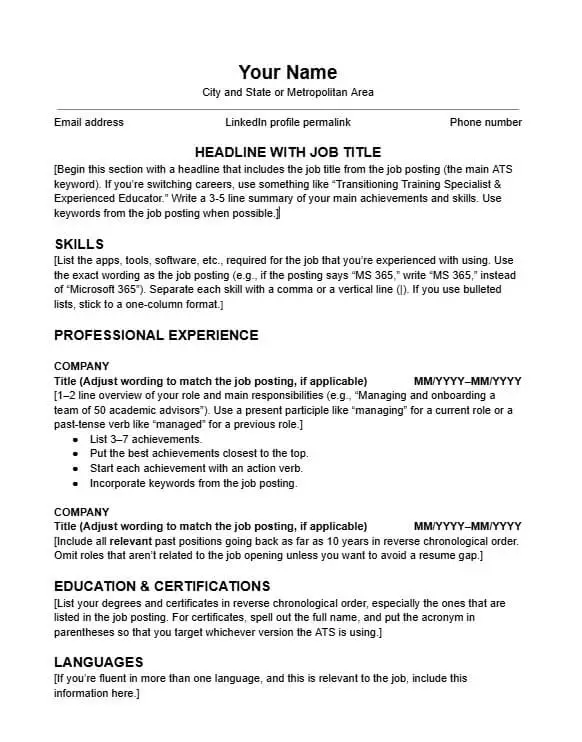
One of the quickest ways to make an ATS-friendly resume is by customizing an ATS-friendly resume template. Quillbot’s free ATS resume template includes all of the standard resume sections in the simple formatting and clear structure that an ATS needs.
To use this template, customize the resume summary, skills, work history, and education sections with your own details, using keywords from the job description.
ATS resume checklist: Is my resume ATS friendly?
Before you submit your resume to an employer, use this checklist to make sure you have all of the ATS-friendly components.
ATS resume checklist
0 / 17ATS-friendly resume examples
Review the ATS-optimized resume examples below to see how formatting and keywords come together in practice. Each sample is tailored to a specific industry to show how the same core skills can be targeted without keyword stuffing.
ATS resume example: Administrative assistant
This example shows how an administrative professional can leverage keywords from the job posting (highlighted in blue) to optimize a resume for ATS while maintaining a natural writing voice that appeals to human readers. JORDAN HAYES Greater Dallas Area jordan.hayes@example.com | (555) 013-4829 | linkedin/jordanhayes ADMINISTRATIVE ASSISTANT 4 years of experience supporting property management operations for luxury apartment communities. Maintains meticulous leasing and maintenance records and positive tenant relations in fast-paced residential environments. Handles 50+ tenant inquiries per week and ensures timely communication between residents, vendors, and property staff. Consistently recognized in resident feedback for responsiveness and clear communication. SKILLS EXPERIENCE Administrative Assistant | Greenfield Luxury Apartments | Dallas, TX | 06/2022–03/2026 Office Coordinator | Lakeside Insurance | Fort Worth, TX | 01/2020–05/2022 EDUCATION Associate of Applied Science, Business Administration, Central Community College CERTIFICATIONS
ATS resume example: Marketing specialist
When reviewing the example below, notice how the keywords (highlighted in blue) occur naturally throughout the resume, which has the clean, no-frills layout and headings that work best for an ATS. MARIO COLLINS MARKETING SPECIALIST Marketing professional with experience executing digital marketing campaigns, managing social media content, and supporting SEO-driven content updates across multiple platforms. Contributed to campaigns reaching 10,000+ monthly impressions and improved engagement rates by 25% through optimized posting strategies and audience targeting. Skilled in content creation, campaign coordination, and marketing analytics to support data-driven decision-making. SKILLS EXPERIENCE Marketing Assistant | BrightWave Creative Agency | Hatteras, NC | 05/2023–Present Marketing Intern | Northview Retail Group | Norfolk, VA | 06/2022–04/2023 EDUCATION
Outer Banks, NC
mario.collins@example.com | (555) 018-4421 | linkedin.com/in/mcollins
Bachelor of Arts in Marketing, University of Texas at Arlington
Frequently asked questions about ATS-friendly resumes
- Should I bold keywords in my resume?
-
No, you should not bold the keywords in your resume. The purpose of using keywords is to pass the initial ATS screening and to help recruiters quickly assess your fit.
However, bolding the keywords makes it look like you’re trying to trick the ATS or exaggerate your experience. Plus, an ATS doesn’t treat bold words any differently than words in plain font.
Instead, format the keywords on your resume the same way you would format other words (e.g., bold for headings, plain font for skills and work experience bullet points, etc.).
It’s always a good idea to get feedback about how well your resume uses keywords, though. Quillbot’s AI Chat is a fast way to check your resume for strong use of keywords.
- What keywords should I include in my resume for Applicant Tracking Systems (ATS)?
-
Include keywords that match the job description, especially hard skills, industry-specific terms, and qualifications. For example, if the job posting emphasizes “project management,” “data analysis,” and “Python,” make sure these terms appear naturally in your resume.
Chatbots such as ChatGPT and Quillbot’s free AI chat can help identify these keywords from the job description and weave them into your resume so it gets past Applicant Tracking Systems (ATS) more easily.
- How do I know what keywords to use when writing a resume?
-
To decide what keywords to use when writing a resume, look closely at the job posting to find:
- The job title you’re applying for
- Required skills (e.g., software)
- Required certificates or degrees
Make a list of those keywords from the job description, and decide which ones are consistent with your skills and background.
Ask yourself, “If an interviewer asked me about this keyword, would I be able to give honest and accurate examples?” Those are the best keywords to include on your resume.
You can prompt Quillbot’s AI Resume Builder to help identify the keywords in a job posting and check that your resume contains the right keywords.
Other interesting articles
If you want to know more about colors, letters, or the meaning of emojis, make sure to check out some of our other articles with explanations and examples.