8 of the Best AI Detectors You can Actually Use for Free
AI detectors have become popular tools for students, educators, writers, and businesses that want to understand whether text may have been created or modified with AI. But finding a genuinely free AI detector can be challenging. Many tools advertise free detection while limiting the number of scans, requiring users to create an account, or placing key features behind paid plans.
The best free AI detector depends on what you need from the tool. Some provide a simple AI-generated percentage, while others offer sentence-level analysis, explanations for flagged content, readability feedback, or additional writing tools.
This article compares eight of the best free AI detectors based on accessibility, input options, free usage limits, detection results, and other features.
If you’re ready to try one of these tools right now, Quillbot’s free AI Detector requires no sign-up and allows you to run six free scans per day.
When using AI writing tools, always make sure to follow the guidelines from your institution or workplace for citing and acknowledging AI assistance.
Key takeaways
- The best free AI detector depends on your needs. Some tools focus on quick AI detection scores, while others provide sentence-level feedback, writing suggestions, or additional editing features.
- Free AI detectors vary widely in their limitations. Depending on the tool, you may encounter scan limits, word count restrictions, account requirements, or premium-only features.
- AI detection results should be interpreted with caution. Because detectors use different methods to identify AI-generated content, the same text may receive different results across multiple tools.
8 of the best free AI detectors at a glance
Free AI detectors differ in both their features and how they present results. The table below provides a quick overview of the signup requirements, free usage limits, input options, and detention result formats for eight free AI detectors. The individual reviews that follow provide more details about each tool’s features. Detection results can be presented in several formats, including:
- Overall verdict about whether the text as a whole appears to be AI generated or human written
- Percentage of text that appears to be AI generated and/or human written (and in some cases AI assisted)
- Probability score that indicates how “certain” the tool is about the results (e.g., “76% probability this text was AI generated”)
| Tool | Signup required | Free usage limits | Input options | Detection result format |
|---|---|---|---|---|
| Quillbot | No | Up to 1,200 words per scan; six free scans per day | Paste text or upload a file | Percentage estimates for AI-generated, AI-refined, and human-written content and sentence-level probability rankings |
| Getsolved | No | None observed during testing | Paste text or upload a file | Percentage estimate of AI-written text |
| Humalingo | No | Three free scans during testing | Paste text only | Percentage of AI-written and human-written content |
| Humbot | No | Up to 100 words per scan during testing | Paste text only | Overall verdict: human-written, 50% human-written, or AI-generated |
| Monica | Yes | Up to 250 words per scan; total free allowance appears to be 3,000 words (reset period not confirmed) | Paste text only | Overall verdict: human-written, 50% human-written, or AI-generated |
| Phrasly | No | 3 scans without an account; free account allows unlimited scans (up to 10,000 words per scan) | Paste text or upload file | Overall AI versus human percentage score and number of sentences identified as AI generated |
| Scribbr | No | Unlimited scans; up to 1,200 words per scan | Paste text or upload a file | Percentage estimates for AI-generated, AI-refined, and human-written content |
| Walter Writes | No | Free trial (with signup) offers unlimited scans (300 word maximum per scan) for 3 days | Paste text only | Overall verdict and probability score |
Quillbot
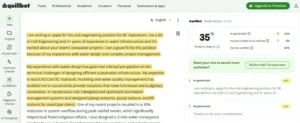
Quillbot’s free AI Detector analyzes text to estimate whether it was written by AI, refined with AI, or created by a human. The detector is part of Quillbot’s broader creation ecosystem, which also includes a Grammar Checker, Paraphraser, and other editing tools.
After you paste or upload text, Quillbot estimates the percentage of content that appears to be AI generated, AI refined, or human written. It also highlights sentences that may contain AI-generated text.
Hovering over a highlighted sentence opens an explanation card that labels the AI likelihood as low, medium, or high and explains why the sentence was flagged, using descriptions like “overly formal tone” or “predictable structure.” The same panel also lets you rewrite the sentence. The free version displays one sentence-level explanation per scan, while Premium unlocks explanations for every highlighted sentence.
| Feature | Details |
|---|---|
| Sign-up required | No |
| Input options | Paste text or upload a file |
| Free usage limits | Up to 1,200 words per scan; six free scans per day |
| Detection results | Percentage estimates for AI-generated, AI-refined, and human-written content |
| Sentence-level analysis | Highlights sentences that may be AI-generated |
| Detection explanations | Sentence-level explanation with an AI confidence level and reason for each flagged sentence (limited to one passage per free scan) |
| Export/share options | Available with Premium only |
| Additional features | Thumbs up/down accuracy feedback and an in-line Rewrite option (one explanation car per scan in the free version) |
Getsolved
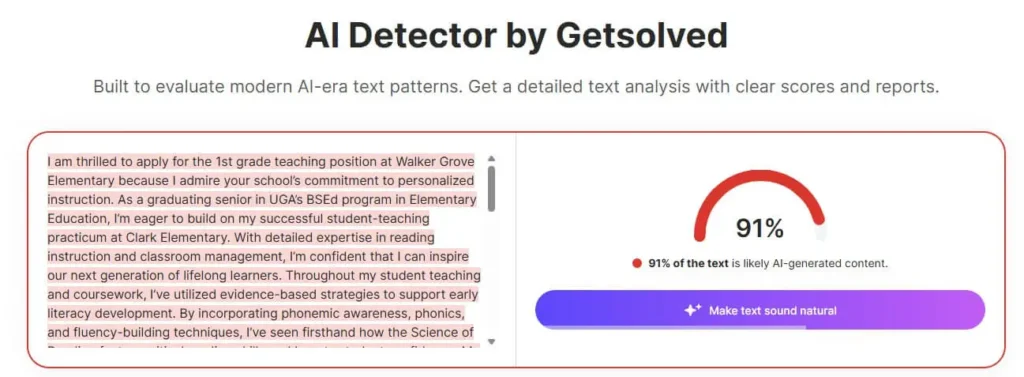
Getsolved offers a free AI detection tool that lets users check text without creating an account. After you paste or upload text, the tool provides an estimated percentage of content it identifies as AI written. Getsolved focuses primarily on an overall AI percentage, which is helpful for users who need a fast, straightforward way to check whether their writing may be flagged as AI generated.
The platform also includes an AI humanizer feature that lets users choose a goal, writing tone, and refinement intensity before generating a revised version of the text. The humanization feature requires paid access, but the detector itself is available without an account.
| Feature | Details |
|---|---|
| Sign-up required | No |
| Input options | Paste text or upload a file |
| Free usage limits | No usage restrictions observed during testing |
| Detection results | Percentage estimate of AI-written text |
| Sentence-level analysis | Highlights sentences it identifies as AI written |
| Detection explanations | No sentence-specific explanations observed during testing |
| Export/share options | No report or download option observed in the free version |
| Additional features | AI humanizer with customizable goals, writing tone, and refinement intensity; humanized output requires payment |
Humalingo
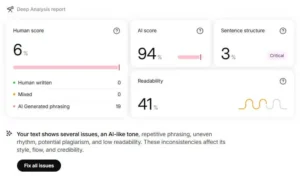
Humalingo’s free AI Detector allows users to check a limited amount of text without creating an account. The tool provides up to three free scans and generates a report with four scores: human written, AI written, sentence structure, and readability.
Along with the scores, Humalingo provides a brief narrative assessment of potential writing issues, such as an AI-like tone, repetitive phrasing, or potential plagiarism. This combination of detection results and writing feedback gives users information beyond a simple AI-generated percentage alone.
| Feature | Details |
|---|---|
| Sign-up required | No |
| Input options | Paste text only |
| Free usage limits | Three free scans during testing |
| Detection results | Percentage of AI-written and human-written content |
| Sentence-level analysis | Not observed during testing |
| Detection explanations | Narrative feedback about potential writing issues |
| Export/share options | Not observed during testing |
| Additional features | Sentence structure and readability scores |
Humbot
Humbot offers a free AI Detector that allows users to check text and receive a quick assessment of whether content appears to be AI generated or human written. The tool is designed as an all-in-one AI writing platform and includes access to multiple AI detection models, allowing users to compare how different detectors evaluate the same text.
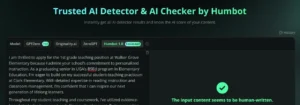
After you paste text into Humbot, the tool provides a verdict based on the selected detection model. Results may appear as human written, 50% human written, or AI generated. Humbot also includes a thumbs up/down option that allows users to share feedback about the detection result.
| Feature | Details |
|---|---|
| Sign-up required | No |
| Input options | Paste text only |
| Free usage limits | Up to 100 words per scan during testing |
| Detection results | Brief overall verdict: human-written, 50% human-written, or AI-generated |
| Sentence-level analysis | Not observed during testing |
| Detection explanations | Not observed during testing |
| Export/share options | Not observed during testing |
| Additional features | Four detection models available: GPTZero, Originality.ai, ZeroGPT, and Humbot 1.0); thumbs up/down feedback; AI humanizer option with signup |
Monica
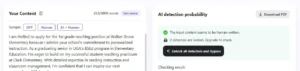
Monica’s AI Detector requires users to create an account before viewing results. The tool allows users to analyze text by pasting content into the detector and provides a quick overall verdict about whether the writing appears human written or AI generated.
In addition to its detection tool, Monica includes an AI humanizer as part of its free version. Users can also access a PDF report option by installing the extension.
| Feature | Details |
|---|---|
| Sign-up required | Yes, account required to run and view AI detection results |
| Input options | Paste text only |
| Free usage limits | Up to 250 words per scan; total free allowance appears to be 3,000 words (reset period not confirmed) |
| Detection results | Brief overall verdict: human-written, 50% human-written, or AI-generated |
| Sentence-level analysis | Not observed during testing |
| Detection explanations | Not observed during testing |
| Export/share options | PDF report option available for users who install the extension |
| Additional features | AI humanizer included with free version (no extension required) |
Phrasly
Phrasly’s AI Detector provides users with an overall AI versus human percentage score and sentence-level results. The tool can be used without creating an account for initial scans, while a free account provides access to additional scanning capacity.
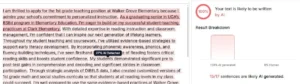
After analyzing text, Phrasly displays the percentage of content it identifies as AI generated and shows the number of sentences it flags. The tool highlights individual sentences that may be AI generated and displays an AI detection percentage when users hover over the text. Phrasly also offers a humanizer feature for users who want to revise their writing.
| Feature | Details |
|---|---|
| Sign-up required | No for initial scans; free account unlocks unlimited scans |
| Input options | Paste text or upload file |
| Free usage limits | 3 scans without an account; free account allows unlimited scans (up to 10,000 words per scan) |
| Detection results | Overall AI versus human percentage score and number of sentences identified as AI generated |
| Sentence-level analysis | Highlights sentences identified as AI generated |
| Detection explanations | Hovering over highlighted sentences displays an AI detection percentage only; no explanation for why the sentence was flagged |
| Export/share options | Not observed during testing |
| Additional features | Sentence-level AI percentage indicators |
Scribbr
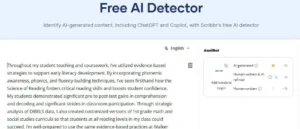
Scribbr’s AI Detector provides a free way to analyze text for potential AI-generated content without requiring users to create an account. The tool accepts pasted text or uploaded files and provides percentage estimates for AI-generated, AI-refined, and human-written content.
The detector also highlights sentences that may be AI generated. With the free version, you can get an explanation and an AI confidence level for one passage per scan. With the paid version, you can access sentence-level feedback for every passage that the tool flags.
| Feature | Details |
|---|---|
| Sign-up required | No |
| Input options | Paste text or upload a file |
| Free usage limits | Unlimited scans; up to 1,200 words per scan |
| Detection results | Percentage estimates for AI-generated, AI-refined, and human-written content |
| Sentence-level analysis | Highlights sentences that may be AI-generated |
| Detection explanations | Sentence-level explanation with an AI confidence level and reason for each flagged sentence (limited to one passage per free scan) |
| Export/share options | Available with Premium only |
| Additional features | Thumbs up/down accuracy feedback and an in-line Rewrite option (one explanation car per scan in the free version) |
Walter Writes AI
Walter Writes AI offers a free AI detector that provides a quick assessment of whether text may appear AI generated. The tool allows users to run an initial scan without creating an account, with additional access available through a free trial.
- Without an account, you can run a scan and receive an overall verdict of human written or AI generated.
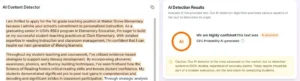
- Signing up for a free trial gives you access to a more detailed platform that provides an overall verdict and a probability score about tool’s confidence in the results. This version also highlights the sentences in your text that contributed to the overall verdict.
| Feature | Details |
|---|---|
| Sign-up required | No for initial scan; free trial available for 3 days of additional access |
| Input options | Paste text only |
| Free usage limits | Free trial (with signup) offers unlimited scans (300 word maximum per scan) for 3 days |
| Detection results | Overall verdict and probability score |
| Sentence-level analysis | Not observed during testing |
| Detection explanations | Not observed during testing |
| Export/share options | Not observed during testing |
| Additional features | AI humanizer available with paid versions |
What is the best free AI detector?
The best free AI detector depends on how you plan to use it. If you want detailed sentence-level feedback, Quillbot and Scribbr provide explanations for flagged content. If you prefer a quick overall score, Getsolved, Phrasly, and Walter Writes offer fast results with minimal setup. Humalingo adds readability and sentence structure scores, while Humbot lets you compare multiple AI detection models.
Because AI detectors can produce different results on the same text, it’s often helpful to compare findings from more than one tool before drawing conclusions. Comparing results from more than one detector can provide a more complete picture than relying on a single score.
Frequently asked questions about the best AI detectors
- What is the best AI detector for educational institutions?
-
Quillbot’s AI Detector is a strong option for educational institutions looking for an accessible and easy-to-use AI detection tool. It helps educators identify sections of writing that may sound AI-generated while supporting a more balanced and thoughtful review process.
One of Quillbot’s biggest advantages is that it goes beyond detection. Educational institutions can also use Quillbot’s writing tools for grammar checking, paraphrasing, summarizing, and citation support, making it useful for both educators and students.
Rather than relying only on detection scores, schools can use Quillbot to encourage stronger writing habits, improve clarity, and support responsible AI use in academic environments.
- What is the best AI detector for copywriters?
-
There’s no universally perfect AI detector, but Quillbot’s AI Detector is a popular option for copywriters who want to check content authenticity and reduce the risk of AI flags. It helps highlight sections that may sound machine-generated so you can refine them.
That said, detection tools shouldn’t be treated as final proof. The best approach is to pair them with thoughtful editing and your own judgment to ensure the content feels natural and original.
- What is the best AI detector for recruiters?
-
While there’s no single “best” tool, Quillbot’s AI Detector is a strong option for screening resumes and cover letters and identifying original content.
However, AI detection results alone can’t confirm whether someone is a good candidate for a job. For a more in-depth approach, combine AI detection with interviews and candidate validation.
- What should an instructor do if an AI detector flags student work?
-
A flag is a prompt for a conversation, not a verdict. Instructors can use it as a starting point to discuss the writing process, review earlier drafts, or compare it with in-class writing samples. This allows for meaningful learning conversations instead of immediate disciplinary action.
Instead of delivering final judgements, Quillbot’s AI Detector highlights areas worth a closer look, giving instructors a useful entry point for discussing a student’s writing process and encouraging more thoughtful, constructive conversations.
Other interesting articles
If you want to know more about colors, letters, or the meaning of emojis, make sure to check out some of our other articles with explanations and examples.